Which solution is right for you?

Homes with a Wi-Fi dead spot by the TV

If your broadband connection is working as it should but your streaming device is behind thick internal walls, the connection by your TV and the position of any additional access point are key. FRITZ! also highlights the importance of a good connection to the main router when using Mesh repeaters.

Homes where you can run an Ethernet cable

If you can run a network cable to your TV room or to an access point, check that your chosen device has the connections you need and supports a wired connection. TP-Link lists Ethernet backhaul as an option between Deco X50 units.

Homes considering a router upgrade

If you’re planning to replace your main router, you’ll need to consider its connection type and any existing Mesh devices as well as Wi-Fi coverage. The Verbraucherzentrale also notes that, if you use your own router, you’re responsible for its installation, configuration and updates.

What to look for when buying

A single router

A good fit if: the router is compatible with your connection and the TV already gets a stable signal for the picture quality you want.

The trade-off: A high advertised Wi-Fi data rate doesn’t prove that the signal will reliably pass through the walls in your home.

A wireless repeater or Mesh node

A good fit if: you want to keep your main router and can find a spot between it and your TV room with a good wireless connection.

The trade-off: The additional node needs a stable connection to the main router. A repeater can’t reliably make up for a signal that’s already weak where you place it.

Ethernet or a wired access point

A good fit if: you can run a network cable to your TV or to an access point in the area where you need coverage.

The trade-off: This lets you avoid the problem section of the wireless connection, but you’ll need a suitable cable route and network ports.

Buying priority What to check Who it matters most to
Reception through walls Check the connection right by the TV, and test a possible location for an additional node too. If I get very little reception in my TV room, I want to know whether a single router will be enough or whether I need another access point. This is the top priority for around 36% of consumers with stable reception as their main concern.
Connection to your streaming device Check the internet speed at your streaming device and find out whether you can connect your TV or access point via Ethernet. Netflix recommends a stable connection of at least 15 Mbit/s for UHD; requirements may differ for other services or resolutions. When I’m weighing up wireless extension against running a cable, what matters is the connection that actually reaches my TV. This is the main priority for around 29% of consumers who are most concerned about their connection.
Connection type and Mesh compatibility Check that the router matches your connection type and the modem you need. For Mesh, check the exact device models and whether any firmware updates are required. If I’m replacing my main router anyway, I want to choose a compatible router and an extender that work with my existing devices. This is the main priority for around 21% of consumers who are most concerned about connection compatibility.
Additional devices and setup Consider how many devices you need, whether you’ll need to run cables, rental terms, responsibility for updates and power consumption. When I’m weighing up the cost and effort of using my own router or adding Wi-Fi access points, I also want to factor in setup and ongoing use. This is the main priority for around 14% of consumers who are most concerned about ongoing costs.

Common buying mistakes

  • Assuming the maximum Wi-Fi data rate guarantees good reception

    An advertised data rate doesn’t tell you how well the wireless signal will reach your TV through the walls in your home.

    Check the connection at your streaming device and at the planned location for an additional node before replacing your router just to get a higher data rate.

    Depending on what you find, you may also need an access point or an Ethernet cable.

  • Putting the repeater right in the Wi-Fi dead spot

    A repeater extends the existing signal. If its connection to the main router is already weak where you place it, its coverage will be limited too.

    Find a spot where the node still gets a good signal from the router and can also reach your TV room. If you could run a cable, consider a wired access point too.

    An additional node may end up unused if it can’t get a decent connection to the main router.

  • Assuming connection type and Mesh branding guarantee compatibility

    Routers differ in their connection types and Mesh support. The word ‘Mesh’ alone doesn’t tell you whether your existing devices will work together. Telekom says that the Speedport Smart and Smart 2 are not Mesh bases themselves.

    Before ordering, check your connection type, existing modem, exact device models and any firmware requirements.

    Depending on your connection, you may need an additional modem, a different Mesh node or extra setup work.

Key brands to consider

FRITZ!

FRITZ! offers main DSL routers and products for extending existing home networks. The right combination depends on whether you want to add to or replace your router.

  • According to FRITZ!, the FRITZ!Box 7690 has a DSL modem and Wi-Fi Mesh. The manufacturer also says that a FRITZ!Mesh Set can be connected to another router via LAN.
  • These specifications don’t prove that a single router can get through the walls in a particular home. With a wireless extender, the node’s position still matters.

TP-Link

TP-Link offers routers and Deco whole-home Mesh systems for a range of connection types and home network setups.

  • TP-Link lists Ethernet backhaul as an optional connection between Deco X50 units. The Archer AX55 is described as a dual-band Wi-Fi 6 router.
  • Advertised wireless data rates are manufacturer figures; they don’t prove how well streaming will work through the walls in your home.

Telekom

Speedport main routers and Speed Home WLAN are worth considering if you want to extend a compatible Telekom Mesh network.

  • Telekom lists Mesh-compatible Speedport models and notes that you’ll need the latest firmware.
  • Telekom says that the Speedport Smart and Smart 2 are not Mesh bases themselves. Check that your specific models are compatible before buying.

ASUS

ASUS describes the RT-AX58U as a dual-band router. AiMesh lets you extend your network with compatible ASUS routers.

  • ASUS says AiMesh can create a network using multiple ASUS routers.
  • The manufacturer’s specifications don’t confirm that the RT-AX58U has a built-in DSL modem or show how far its signal will reach in a particular building. Check your connection type and device combination separately.

Joybuy products for Wi-Fi extension and home networks

This selection includes a Mesh system, wired access points and a Wi-Fi-enabled gateway for different home network setups.

TP-Link Deco BE22 (2-Pack) Mesh system, Wi-Fi 7, dual-band

TP-Link Deco BE22 (2-Pack) Mesh system, Wi-Fi 7, dual-band

A good option if you’re looking for a two-unit Mesh system to cover several rooms, with the option to connect each unit via wired network ports.

Described as a dual-band Wi-Fi 7 system, with two Gigabit WAN/LAN ports on each unit. Router and access point modes are listed.

View at Joybuy

Ubiquiti UniFi U7 Lite Wi-Fi 7 access point

Ubiquiti UniFi U7 Lite WiFi 7 Access Point

A good fit if you want to install a wired access point closer to your TV room and have PoE power available.

Described as a dual-band Wi-Fi 7 access point with a 2.5 GbE port and PoE+. It can be wall- or ceiling-mounted; setup requires PoE and UniFi Network.

View at Joybuy

Ubiquiti UniFi U6+ Wi-Fi 6 access point

Ubiquiti UniFi U6+ WiFi 6 Access Point

A good option if you want to connect an access point via Ethernet and power it using PoE.

Described as a dual-band Wi-Fi 6 access point with Gigabit Ethernet and PoE. It can be wall- or ceiling-mounted; operation requires a PoE power supply and UniFi Network.

View at Joybuy
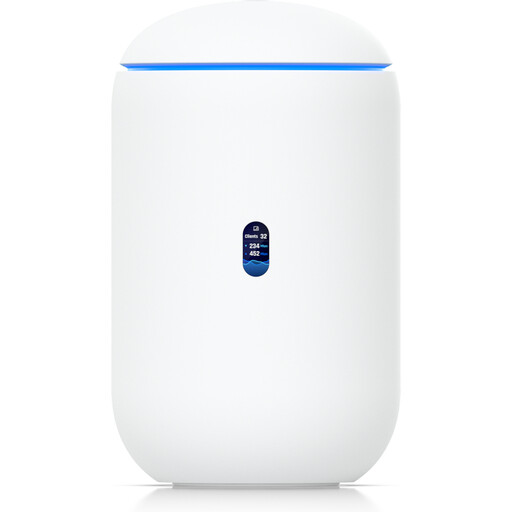
Ubiquiti UniFi Dream Router 7 Wi-Fi 7 gateway

Ubiquiti UniFi Dream Router 7 WiFi 7 Gateway

A possible option for a home network gateway with built-in Wi-Fi. Check that its connections and features are compatible with your existing internet service before buying.

The description lists Wi-Fi 7 across the 2.4, 5 and 6 GHz bands, plus four 2.5 GbE RJ45 ports. Management requires an active internet connection and UniFi Network version 9.0.108 or later.

View at Joybuy

Ubiquiti UniFi U6 Mesh Wi-Fi 6 indoor/outdoor access point

Ubiquiti UniFi U6 Mesh WiFi 6 Indoor/Outdoor Access Point

A good fit if you want to use an access point closer to your TV room, with either an Ethernet uplink or wireless Mesh.

Described as a Wi-Fi 6 access point for indoor and outdoor use, with a Gigabit Ethernet uplink and wireless Mesh. The product name states that a PoE adapter is included. Setup requires UniFi Network; the device is described as an access point, not a main router.

View at Joybuy

Frequently asked questions

How can I tell whether buffering is caused by my router or my internet connection?

Check the connection right by your streaming device, not just next to the router. Netflix recommends a stable internet speed of at least 15 Mbit/s for UHD; other streaming services or resolutions may have different requirements. If your internet connection itself is too slow, adding Wi-Fi hardware won’t overcome that limitation.

Where should I place a wireless Mesh node?

Choose a spot where the node still gets a stable signal from the main router and can also reach your TV room. Don’t put it right in the middle of the dead spot: the connection between the node and main router matters just as much as the connection to your TV.

What am I responsible for if I buy my own router?

According to the Verbraucherzentrale, you’re responsible for installation, configuration and installing updates. Before buying, check that the router is suitable for your connection and compare the cost of buying one with the option of renting a device.

Can I use my own router in Germany, and what Wi-Fi rules apply?

For passive optical fibre networks, the Bundesnetzagentur confirms that you can freely choose the end device at the network termination point. Wi-Fi is subject to general frequency allocations and their respective conditions. In the 2.4 GHz band, the permitted equivalent isotropically radiated power in the 2400.0–2483.5 MHz range is no more than 0.1 W EIRP. The specific device must also be technically compatible with your connection.