A Wi-Fi repeater can help with course downloads behind thick internal walls, but only if it still gets a good signal from the router where you install it; Bitkom e. V. highlights this as a requirement. If you can run a network cable, a suitable LAN bridge can bypass the wireless connection through the wall. If you have no cable route and nowhere suitable to place a repeater, Wi-Fi over powerline is another option. However, socket placement and electrical interference can affect the connection, as devolo explains.
Which solution is right for you?
Students behind thick walls
If you download course files in a room with a weak Wi-Fi signal, you first need a way to connect that reaches both the router and your study area. Bitkom e. V. and devolo identify walls and other obstacles as potential sources of interference; FRITZ! recorded reported Wi-Fi problems in a YouGov survey.
Students with a possible LAN route
If you can run a network cable to your study area or to a conveniently located access point, a suitable LAN or access point solution can bypass the wireless connection between the router and the access point. FRITZ! and TP-Link list relevant network features for their respective devices.
Students without a cable route
If you can’t run a cable and there’s nowhere suitable to place a wireless repeater, you can consider a powerline solution using the available sockets. devolo notes that socket placement and electrical interference can affect the connection.
What should you look for when buying?
For consumers in Germany downloading course materials behind thick internal walls, the key consideration is which type of connection is possible in their study area.
| What to consider |
What should you look for? |
Who should pay particular attention? |
| Signal at the repeater location |
Check which sockets are available and how well the router signal reaches them; a signal indicator can help you choose a location. |
If I want to use a repeater, I need to place it somewhere it can still get a good signal from the router. Around 36% of consumers put finding a suitable wireless location first. |
| LAN connection instead of a wireless signal through the wall |
Check whether the specific device has a suitable LAN or access point mode, and whether you can run a cable. |
If I can run a cable to my study area, I want to bypass the wireless connection through the internal wall. Around 29% of consumers prioritise a network cable connection. |
| Powerline without a cable route |
Check which adapters you need, whether suitable sockets are available and whether you can test the connection where you plan to use it. |
If I can’t run a cable and there’s nowhere suitable for a repeater, I could try a connection over the power lines. Around 21% of consumers put this socket-based alternative first. |
| Router integration and device requirements |
Check your router model, supported mesh features, updates and, for powerline, what’s included in the box. |
If I want to keep using my existing home network, I need to make sure the specific combination is compatible. Around 14% of consumers prioritise router integration and the ongoing requirements of the devices. |
Which buying mistakes should you avoid?
-
Plugging the repeater straight into the study room with poor coverage
A repeater needs to have a usable connection to the router itself. Placing it in a dead zone won’t fix the weak wireless connection.
Before buying, check possible locations between the router and your study room, and see how strong the signal is there. Bitkom e. V. identifies good reception from the router as a requirement.
You could spend time buying and setting it up without seeing any noticeable improvement in download speeds.
-
Assuming “mesh-compatible” means it will work with your router
Mesh features from different manufacturers each have their own requirements. TP-Link says OneMesh works with a OneMesh router; ASUS lists the RP-AX58 as an AiMesh extender node, not a primary AiMesh node.
Check your exact router model, along with the combination and firmware supported by the manufacturer.
-
Assuming powerline is a guaranteed interference-free alternative
Socket placement and electrical interference can affect the connection over your power lines. Manufacturers’ maximum speed claims don’t predict the download speed you’ll get at home.
devolo recommends plugging adapters directly into wall sockets rather than extension leads. Test the connection using the sockets you plan to use, and take potential sources of interference into account.
If the connection isn’t suitable, you may need to try different sockets or another type of connection.
Relevant brands and product ranges
FRITZ!
The FRITZ!Repeater 1200 AX is a compact Wi-Fi 6 repeater with Gigabit LAN. Its described mesh integration is particularly relevant to compatible FRITZ!Box home networks.
- FRITZ! lists mesh, Gigabit LAN, updates and a five-year warranty for this model.
- This information from the manufacturer doesn’t prove that the wireless signal will reach through the internal walls in your home. Check your router model and the signal strength at the planned location.
TP-Link
According to TP-Link, the RE600X is a Wi-Fi 6 repeater with a signal indicator, Gigabit LAN and an access point mode.
- The manufacturer describes an access point mode for a wired network connection.
- TP-Link says OneMesh works with a OneMesh router; general router compatibility doesn’t automatically mean OneMesh compatibility.
devolo
The Magic 2 WiFi 6 next Starter Kit combines powerline with Wi-Fi. It could be an option if you can’t run a cable and it’s hard to find a suitable location for a wireless signal.
- According to devolo, the Starter Kit contains two adapters.
- devolo notes that socket placement and electrical interference can affect transmission. Advertised maximum speeds don’t tell you what performance you’ll get in your own home.
Telekom
Speed Home WLAN is positioned as a booster for use with compatible Speedport home networks.
- Telekom lists features including compatibility with Speedport Smart 4 and automatic updates.
- Check your exact Speedport model before buying; the manufacturer’s information doesn’t prove how well the signal will reach behind the walls of your study room.
ASUS
The RP-AX58 could work as a repeater or AiMesh extender node if you already have a compatible ASUS router.
- ASUS Support lists the RP-AX58 as an AiMesh-capable extender node.
- According to ASUS, it isn’t a primary AiMesh node. Check the router support and firmware required for your specific model.
Wi-Fi repeaters for a better connection in your study room
This selection of Joybuy products includes wireless Wi-Fi repeaters to extend your connection towards your study room. For a repeater to work, it’s still important to place it somewhere it can pick up a signal from the router.
 No image available
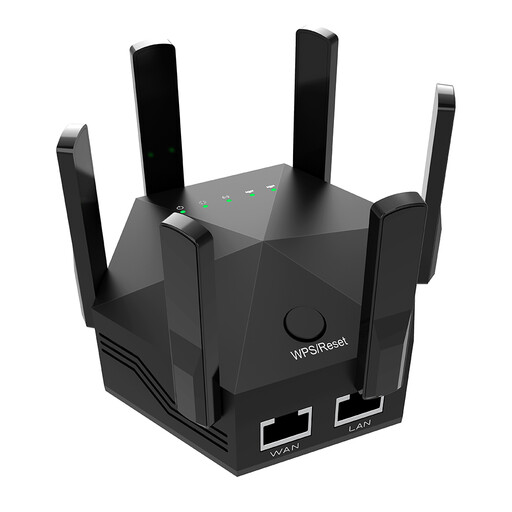
Dual-band Wi-Fi signal booster, 1200 Mbit/s, 6 antennas
Could be an option if you want to extend your Wi-Fi coverage towards your study room; the device needs to pick up the router signal where you place it.
According to the product details: dual-band, six adjustable antennas and two 10/100-Mbit/s LAN ports. EU plug for indoor use.
View at Joybuy
 No image available
Compact Wi-Fi booster
Could be an option for extending your existing Wi-Fi if the device can connect to the router where you plan to place it.
The product name describes a compact device for extending a wireless network.
View at Joybuy
 No image available
TP-Link RE190 AC750 Wi-Fi repeater
Could be an option when finding a suitable repeater location, as long as the device is still within range of the router.
The product name specifies AC750 and 433 Mbit/s.
View at Joybuy
 No image available
MERCUSYS ME80X Wi-Fi 6 AX3000 range extender
Could be an option if you’re considering a repeater with a signal indicator or a wired access point. For repeater mode, the router signal needs to reach the device where you place it.
According to the product name: dual-band, with 574 Mbit/s at 2.4 GHz and 2402 Mbit/s at 5 GHz, a Gigabit port and access point mode.
View at Joybuy
 No image available
TP-Link RE235BE BE3600 dual-band Wi-Fi 7 range extender
Could be an option if you’re considering a repeater with a wired connection; in repeater mode, the router signal needs to reach the device where you place it.
The product name specifies a 2.5 Gigabit multi-gigabit port and EasyMesh compatibility. Check that your specific router model supports it.
View at Joybuy
Frequently asked questions
Where should you place a wireless repeater?
Place it somewhere it can still get a good signal from the router and improve coverage in your study room. Check the signal there, then try downloading an actual course file; a dead zone isn’t a suitable location.
What can you do if downloads are still slow with a repeater?
First, check the router’s location and the signal at the repeater. If you can run a network cable, consider a LAN bridge or access point mode. If you can’t run a cable, you can test powerline using the sockets you plan to use and take potential electrical interference into account.
What should you check about what’s included and compatibility?
Check the specific device to see whether your setup needs a single repeater, a LAN cable or a powerline kit with two adapters. Also check router compatibility, update information and the warranty and statutory guarantee terms stated for the offer.
What requirements apply to Wi-Fi repeaters in Germany?
Radio equipment placed on the market or put into service in Germany must meet the applicable requirements of the Radio Equipment Act. The Federal Network Agency lists CE marking and the required conformity documents among the points to check. Check the information for the specific version of the device on offer; a CE statement alone doesn’t prove that its performance has been independently tested.


