Learners in rooms behind thick walls
You want to stream a language lesson from a fixed spot without Wi-Fi dropouts. The first step is finding a place where the repeater still has a usable connection to the router.


A Wi-Fi repeater only helps if it still has a usable connection to the router where you place it; it can’t make up for a complete dead zone. If there’s a usable Ethernet connection to your study room, an access point is an obvious alternative. Powerline could be an option if you don’t have an Ethernet cable, but test it in the sockets you plan to use, as electrical devices and socket choice can affect performance, as devolo explains. Always check that your router and repeater support the mesh features you want when used together.
You want to stream a language lesson from a fixed spot without Wi-Fi dropouts. The first step is finding a place where the repeater still has a usable connection to the router.
You have a usable network socket near your study space and can check whether an access point might work better than adding another wireless link.
You want to connect your study space to your existing home network. Check that your router and extender support the mesh features you want when used together.
The key question is whether the router’s signal is still strong enough at the potential repeater location, or whether a wired connection would be a better fit for your study room.
A good fit if: You can find a spot between the router and your study space that has a usable signal from both sides.
Bear in mind: A repeater can’t make up for an already weak connection to the router. FRITZ! and Telekom recommend checking the connection at the chosen location.
A good fit if: There’s a usable network cable to the room, and the device supports a suitable access point or Ethernet bridge mode.
Bear in mind: The cable route must work, and the operating mode must be explicitly documented. An Ethernet port alone doesn’t confirm that the device supports this mode.
A good fit if: You don’t have an Ethernet cable and the wireless signal struggles to get through the walls.
Bear in mind: Electrical devices and socket choice can affect performance. devolo recommends testing the connection in the sockets you plan to use.
| Buying priority | What to check before buying | Who is it important to? |
|---|---|---|
| Stable connection | Check the connection indicator and whether there’s a suitable midway location; test the wireless connection in your study space. | If I want to stream a language lesson in a room behind a thick wall, I mainly need a connection that remains usable in my study space. Around 36% of consumers put stability first. |
| Bypass the wall with Ethernet | Check the existing cable route and confirm that access point or Ethernet bridge mode is explicitly supported. | If there’s a usable network socket in my study room, I don’t want to have to get through the wall with another wireless link. Around 29% of consumers say bypassing it with a wired connection is their top priority. |
| Integration with the home network | Check the router model, the supported mesh combination and the operating mode that’s actually been set up. | If I want to connect my study space to an existing mesh network, the specific combination needs to work with my router. Around 21% of consumers focus mainly on this integration. |
| Setup effort | Consider the devices, connections and installation work required for your chosen connection method. | If I’m looking for a straightforward solution, I want to know in advance which devices and setup steps I’ll need. Around 14% of consumers focus on the cost and effort involved in buying and setting everything up. |
The connection from the repeater back to the router needs to work too. If it’s already weak where you place the repeater, the signal it sends to your study space may be affected as well.
Use the connection indicator to test a suitable midway location. If you can’t find one, consider a different way to connect.
The mesh features available depend on the specific combination of devices.
Check compatibility with your router model and, after setup, confirm which operating mode is actually active.
Electrical devices and the socket you use can affect data transmission over your home’s electrical wiring.
Test the connection in the sockets you plan to use day to day.
The FRITZ!Repeater 1200 AX is an option for an existing FRITZ! home network. FRITZ! lists Wi-Fi 6, mesh and a Gigabit LAN port among this model’s features.
According to the manufacturer, the RE705X offers repeater and access point modes, as well as Gigabit Ethernet.
According to the manufacturer, the WiFi 6 Repeater 5400 offers repeater and access point modes. devolo also makes Powerline products for a different type of connection.
Speed Home WLAN is worth considering if you want to check compatibility with your specific Speedport router.
The EAX15 is a Wi-Fi 6 repeater with a Gigabit Ethernet port, for buyers who want to connect a wired device.
The products below include wireless repeaters, an access point for an existing Ethernet connection, and an additional unit for extending an existing Deco mesh network. Before buying, check the specific listing for the CE marking, product identification details, manufacturer information and the relevant declaration of conformity. Whether the wireless signal will get through your walls still depends on placement and the connection in your home.
 No image available
Could be an option if the router signal is still available at a midway location. Whether the connection will get through your particular walls depends on where you place it.
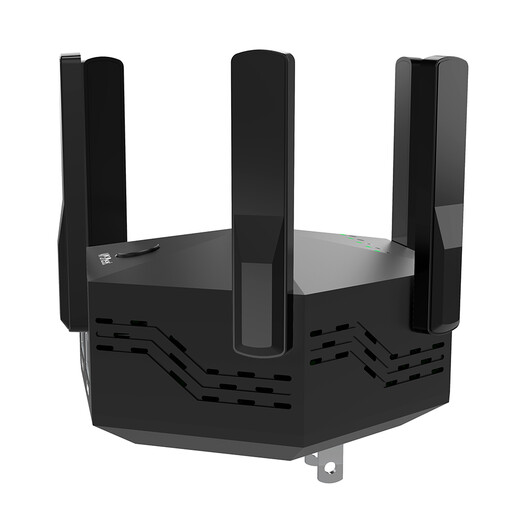
Listed as an indoor dual-band repeater with six adjustable external antennas and an EU plug. 1200 Mbps is stated in the product title and doesn’t prove that the connection will be usable in your study space.
 No image available
Could be an option for extending your Wi-Fi wirelessly if you can find a suitable midway location with a signal from the router.
Listed as a wireless repeater with AC750 and a speed of 433 Mbps stated in the title. The product description mentions 2.4 and 5 GHz bands, a signal strength indicator to help with placement, and WPS setup.
 No image available
Could be a good fit if you already have a Deco mesh network and want to extend it. The described use depends on having this type of network.
Listed as an additional mesh unit with two Gigabit ports. The product description says it can extend an existing Deco mesh network.
 No image available
Could work as an access point if you have a usable Ethernet cable to your study room. For a wireless midway location, the description mentions a signal strength indicator.
The title lists a Gigabit port and access point mode. The product title gives nominal band speeds of 574 Mbps at 2.4 GHz and 2402 Mbps at 5 GHz. To use access point mode, you’ll need to connect the Ethernet port to the router with a cable.
 No image available
Could be an option for a midway location that’s still within range of your existing router.
The title lists Wi-Fi 7, a 2.5 Gigabit port and EasyMesh compatibility. Check mesh support for your specific router combination.
Place it somewhere with a good connection to the router, where it can also reach your study space. Check the connection indicator at the location you have in mind. Directly behind a wall that blocks a lot of the signal, the connection to the router may already be too weak.
No. An Ethernet port alone doesn’t confirm that access point mode is supported. Check the operating modes explicitly listed for the specific model, and make sure there’s a usable cable route. The manufacturers describe wired operating modes for the FRITZ!Repeater 1200 AX and TP-Link RE705X.
Check for firmware updates and change any default, generic administrator passwords. The Federal Office for Information Security recommends these steps to help keep your Wi-Fi secure.
Check the specific listing for the CE marking, product identification details, manufacturer information and the relevant declaration of conformity. The Federal Network Agency lists the marking, product identification and accuracy of manufacturer information among the points to check. A CE marking doesn’t prove that the repeater will provide uninterrupted streaming in your home.