A wireless repeater can be a good option if it still gets a usable connection to your router from a suitable midway point. If the walls have already weakened the wireless signal too much, a wired access point can connect over LAN. If you don’t have a LAN connection, Powerline with Wi-Fi may be an option, but you’ll need to test it using the sockets you plan to use. Also check router compatibility and operating mode, then test access to the learning portal at your actual study spot.
Who is this guide for?
Students with a Wi-Fi dead spot
You want to access the learning portal from your regular study spot and can place a repeater somewhere the router signal still reaches. The F.A.Z. buying guide and TP-Link Germany offer advice on where to position a repeater.
Students behind heavily insulated walls
If there’s no suitable midway point for a wireless signal, consider a LAN connection or Powerline with Wi-Fi. devolo and TP-Link Germany describe these options.
Students with an existing mesh router
You want to extend your Wi-Fi coverage without assuming that any repeater will support all your router’s mesh features. FRITZ! and Telekom outline the requirements, which depend on the device and router.
What to look for when buying
Wireless repeater
Suitable if: There’s a socket between the router and your study spot where the router signal is still usable.
Bear in mind: A repeater can’t overcome a weak wireless connection at its own location.
Repeater in LAN bridge or access point mode
Suitable if: An Ethernet cable can reach the other side of the obstructive walls, and your device supports this operating mode.
Bear in mind: The cable route, connection and explicitly supported operating mode all need to be suitable.
Powerline with Wi-Fi
Suitable if: There’s no suitable location for a wireless signal and no LAN cable, and you can test the sockets.
Bear in mind: The connection over your electrical wiring depends on the sockets you use and the electrical installation.
| What matters |
What to check before buying |
Who it matters most to |
| Signal at the midway point |
Check the signal strength indicator and possible sockets between the router and your study spot. |
If I want to use a wireless repeater, it needs to receive the router signal at the planned location. Around 36% of consumers prioritise having a suitable midway point for the wireless signal. |
| Connection without a wireless link through the walls |
Check whether you have a LAN connection and whether the device supports access point or LAN bridge mode; if not, test Powerline using the sockets you plan to use. |
If there’s no suitable location for a wireless signal, I’d prefer to connect by cable or over the electrical wiring. Around 29% of consumers prioritise a connection without a wireless link through the walls. |
| Compatibility with your existing router |
Check that your router model, repeater model and supported mesh mode are compatible. |
If I already use a mesh router, I want to know in advance which features will work with my device. Around 21% of consumers prioritise router and mesh compatibility. |
| Set-up and reliable operation |
Check the set-up process, status indicators and documented support, then test the learning portal at your study spot. |
If I want to set up and check the connection myself, I need clear status information rather than just a data rate figure. Around 14% of consumers prioritise straightforward set-up and verifiable operation. |
Common buying mistakes
-
Putting the wireless repeater where the router signal has already dropped out
A wireless repeater needs a usable connection to the router itself. A location just beyond the walls that block the signal may therefore be unsuitable.
Check possible midway locations and the connection indicator. If there’s no suitable spot, consider LAN or a Powerline connection that you’ve tested at home.
-
Assuming advertised Mbit/s figures match the speed at your study spot
The available data rate depends on various factors, including the wireless connections and devices involved. FRITZ! also distinguishes between nominal gross data rates and the data rate you can actually use.
Use data rates to compare product specifications, not as a guarantee that you’ll be able to access the portal. Test the connection at your study spot once it’s set up.
-
Assuming a LAN port or the term ‘mesh’ proves compatibility
A port for connecting an end device doesn’t automatically mean a repeater can be set up as an access point or LAN bridge. Mesh features also depend on the specific router and device.
Check your router model against the repeater’s documented operating modes before choosing a model.
-
Assuming Powerline is a guaranteed trouble-free alternative
The connection over electrical wiring won’t be the same at every socket. devolo notes that transfer rates can be low at some sockets.
Test the adapters in the exact sockets you plan to use.
Brands to consider
FRITZ!
The FRITZ!Repeater 1200 AX is a compact option for extending a home network with a FRITZ!Box; FRITZ! says it can also be connected by cable.
- FRITZ! lists Wi-Fi Mesh, regular updates and a five-year warranty for the FRITZ!Repeater 1200 AX.
- This doesn’t establish that mesh features will work with routers from other manufacturers. In wireless mode, this device also needs a usable uplink.
TP-Link
The RE550 is a documented example of a repeater with a signal indicator, Gigabit Ethernet and access point mode.
- TP-Link specifically describes the signal indicator and access point mode for the RE550.
- The nominal AC1900 wireless rate doesn’t guarantee access to the learning portal through your particular walls.
devolo
devolo describes its WiFi 6 Repeater 3000 and 5400 models as suitable for wired access point use, and also offers Powerline products.
- This gives you different connection options, depending on whether cabling or sockets are suitable for your study spot.
- devolo itself notes that Powerline transfer rates can be low at some sockets. Manufacturer specifications are no substitute for testing in your own home.
Telekom
Speed Home WLAN is worth considering if you’re looking to extend a compatible Speedport router.
- Telekom documents the requirements for mesh set-up and also describes repeater operation without mesh.
- Check your router model and set-up method before assuming that particular mesh features will work.
Joybuy products for extending your Wi-Fi
This Joybuy selection includes wireless repeaters and a model with access point mode for your study spot. Check the specific listing for the CE mark and details of the responsible economic operator in the EU. In its notice of 5 February 2025, the Bundesnetzagentur cited both as examples of formal product deficiencies.
 No image available
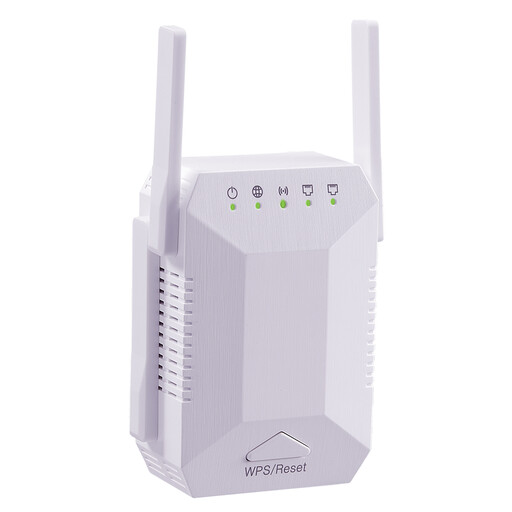
Dual-band Wi-Fi signal booster, 1200 Mbit/s, 5G, four aerials
Could work as a wireless repeater if it can still connect to the router from the planned midway point.
- Dual-band Wi-Fi for indoor use
- Four adjustable external aerials
- Two 10/100 Mbit/s LAN ports
- WPS connection to an existing router, according to the product description
- EU plug
View at Joybuy
 No image available
Compact Wi-Fi booster
Described as a repeater for extending an existing Wi-Fi network; it still needs to be within range of the router at the chosen location.
- Compact design
- Plug-and-play set-up, according to the product description
- Described as suitable for use at home, in the office and while travelling
View at Joybuy
 No image available
TP-Link RE190 AC750 Wi-Fi repeater, 433 Mbit/s
The signal strength indicator can help you find a suitable location, provided the repeater can still receive the router signal there.
- Dual-band Wi-Fi
- Signal strength indicator
- WPS set-up
- According to the manual, place within range of your existing router’s Wi-Fi
View at Joybuy
 No image available
MERCUSYS ME80X Wi-Fi 6 range extender, AX3000 dual-band
Access point mode could suit a study spot with an available network cable; repeater mode still requires a router signal at the chosen location.
- 574 Mbit/s at 2.4 GHz and 2402 Mbit/s at 5 GHz, according to the product name
- Gigabit port and access point mode
- Signal strength indicator and app control
- Ethernet connection to the router required for access point mode
View at Joybuy
 No image available
TP-Link RE235BE BE3600 dual-band Wi-Fi 7 range extender
Described as a wireless repeater for hard-to-reach areas; to set it up, the location must be within range of your existing router’s Wi-Fi.
- 2.5 Gigabit Ethernet port
- MLO and Smart Roaming, according to the product name
- EasyMesh-compatible, according to the product name
- WPS or app set-up, according to the product description
View at Joybuy
Frequently asked questions
Where should I place a wireless repeater to access the learning portal?
Place it at a midway point where it can still receive the router signal, rather than automatically choosing the last socket beyond the walls. Check the connection indicator, then test access to the learning portal at your actual study spot.
Does an Ethernet cable to the repeater make the wireless link to the router unnecessary?
Only if the specific device connects to your home network by cable as a LAN bridge or access point. A LAN port for an end device alone doesn’t show which uplink modes are supported.
Does my router need to be compatible with my mesh repeater?
Your router and repeater need to support the appropriate connection for the mesh features you want to use. Telekom lists specific requirements for Speed Home WLAN and describes repeater operation without mesh as an alternative when the router isn’t mesh-capable.
What extra connections or services should I allow for?
Check whether you’ll also need an Ethernet cable, an access point or several Powerline adapters. FRITZ! offers a five-year manufacturer’s warranty for the FRITZ!Repeater 1200 AX; you shouldn’t assume the same warranty applies to other models or brands.
What product information should I check for a Wi-Fi device in Germany?
Check the specific listing for the CE mark and details of the responsible economic operator in the EU. In its notice of 5 February 2025, the Bundesnetzagentur cited both as examples of formal product deficiencies for devices offered in Germany.


