A single wireless repeater may be suitable if it can still get a usable connection to the router where you plan to place it, and if coverage is poor in just one main area. If you have Ethernet cabling between floors, a wired access point can bypass the wireless link between the router and the access point. Mesh features must be compatible with both the router and repeater. Without Ethernet, you can consider several well-positioned wireless nodes or Powerline, although sockets and electrical appliances can affect the Powerline connection, as devolo explains.
Who is this decision relevant to?
Teams working with large project files
If you share files between work devices and a shared storage device at home, the entire transfer route matters – not just the Wi-Fi indicator on your device. Bitkom and VATM consider the home network connection relevant to data exchange.
Households with Wi-Fi dead spots on several floors
If workspaces are spread across several floors, you’ll need to check whether a single node can be placed where it gets a reliable connection, or whether you need several well-positioned access points. devolo and TP-Link describe repeater and extension solutions for these kinds of Wi-Fi coverage issues.
Households without Ethernet between floors
If there are no network sockets between floors, you’ll need to find a suitable position for a wireless node or test a Powerline connection in your home. devolo notes that sockets and electrical appliances can affect Powerline transmission.
What should you look for when buying?
For project files shared across three floors, consider the route from your work device to your storage, and assess Wi-Fi reception, the connection between floors and the available ports separately.
| Priority |
What to check before buying |
Who it matters most to |
| Transfer route for project files |
Check where the storage device is located and which connections the devices involved have; confirm whether the specific device can work as an Ethernet bridge. |
If I share project files between work devices and storage, I want to assess the entire transfer route. Around 33% of consumers are likely to have this as their main priority. |
| Wi-Fi across three floors |
Check reception where you plan to place each node and at the workspaces; then decide how many devices you need and where to put them. |
If workspaces on several floors need Wi-Fi, I want to know whether the nodes will stay connected in suitable locations. Around 27% of consumers are likely to prioritise coverage above all else. |
| Integration with the router |
Check the router and repeater models, hardware versions, firmware and the mesh or backhaul mode you want to use. |
If I want to keep using features on my existing router, I’ll check that the specific devices and operating modes are compatible. Around 20% of consumers are likely to have this as their main priority. |
| Connection between floors without Ethernet |
Test Powerline using the sockets you plan to use; if you have a VDSL connection, check for possible interference. |
If there’s no network cable, I need another way to connect the floors and want to try it under normal conditions. Around 20% of consumers are likely to prioritise this type of connection. |
Common misconceptions
-
The advertised Wi-Fi data rate is the speed you’ll get when transferring files
A device’s maximum stated data rate doesn’t tell you the actual transfer speed between your devices and file storage in your home.
Check the entire transfer route. If you have Ethernet cabling between floors, compare using an Ethernet bridge or access point with a wireless connection.
-
A mesh label guarantees the features you want will work with your existing router
Mesh and Ethernet backhaul features depend on the devices involved and, in some cases, their firmware.
Check the requirements for the router, repeater and intended operating mode separately.
Depending on your existing set-up, you may need additional compatible devices or a different way to connect.
-
Powerline is guaranteed to perform just as well as a network cable
Sockets and electrical appliances can affect transmission. devolo also describes possible interference with certain VDSL connections.
Test Powerline using the sockets you plan to use and under your usual conditions before relying on it.
Depending on the results, you may need to move the adapters or use a different connection method.
Key brands to consider
FRITZ!
FRITZ!Repeaters extend your home network. Mesh features are especially useful when the router and repeater are compatible.
- According to FRITZ!, the FRITZ!Repeater 3000 AX has three wireless bands and two Gigabit LAN ports.
- Features and mesh functionality vary by model. The specifications don’t give a reliable indication of the throughput you’ll get in your home.
TP-Link
Range extenders with EasyMesh support, which varies by model and version, may be suitable if they’re compatible with your router.
- TP-Link documents Ethernet backhaul support for certain models and versions.
- According to TP-Link, both the main router and satellite must support the feature for EasyMesh Ethernet backhaul to work.
devolo
According to devolo, the WiFi 6 Repeater 3000 and 5400 can also be used as wired access points. Powerline is a separate option for connecting floors.
- Access point mode can make use of existing network cabling.
- Access point mode requires an Ethernet cable. With Powerline, sockets and electrical appliances can affect transmission.
Deutsche Telekom
Speed Home WLAN is an option for extending compatible Speedport set-ups.
- Deutsche Telekom lists the Speedport models supported by its mesh set-ups.
- Mesh depends on the router model and firmware. According to Telekom, the Speedport Smart and Smart 2 can’t act as the mesh base themselves.
Joybuy product selection
This selection includes wireless repeaters for Wi-Fi dead spots, as well as an access point that needs a wired connection. Before choosing, check which connection between your router, floors and file storage will work best in your home.
 No image available
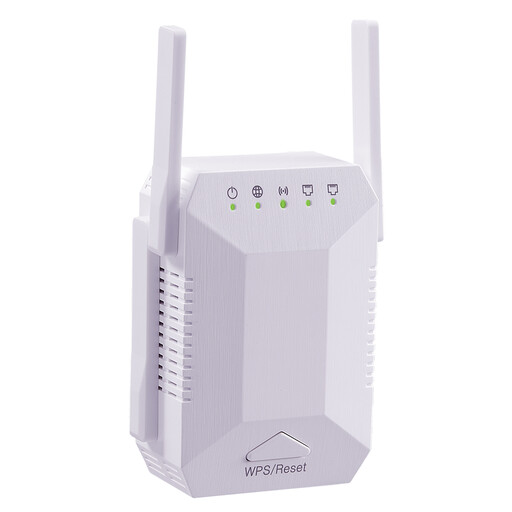
Dual-band Wi-Fi signal booster, 1200 Mbit/s
Described as a wireless repeater for a Wi-Fi dead spot indoors.
- Dual-band
- Four adjustable antennas
- EU plug
View at Joybuy
 No image available
Wi-Fi repeater, 1200 Mbit/s, 5 GHz
Described as a wireless repeater for extending an existing Wi-Fi network.
- Product name specification: 1200 Mbit/s
- Product name specification: 5 GHz
View at Joybuy
 No image available
Compact Wi-Fi booster
Described as a compact way to extend an existing Wi-Fi network.
View at Joybuy
 No image available
Ubiquiti U7 Mesh, 5000 Mbit/s, PoE
Designed as a Wi-Fi access point with a wired connection.
- Ethernet uplink required
- Requires a suitable PoE power supply
View at Joybuy
 No image available
TP-Link RE190 AC750
Described as a repeater for extending Wi-Fi coverage. For repeater mode, the device should be placed within range of your existing router.
- Product name specification: 433 Mbit/s
- White
View at Joybuy
Frequently asked questions
Will a repeater automatically improve file transfers on my home network?
No. Check how your work devices and file storage are connected. A repeater can extend coverage to an area with weak Wi-Fi; an existing Ethernet cable can bypass the wireless link between your router and an additional access point. A device’s maximum Wi-Fi data rate doesn’t tell you how fast your file transfers will be.
How can I use a repeater if there are network sockets on each floor?
Choose a model with a documented Ethernet bridge or access point mode, then connect it to your home network according to the manufacturer’s instructions. According to TP-Link, both the main router and satellite must support the feature for EasyMesh Ethernet backhaul to work.
What should I check after setting up Powerline?
Test the connection using the sockets you plan to use and monitor file transfers under normal conditions. devolo lists electrical appliances as possible sources of interference; with VDSL profiles 17a and 35b, devolo describes additional interference in a small number of cases.
What else should I check before buying, beyond the device specifications?
Check whether you’ll need additional nodes, network cables or Powerline adapters for your floors. Also make sure the operating mode of the specific model is compatible with your router and the transfer route you want to use.
Do I need an individual frequency licence for a private Wi-Fi network in Germany?
No individual frequency assignment is needed for Wi-Fi in frequency bands covered by a general allocation, but you must comply with the conditions of that allocation. The Federal Network Agency also lists correct CE marking, product identification, German-language instructions and a declaration of conformity as points checked during market surveillance.


