Families with Wi-Fi dead spots behind thick walls
Check whether the repeater can still get a usable connection to the router where you plan to put it. If not, an Ethernet or Powerline connection may be an alternative.


If you can still get a usable signal from your router at the spot where you plan to place it, a Wi-Fi repeater that’s compatible with your router is a sensible first option to try. If the signal is already weak there because of the walls, a higher advertised Wi-Fi data rate won’t solve the problem. In that case, consider an Ethernet bridge or Powerline with Wi-Fi in the room where you need it, and test the connection at the sockets you plan to use. Manufacturers’ maximum data rates can’t predict how reliably family videos will stream in a particular home.
Check whether the repeater can still get a usable connection to the router where you plan to put it. If not, an Ethernet or Powerline connection may be an alternative.
Consider the connection between the router and the Wi-Fi access point, as well as how several devices in use at the same time will connect – not just the advertised peak data rate.
Check mesh compatibility with your exact router model and whether an existing network cable can connect the Wi-Fi access point.
A good fit if: you can find a spot between the router and the room you want to reach where the router signal is strong enough, and you don’t want to run an Ethernet cable.
The trade-off: The connection to the router is still wireless, so obstacles can affect it.
A good fit if: there’s already a suitable network cable in the area you want to reach, or you can run one there.
The trade-off: You’ll need a usable cable route and a device with the right operating mode.
A good fit if: there’s no usable wireless connection or Ethernet cable available.
The trade-off: The connection depends on your electrical wiring and the sockets you actually use, so test it in place.
| What you need | What to check when buying | Who is it most relevant to? |
|---|---|---|
| Connection through thick walls | Signal strength where you plan to place the repeater; if the connection is weak, consider Ethernet or Powerline. | If I want to share videos in another room, the access point itself needs to reach the router reliably. Around 36% of consumers prioritise a solid connection to the router. |
| Several video devices | Check the connection to the router and the Wi-Fi bands; for stationary devices, also look for suitable network ports. | If we use several devices to share or watch videos, the connection across the entire route matters. Around 29% of consumers prioritise support for several video devices. |
| Mesh compatibility | Note the exact router model and check which combinations are explicitly supported for the mesh function you want. | If I want to keep using my existing mesh, I need a combination that works with my router. Around 21% of consumers prioritise mesh integration. |
| Easy set-up | Check the set-up method and connection indicator; take existing cables and suitable sockets into account. | If I don’t want to run a new cable, an easy set-up matters – provided the connection is strong enough where I need it. Around 14% of consumers prioritise ease of set-up. |
The Wi-Fi access point needs a usable connection to the router itself. It can’t simply replace that connection where the signal has already dropped out.
Check the connection indicator at a spot between the router and the room you want to reach. If there’s no usable wireless signal there, consider an Ethernet bridge or Powerline.
Maximum Wi-Fi or Powerline data rates don’t show what connection you’ll get through the walls, sockets and devices in your home.
Consider the whole connection route and test video streaming with the devices you plan to use in the room you want to reach.
Mesh features can depend on the specific router and repeater combination. TP-Link requires a compatible OneMesh router for OneMesh on the RE3000X; with Speed Home WLAN, check the generation and set-up method.
Check the exact router model, repeater generation and explicitly supported set-up.
Powerline carries the connection between adapters over your electrical wiring. Performance can vary depending on the socket and the electrical devices connected.
Compare complete kits and test the sockets you actually plan to use before choosing this type of connection.
For the set-up described, you’ll need at least one adapter by the router and another in the room you want to reach.
The FRITZ!Repeater 1200 AX and 3000 AX are Wi-Fi 6 models with Gigabit LAN. According to FRITZ!, the 3000 AX has three radio units and two Gigabit LAN ports. FRITZ! Mesh is particularly relevant for compatible FRITZ!Box home networks.
The RE3000X combines dual-band Wi-Fi 6, Gigabit Ethernet and an AP mode. The Deco PX50, by contrast, is a mesh system with Powerline connectivity.
devolo offers the WiFi 6 Repeater 5400, which can be placed wherever you need it, and Magic Powerline, a Wi-Fi solution that connects over your electrical wiring.
Speed Home WLAN may suit households looking for a mesh extender that matches their generation of Speedport router.
This selection includes wireless indoor Wi-Fi repeaters and a mesh system for several rooms. The right type of connection for your home depends on whether there’s a usable wireless signal or a suitable cable route where you plan to place the device.
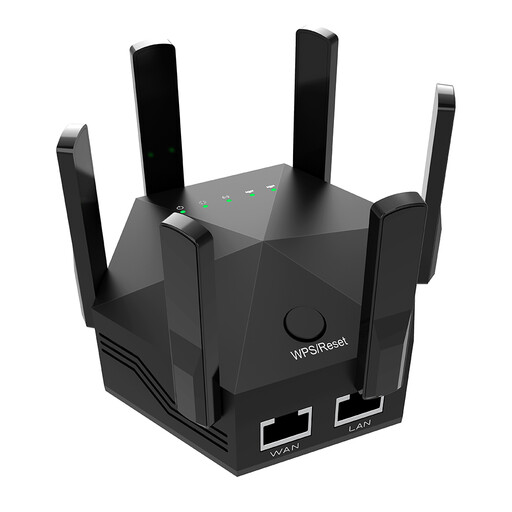 No image available
Described as a Wi-Fi booster for indoor use; the product description also mentions streaming and WPS set-up.
Dual-band; six adjustable aerials. Two LAN ports with 10/100 Mbit/s.
 No image available
The AP mode described may be useful if you already have an Ethernet connection; check that the set-up suits your plans.
Dual-band, four aerials and two RJ45 ports. The RJ45 ports are rated at 10/100 Mbit/s.
 No image available
The description says it extends an existing Wi-Fi network for streaming and other internet use.
Compact design; the product description mentions plug-and-play set-up.
 No image available
Described as a wireless repeater; the signal strength indicator can help you choose where to place it.
Dual-band operation and WPS set-up are specified.
 No image available
The mesh system is described as providing Wi-Fi coverage across several rooms. The Deco app is specified for set-up.
Three units; two Gigabit Ethernet ports per unit. An access point mode is specified.
Don’t place it where the router signal has already dropped out. Check the connection indicator at a spot between the router and the area you want to reach; the Telekom instructions for Speed Home WLAN explain how to identify a weak or missing connection. If there’s no suitable spot, consider a wired or Powerline connection.
Yes, if the specific model has a suitable operating mode. FRITZ! specifies a Gigabit LAN port on the 1200 AX for a wired network connection; TP-Link explicitly describes an AP mode via the Gigabit Ethernet port on the RE3000X.
Test both adapters in the sockets you actually plan to use. devolo recommends plugging them directly into wall sockets where possible and says power supplies and dimmers can cause interference. A connection in other sockets won’t tell you how well it will work in the room you want to reach.
Check what you’ll need for your planned set-up: Powerline requires one adapter by the router and another in the room you want to reach, while an Ethernet bridge needs a usable cable route. Also compare the warranty and firmware information for the specific model; FRITZ! offers a five-year warranty for the 1200 AX.
The relevant 2.4 and 5 GHz frequency bands are generally allocated for Wi-Fi use, which must comply with the applicable frequency regulations. This doesn’t mean you can use any transmission power or any imported device. When monitoring the market for radio equipment, the Bundesnetzagentur lists CE marking, manufacturer information and a declaration of conformity among the points it checks.