If you mainly print small landscape photos and want to clear the desk afterwards, a compact postcard printer could be a good fit. For larger prints, you’ll need a model that supports A4 or A3+. Canon Germany lists a postcard size of 100 × 148 mm for the SELPHY CP1500, while Epson Germany specifies A4 for the ET-8500 and up to A3+ for the XP-15000. Before buying, also check how everyone who shares the printer will connect to it, which consumables are compatible, and which paper and colour settings suit your images.
Which printing option is right for you?
Landscape enthusiasts who care about tonal range
You want to fine-tune bright snow and dark trees, so you pay attention to paper, print settings and, where appropriate, a colour-managed workflow. Canon Germany recommends a colour-managed workflow for precise colour matching.
Photo printers sharing a desk
You need a straightforward way for several devices to print, and want to reclaim the workspace after making small photo prints. The Canon SELPHY CP1500 offers Wi-Fi, USB-C and memory card printing.
Fans of larger landscape prints
You’re planning A4 or A3+ images, so start by considering the print size and the space available. Epson Germany specifies A4 for the ET-8500 and photo printing up to A3+ for the XP-15000.
What should you look for when buying?
First, decide on your preferred print size and how everyone will connect to the printer. Then weigh up tonal adjustment, materials and maintenance in light of how you plan to use it.
| Priority |
What to check before buying |
Who is this especially important to? |
| Snow and shadow tones |
Compatible photo paper and available paper and colour settings; plan to make test prints of your own image. |
If I want to fine-tune light and dark areas of an image, I look at the paper and colour settings. Around 31% of consumers say tonal control is their top priority. |
| Desk space and printing options |
Check how much room the printer needs while in use, including paper feed and output, and whether Wi-Fi, USB or app printing works with the devices you actually use. |
When I share a desk, I want to be able to put the printer away after use. Around 25% of consumers prioritise keeping their workspace clear. |
| Print size |
Choose your preferred paper size and check whether borderless printing is available for the specific model and paper. |
If you’re planning larger landscape prints, decide first whether you need A4 or A3+. Around 19% of consumers prioritise a larger print size. |
| Materials and maintenance |
Check which paper, ribbon, film or ink is compatible, what’s included in the box, and whether the specific model may need maintenance. |
If I want to keep ongoing purchases and upkeep manageable, I compare the requirements for consumables and maintenance. Around 25% of consumers say running costs and upkeep are their top priority. |
Common misconceptions
-
“Compact” means you won’t need extra space when printing
The dimensions Canon gives for the SELPHY CP1500 are with its trays retracted, so they don’t show how much room it needs while in use.
Before deciding where to keep a shared printer, measure the available space, allowing for the paper feed, output and cables.
-
A quoted photo yield is guaranteed for every image
Epson’s photo yield figures for the ET-8500 are based on the manufacturer’s test conditions and don’t necessarily apply to other images or print sizes.
Compare the compatible materials with how often you plan to print, rather than treating the quoted yield as a fixed figure for your own landscape photos.
-
Instant, postcard and A4 printing all give you the same size
The instax Link WIDE 2 uses WIDE film, the SELPHY CP1500 uses postcard-size media, and the PIXMA G650 supports photo printing up to A4. These print sizes aren’t interchangeable.
Decide what size you want your finished landscape image to be before comparing printer models.
Printer brands to consider
Canon
The models covered here range from compact postcard prints to A3+ photo printing.
- Canon Germany lists several printing options and media for the SELPHY CP1500, from postcard size to mini stickers.
- The PIXMA G650 supports borderless A4 printing; the PIXMA PRO-200S is an A3+ model with eight separate dye-based CLI-65 inks.
- The SELPHY CP1500 is limited to the smaller media it supports. The PRO-200S also requires different consumables from the SELPHY ink-and-paper set.
Epson
The models covered here include an A4 photo inkjet printer with refillable tanks and a cartridge-based A3+ model.
- Epson lists six-colour printing and refillable tanks for the ET-8500; the XP-15000 prints photos up to A3+ using six Claria Photo HD inks.
- The ET-8500’s photo yield is a conditional figure supplied by the manufacturer. For affected EcoTank and Expression devices, Epson describes nozzle checks and print head cleaning as possible maintenance steps.
Fujifilm
The instax Link WIDE 2 is designed for smartphone prints on instax WIDE instant film.
- Fujifilm specifies Bluetooth and a required app for printing.
- The film, sold separately, measures approximately 86 × 106 mm. It’s a different format and material choice from A4 photo paper.
Kodak
The Dock Plus is a compact dye-sublimation option for smartphone prints in 4 × 6-inch format.
- KODAK lists Bluetooth, 4PASS printing and a combined ink ribbon and paper cartridge.
- According to the supplier’s FAQ, images on a computer must first be transferred to a smartphone.
HP
The HP Sprocket Photo Printer is a very small ZINK smartphone printer, rather than a printer for traditional large-format landscape photos.
- HP Support lists ZINK media in 5.0 × 7.6 cm format and Bluetooth app printing for this model.
- It’s limited to small prints; this doesn’t tell you anything about other HP printers.
Joybuy products
The Joybuy products below are relevant to printing at a shared workstation and making mobile prints from a smartphone. For winter landscapes, check in particular that the colour output and supported paper size are right for your image.
 No image available
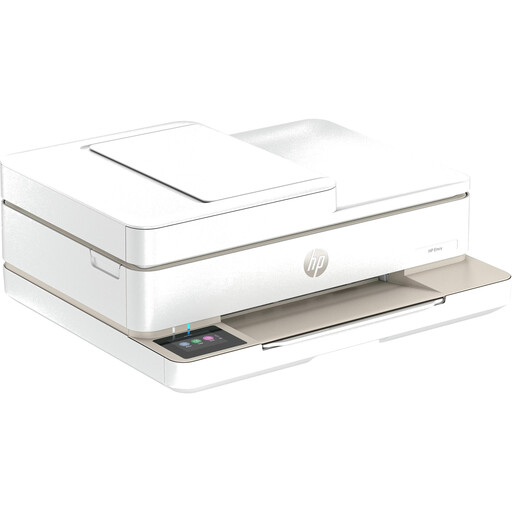
HP Envy 6520 All-in-One Wireless Inkjet Printer
Could be worth considering if you’re looking for a wireless inkjet all-in-one printer for a shared workspace.
Before printing landscapes, check the photo paper sizes it supports and which connections are available for your devices.
View at Joybuy
 No image available
Portable mini thermal printer for smartphone photos and notes
The product description lists smartphone photos and notes as possible uses for this portable mini thermal printer.
Before buying, check the print size and whether the prints will suit your winter landscapes.
View at Joybuy
 No image available
Portable Bluetooth mini thermal printer for photos and labels
The product description lists photo and label printing as uses for this portable mini thermal printer.
Compare the paper size it actually supports with the print size you want for your landscapes.
View at Joybuy
 No image available
Portable Bluetooth thermal printer with 10 rolls of thermal paper
Could be suitable for small smartphone prints and notes if black-and-white printing is all you need.
The product details specify black-and-white printing on thermal paper, so this printer won’t produce colour winter landscapes.
View at Joybuy
 No image available
Xiaomi Portable Photo Printer 1S
Could be a good fit if you want small smartphone photo prints rather than larger landscape images.
Check whether the supported print size is large enough for your images; small prints can’t replace a larger landscape print.
View at Joybuy
Frequently asked questions
What can I do if snow looks different in the print from how it looks on screen?
Start by checking the paper and print settings. For demanding photo printing, Canon Germany describes a colour-managed workflow using screen calibration and ICC profiles. This is a manufacturer recommendation, not a guarantee that a particular image will automatically look the way you want.
What should I do if a photo inkjet printer produces faded or patchy prints?
For affected EcoTank and Expression devices, Epson Germany recommends running a nozzle check first, followed by print head cleaning through the maintenance function if necessary. Always follow the instructions for your specific model.
Who is responsible if a printer is faulty?
Under EU rules, if you buy a faulty product in the EU, the seller must repair or replace it free of charge. This is separate from any additional manufacturer’s warranty; the applicable terms of sale and warranty determine what applies in your particular case. Source: European Union, Your Europe.
How do I dispose of an old printer in Germany?
Electrical and electronic equipment must not go in household waste. Germany’s Federal Environment Agency lists recycling centres and retailers as drop-off points, as well as local collection schemes where available.


