
Lieferung heute & morgen

Qualitätsgarantie

Willkommens-Angebote freischalten: KOSTENLOSE Lieferung | Bis zu 80 % RABATT | Kostenlose 30-Tage-JoyPlus-Testphase
App herunterladen
A wired gaming mouse promises a stable connection, fast signal transmission and precise control. However, a high DPI figure doesn’t automatically mean a better gaming experience. Some models offer features you’re unlikely to use day to day, while important details such as cable management, shape and software compatibility can get less attention.
This guide explains what PC gamers, esports players, casual gamers and demanding users should look for when buying a mouse. It focuses on clear technical specifications and matching the right model to different needs.
A high-DPI gaming mouse can significantly increase sensor sensitivity. That doesn’t mean it will automatically be more accurate at every setting. Many users play at much lower values and adjust sensitivity further in the game or operating system.
More important than the maximum figure are:
A sensor with 26,000 or 30,000 DPI mainly offers a wide range of settings. Lower values are often enough for office work, browsing or casual gaming.
An 8000 Hz gaming mouse theoretically reports its position more often than a 1000 Hz model. With suitable hardware and settings, this can make input polling more frequent. However, the practical benefit depends on several factors:
If you mainly use office applications, strategy games or older games, you may not need this feature. A high polling rate can be appealing for fast competitive games, provided your whole PC is up to the task.
An RGB gaming mouse can complement the look of your desk. But lighting zones, colours and effects are design and convenience features. They’re no substitute for a comfortable shape or a suitable sensor.
Before buying, check the weight, button layout, hand size and grip style that suit you. Then compare the RGB features.
An optical gaming mouse uses an optical sensor to track movement. The maximum resolution isn’t the only thing that matters: you should also consider how easily you can adjust the settings. The product specifications should include at least the DPI range, polling rate and connection type.
For a gaming mouse for PC and laptop, the USB connection is also relevant. The models featured here use a wired USB connection. This means no charging or battery changes, but you’ll need a suitable USB port and enough room for the cable.
A lightweight gaming mouse can make quick movements and frequent changes of direction easier. Very light models aren’t comfortable for everyone, particularly if you find a heavier mouse more stable at low sensitivity.
Check the:
For example, the HyperX Pulsefire Haste 2 is listed at around 52–53 g without the cable and comes with a 1.8 m USB cable and PTFE glide feet. The Razer DeathAdder V3 is listed at 59 g. These figures may appeal if you prefer a lightweight esports mouse.
An ergonomic gaming mouse should suit the way you like to hold it. Right-handed users often have a wider choice of specially shaped models. Symmetrical designs, on the other hand, can suit different grip styles or be more versatile.
Extra buttons are useful if you need macros, media controls or in-game commands. For simple games and office tasks, though, lots of buttons may be unnecessary. Also check whether you can only customise the buttons using software or whether you can save a profile to the mouse’s internal memory.
The models below cater to different needs. The technical specifications are based on the available product information.
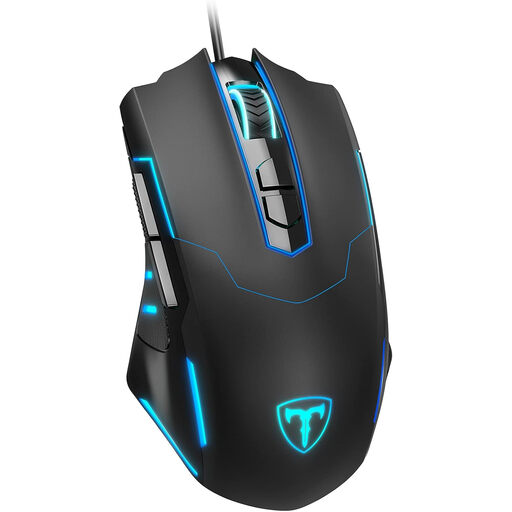
Why this product suits this profile: This model offers a USB connection, seven programmable buttons, RGB lighting and a stated DPI range of 1200 to 7200. It’s a good fit if you’re looking for gaming features without an overwhelming array of extras.
The DPI and polling rate ranges are clearly stated. This lets you check whether the settings suit your game and PC, rather than focusing only on the RGB lighting.
Seven programmable buttons, an optical sensor, 1200–7200 DPI and a stated polling rate range of 125–1000 Hz.
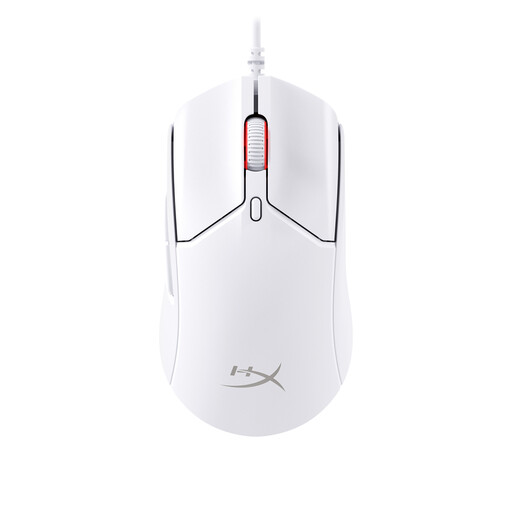
Why this product suits this profile: The mouse combines a stated weight of around 52–53 g with a HyperX 26K sensor, a polling rate of up to 8000 Hz and six buttons. It’s aimed at users who prioritise flexible settings and a lightweight design.
The specifications cover more than just a high DPI figure, also listing the polling rate, weight, cable length, PTFE glide feet and internal profile storage.
26,000 DPI, up to 8000 Hz, around 52–53 g without the cable, six buttons, RGB lighting and a 1.8 m USB cable.
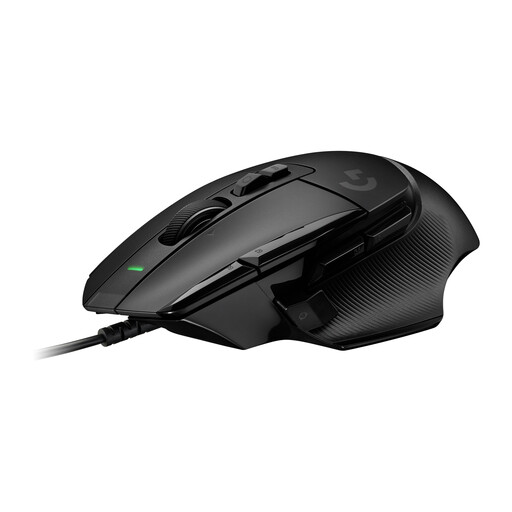
Why this product suits this profile: With up to 13 programmable controls, a DPI range of 100 to 25,600 and space for up to five profiles in its internal memory, this model is designed for extensive customisation.
The extensive button layout is clearly documented for macros and workflows. Before buying, consider whether the weight of around 89 g suits your preferred style of play.
HERO-25K sensor, 13 programmable controls, five profiles in the internal memory and PTFE glide surfaces.
We’ve put together a complete, regularly updated list of products that meet these strict selection criteria and comply fully with the safety regulations in force in the EU.
A wired mouse doesn’t need a battery and never needs charging. Connect the USB plug directly to your PC or laptop, or use a suitable hub. Don’t pull the cable to unplug it; hold the connector instead. Sharp bends, liquids and excessive pulling can damage the cable and connector.
To help your mouse last longer:
Figures for click durability, such as “up to 100 million clicks”, are manufacturer claims, not a guarantee of a particular lifespan. How often you use the mouse, how you transport and care for it, and the amount of mechanical wear also matter.
Yes, as long as your device has a compatible USB port. Modern laptops may need a suitable adapter or docking station. Check the connection type and cable length before buying.
It depends on the game, monitor and your personal sensitivity preference. Low to medium settings are enough for many uses. A wide DPI range is most useful if you switch between different games, work tasks or screen configurations.
A wired mouse draws power from the USB port. Its consumption is low compared with power-hungry PC components. RGB lighting and high polling rates can affect power consumption, but in normal use they don’t replace the need for a battery or separate power supply.