What should you look for when choosing?
First, try your existing headphone output. Then decide whether you need a free USB port, a microphone input or a dock with additional features.
| Priority |
What to check before buying |
Who is this important for? |
| Ports and charging |
Available USB ports and compatibility with your laptop and dock; if you’re buying a dock, check its power connection too. |
If I need the same port for charging or peripherals, I want to know whether a dock can connect audio and other devices. Around 36% of consumers prioritise ports and charging. |
| Simple headphone connection |
Check whether your laptop has USB-A or USB-C and match it to the right headphone plug. |
If a straightforward connection for my wired headphones is all I need when I’m out and about, I don’t automatically need a desktop device. Around 29% of consumers put a simple, portable audio connection first. |
| Microphone for video calls |
Check your headset plug, microphone input and whether the specific model supports a microphone. |
If I join video calls with a wired headset, its microphone needs to work through the adapter too. Around 21% of consumers prioritise microphone support for calls. |
| Additional outputs |
Match the headphone plug to the device output; take the power requirements and space needed by a desktop device into account. |
If I need specific headphone outputs or a desktop device, I’m more willing to make room for it and provide a power supply. Around 14% of consumers prioritise additional outputs or amplification. |
Joybuy products for laptop audio
This selection includes a USB-C to 3.5 mm adapter for compatible headphones and a dock with audio and peripheral ports. If you choose the dock, check that your laptop has a compatible port and bear in mind that it needs an additional power supply.
 No image available
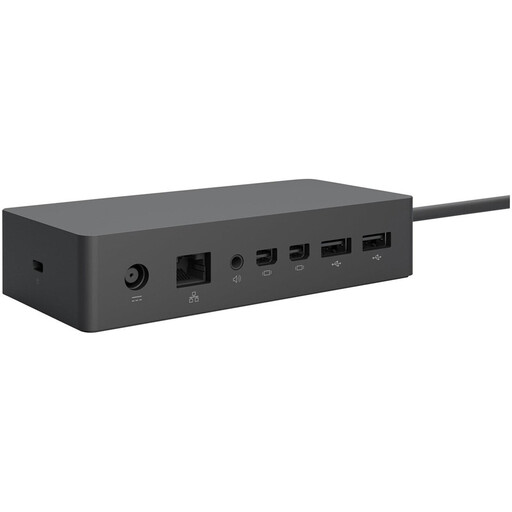
Microsoft Surface Thunderbolt 4 Dock
An option if you want to connect headphone audio and peripherals through a compatible dock.
Features include a 3.5 mm audio port, Thunderbolt 4 and three USB-A ports. Your laptop needs a compatible Thunderbolt 4 port, and the supplied power adapter must be plugged into a mains socket for the dock to work.
View at Joybuy
 No image available
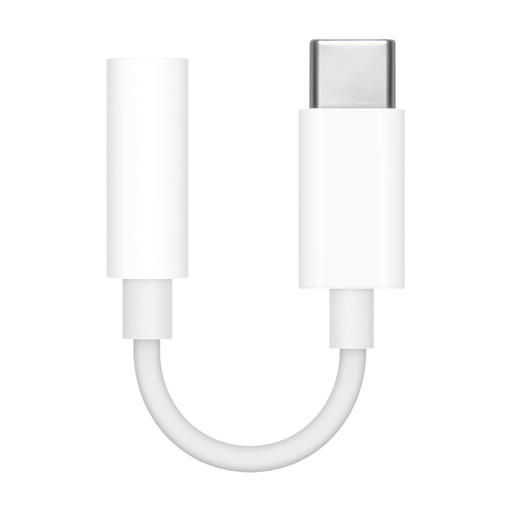
Apple USB-C to 3.5 mm headphone adapter
A compact way to connect your headphones if your laptop has a USB-C audio port and your headphones have a 3.5 mm plug.
According to the product description, the adapter provides a 3.5 mm headphone socket via USB-C. You’ll need a USB-C port that supports audio; microphone support isn’t guaranteed.
View at Joybuy
Frequently asked questions
Do I need to buy a USB DAC for wired headphones?
No, not if your existing headphone output is compatible and works properly. A USB audio adapter can help if you don’t have a suitable port or can’t use it. Manufacturer claims alone don’t prove that it will improve sound quality on your laptop.
How do I set up a USB DAC for a video call?
Connect a device that’s compatible with your laptop and headset, then select your preferred audio output and, if available, the USB microphone input in your operating system and calling app. Test the connection with a call; FiiO says the KA11 doesn’t support a microphone in the headphone cable.
How can I use a more powerful headphone amplifier at a sensible volume?
Start at a low volume and turn it up only as needed. The German Environment Agency recommends listening to headphones at a moderate volume. Apple recommends cleaning its EarPods with a soft, dry, lint-free cloth and advises against letting liquid get into any openings.
What should I know if a product develops a fault after purchase in Germany?
Your statutory rights against the seller are separate from any voluntary manufacturer’s or retailer’s guarantee. The consumer advice centre explains that, if a product is faulty, the first step is supplementary performance in the form of a repair or replacement. Check the specific guarantee terms as well.
What should I know about product safety and disposal?
The European Union explains that CE marking is required only for products covered by relevant harmonised legislation; it isn’t a general mark of quality. Germany’s Federal Network Agency recommends checking the product identity and manufacturer details. According to the German Environment Agency, electrical waste must be collected separately and not thrown away with household rubbish.


