
Lieferung heute & morgen

Qualitätsgarantie

Willkommens-Angebote freischalten: KOSTENLOSE Lieferung | Bis zu 80 % RABATT | Kostenlose 30-Tage-JoyPlus-Testphase
App herunterladen
A wired USB mouse is a practical solution for many workstations, laptops and school computers: it needs no batteries, draws power directly via USB and is usually ready to use straight away. Even so, models can vary considerably in terms of click noise, sensor, cable length and ergonomics.
If you focus only on a low price or a high DPI rating, it is easy to overlook important details. The following criteria will help you choose the right USB mouse for a laptop, PC, Chromebook or Mac and avoid common buying mistakes.
For a quiet computer mouse, noise-reduction claims often apply only to the left and right mouse buttons. The scroll wheel or middle button may still produce an audible click. If you work in a shared office, library or home office, check which controls are actually described as quiet.
A 1000 DPI mouse moves the pointer less quickly for the same hand movement than a 1600 DPI model. Moderate settings are usually sufficient for word processing, spreadsheets and web browsing. Clear, verifiable manufacturer information is important. The RAPOO N1600 is listed as both 1000 and 1600 DPI in its product information. You should therefore check the current product page and variant before buying.
A mouse may be technically suitable but become uncomfortable if its design is too small or its cable is awkwardly positioned. An ambidextrous mouse with a symmetrical shape is suitable for different users. The cable length should also suit your workspace. A cable measuring around 1.5 metres offers more flexibility than very short versions, but may take up additional space on a small desk.
An optical mouse uses an LED and sensor unit to detect movement across a surface. For office work, online research and lessons, smooth pointer control is more important than the maximum DPI figure. A resolution of 1000 to 1600 DPI is sufficient for many everyday applications.
Tracking can be affected on highly reflective or very uneven surfaces. A clean, matt and level surface helps provide smooth cursor movement.
A 3-button mouse normally has left and right mouse buttons plus a clickable scroll wheel. This layout covers the usual functions for documents, browsers and file management. Additional side buttons are only worthwhile if you regularly use them for navigation or customised shortcuts.
It is worth checking the product description for details about the scroll wheel: a non-slip surface can make it easier to use. However, ‘quiet’ should not automatically be taken to include the click of the middle button.
A plug-and-play mouse connects via USB and is recognised automatically by the operating system. The models featured here do not require any additional driver installation. Even so, check before buying that the device can be connected directly to the available USB-A port. Modern laptops with USB-C ports only may require a suitable adapter.
For a mouse for PC and Mac, information about operating-system compatibility is important. According to the product description, the Logitech B110 is designed for Windows, macOS and Linux. Chromebook users should also consider basic USB compatibility.
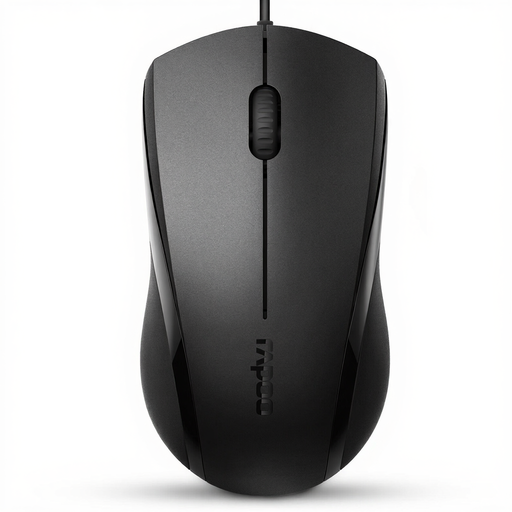
Why this product suits this profile: This black wired USB mouse is designed for users looking for a straightforward solution for a laptop, PC, Chromebook or Mac. Its symmetrical body is designed for both left- and right-handed use.
The product description mentions USB plug-and-play, optical tracking and three controls. According to RAPOO, the left and right clicks are noise-reduced; the scroll-wheel click is not described as quiet.
Optical sensor, two-way scroll wheel, 5-foot cable and symmetrical design, weighing 90 g.
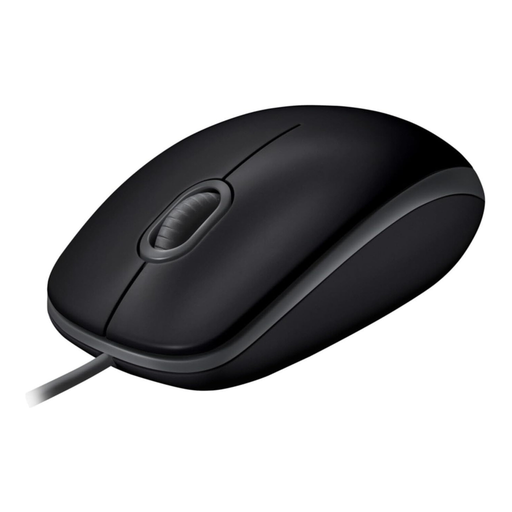
Why this product suits this profile: The Logitech B110 is intended for users who prefer a standard-sized office mouse with a wired connection and broad operating-system support.
According to Logitech, Silent Click technology reduces click noise by more than 90 per cent. This specification applies to the relevant buttons and should not be interpreted as complete silence.
Optical tracking, ambidextrous design, USB plug-and-play and compatibility information for Windows, macOS and Linux.
Why this product suits this profile: This version is suitable for users who want to use a lightweight mouse with a non-slip scroll wheel and symmetrical design for extended periods in everyday life.
According to RAPOO, the model has a symmetrical design and a specified service life of 5 million clicks. This is a technical design specification, not a guarantee of a particular period of use.
118 × 63 × 40 mm, weighing 90 g, with an optical tracking sensor and USB connection without any required driver installation.
Before ordering an office mouse, it is worth carrying out this quick check:
Always disconnect a cable by pulling on the USB plug, not the cable itself. Liquids, excessive heat and dropping the mouse can shorten its service life. With a notebook, it is also advisable to route the cable so that it does not remain permanently bent over the edge of the desk.
We have put together a complete, regularly updated list of products that fully meet these strict selection criteria and the safety regulations applicable in the EU.
With a plug-and-play mouse, you normally only need to connect it to a suitable USB port. The operating system will recognise the device automatically. If the laptop has USB-C ports only, a compatible adapter is required.
Its service life depends on how often it is clicked, cable strain, the surface it is used on and how it is handled. Specifications such as 5 million clicks are technical manufacturer figures for specific components. They do not provide a binding prediction of the actual service life in a home or office.
A wired USB mouse does not need batteries and does not have to be charged. It draws power through the USB port, with low consumption during normal use. Additional costs may arise if an adapter is needed for a USB-C laptop.