What should you look for when buying?
First, work out whether wired or wireless will suit your desk and gaming device best. Then check voice chat, the mute function and the fit of the specific model you’re considering.
| Consideration |
What to check before buying |
Who is it important to? |
| Clear raid chat |
Microphone and mute function; make a test recording in your usual environment |
If I often give call-outs during raids, I want to test my voice beforehand and be able to mute the microphone quickly. Around 29% of consumers put clear team chat first. |
| Clear desk space |
Cable route to the port, or space for the receiver and charging cable |
At a small desk, I want to move my mouse freely without an audio cable running across my work area. Around 23% of consumers prioritise keeping their desk clear. |
| Connection and chat compatibility |
Connection for your specific gaming device; microphone functionality |
If I play on several devices, I need the right connection and a working microphone for each one, not just a general platform compatibility claim. Around 18% of consumers prioritise having the right connection for voice chat. |
| Comfort during long raids |
Cushion material and adjustability; try the fit for yourself if possible |
For longer sessions, I want a headset that feels comfortable on my head. Material details alone don’t tell me how it will feel to wear. Around 18% of consumers put comfort first. |
| Charging and replacement parts |
Battery life for the specific version; access to charging and available replacement parts |
If I want to plan for charging breaks and replacing worn cushions, I check the battery life claims and availability of spare parts. Around 12% of consumers prioritise maintenance and charging requirements. |
Joybuy product selection
This selection includes both wired models and wireless headsets. The key things to consider are whether the connection works with your gaming device, how the cable or receiver will fit on your desk, and whether the microphone connection works.
 No image available
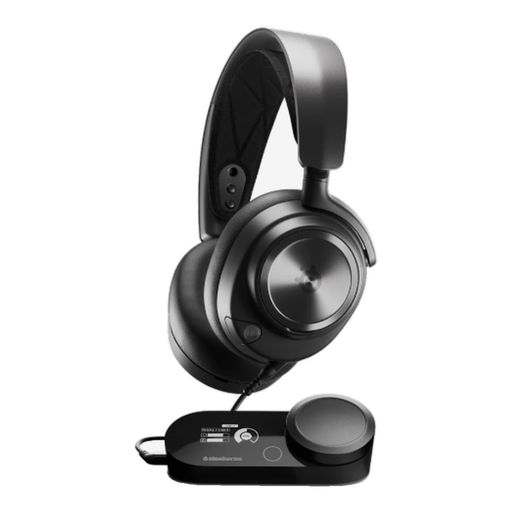
SteelSeries Nova Pro Wired, Black, PlayStation 5
This wired headset may suit a dedicated gaming setup with a compatible connection; remember to allow space for the GameDAC, too.
The product description lists a retractable microphone, GameDAC, and USB and 3.5 mm connections.
Wired use means you’ll need to plan how to route the cable on a small desk.
View at Joybuy
 No image available
ONIKUMA GT889 Wireless Gaming Headset
If you want the choice of wireless or wired use, the product description lists several modes. Check that the connection works with your gaming device and raid chat before buying.
It lists 2.4 GHz wireless via a USB receiver, Bluetooth and a wired mode, as well as a detachable microphone and mute function.
Wireless use requires a compatible USB port, and the headset has a rechargeable battery.
View at Joybuy
 No image available
Logitech G G535 LIGHTSPEED Wireless Gaming Headset
This wireless model may suit raid chat if you want a quick mute function; check that the connection and microphone work with your gaming device.
The product description lists a flip-to-mute microphone, USB-C charging, a weight of 236 g and battery life of up to 33 hours.
The stated battery life is a manufacturer’s figure, so plan charging around how you use the headset.
View at Joybuy
 No image available
Logitech G PRO X Gaming Headset (black, USB)
This wired model may suit a dedicated gaming setup if your device has the connection you need.
The product description lists a detachable microphone, an in-line mute button, a USB sound card and a 3.5 mm cable for mobile devices.
Bear in mind how you’ll route the cable on a small desk.
View at Joybuy
 No image available
Siukie L200 Wired Gaming Headset
If your gaming device has one of the listed connections, this wired model could be an option for team chat.
The product title lists USB and 3.5 mm connections and 50 mm drivers; the description mentions a flexible microphone.
Check that the connection and voice chat work with your specific gaming device, and plan the cable route across your desk.
View at Joybuy
Frequently asked questions
How do I check the microphone settings before a raid?
Connect the headset using the connection type intended for your device, check the microphone input and make a short test recording in your usual environment. HyperX says an LED on the Cloud III indicates when the microphone is muted; other models may have a different indicator.
Can I rely on a Bluetooth headset for PS5 voice chat?
No, not based on the headset’s Bluetooth claim alone. In its PS5 troubleshooting guidance, PlayStation says that a Bluetooth audio device may be incompatible. For a third-party model, check the specific PS5 connection and microphone support.
What should I know if an online purchase in Germany is faulty or I change my mind?
For newly purchased faulty goods, you may generally have statutory rights against the seller for up to two years, according to the Verbraucherzentrale. Many consumer distance sales also allow you to withdraw from the contract within 14 days of receiving the goods; the conditions and possible exceptions depend on the specific purchase. A voluntary guarantee is not the same as your statutory rights.
What should I know about product safety and disposal?
For market surveillance of electronic and Bluetooth devices, the Bundesnetzagentur lists points to check such as CE marking and manufacturer details; this does not guarantee anything about an individual headset. Take an old electrical headset to an authorised collection point, such as a local council recycling centre. Retailers have additional take-back obligations, as explained by the Bundesumweltministerium.


