If you usually stay seated to record your audio diary, a wired lavalier microphone with a connector supported by your specific recording device is often the simplest place to start. Wireless is worth considering if you want to move around while recording, but you’ll need to factor in the receiver, connection and battery. Positioning the microphone close to you or using noise reduction is no substitute for a test recording or for being considerate of other people’s conversations.
Which lavalier microphone is right for you?
Connect it to your recording device with confidence
If you want to use your existing smartphone or computer, first check whether it supports USB-C audio or has the right TRRS or TRS input. Sennheiser, Shure and RØDE describe different connection options for their respective models.
Record your voice at a shared desk
If other people are nearby, think about microphone placement and background noise, and listen back to a test recording. RØDE generally recommends positioning a lavalier microphone around 20–30 cm from your mouth; this won’t automatically prevent other people’s voices from being recorded.
Move freely while recording
If you sometimes stand up or move away from your recording device, wireless can eliminate the cable. Remember to factor in the connection and charging requirements, too.
What to consider when choosing
First, check which recording connections your device supports. Then decide whether a cable will do for a fixed workspace or whether freedom to move is more important.
| Consideration |
What to check before buying |
Who it matters most to |
| Connection and recording device |
Check for USB-C audio support or, with 3.5 mm, make sure the full TRRS or TRS signal path is supported, including any adapter you need. |
If I want to keep using my existing smartphone or computer, the microphone input must be compatible. Around 36% of consumers put the type of connection first. |
| Voice and background noise |
Test the microphone position, clothing rustle and recording in your actual workspace. |
If I’m recording at a shared desk, I want my voice to come through clearly without overlooking background noise or other conversations. Around 29% of consumers pay particular attention to noise levels. |
| Simple set-up |
Check the cable length and accessories against your workspace, then listen to a short recording before making an important entry. |
If I usually record short entries while seated, a straightforward set-up matters more to me than extra freedom to move. Around 21% of consumers prioritise getting started easily at a fixed desk. |
| Freedom to move |
With a wireless set, check that the receiver is the right version and that the connection, battery and recording app are suitable. |
If I want to move away from my recording device while speaking, a cable may get in the way. Around 14% of consumers prioritise freedom to move. |
Avoid common buying mistakes
-
Assuming all 3.5 mm clip-on microphones are interchangeable
TRRS models such as the RØDE smartLav+ and Shure MVL are described for use with compatible smartphone connections; the RØDE Lavalier GO is designed for a compatible TRS microphone input. A similar-looking plug alone doesn’t guarantee compatibility.
Check your specific device’s input, plug standard, power requirements and recording app. Depending on the connection, you may need a suitable adapter.
You may need an additional adapter or a different microphone.
-
Confusing noise reduction with privacy
A feature designed to reduce background noise doesn’t prove that other people’s conversations will be inaudible in a particular recording.
Choose your recording spot carefully, listen to a test recording and don’t record other people’s private conversations without permission.
-
Choosing a wireless model based only on range when you’ll mostly be seated
If you usually stay at your desk, a compatible wired microphone may be all you need; wireless mainly solves the problem of a cable getting in the way.
First think about how far you need to move, then check that a wireless set’s connection and recording path are suitable.
Wireless also means extra charging, a receiver and a connection to manage.
Useful brands to consider
Sennheiser
The XS Lav USB-C is a wired option for voice recordings with compatible USB-C mobile devices or computers.
- Sennheiser says the individual model comes with a 2 m cable, a clip and a windshield.
- Check that your device supports USB-C audio and that the cable is long enough for your workspace. These details don’t apply to every lavalier microphone from the brand.
Shure
Shure describes the MVL as suitable for close-up voice recordings with compatible mobile devices.
- Shure says the model can be used with a compatible 3.5 mm connection or a suitable CTIA adapter.
- This doesn’t mean it’s universally compatible with USB-C or TRS recorders.
RØDE
RØDE offers the smartLav+ and Lavalier GO lavalier microphones for different connection types.
- RØDE lists a 1.2 m cable for the smartLav+; the Lavalier GO is designed for compatible TRS inputs.
- TRRS and TRS are not interchangeable. Check which microphone input or adapter works with your device.
DJI
The DJI Mic Mini is a wireless option if you want more freedom to move while recording.
- DJI lists two levels of noise reduction and a battery life figure when used with the charging case.
- How well it works at a shared desk, app compatibility and the available features depend on your recording set-up and the version of the set.
BOYA
According to BOYA, the BY-M1 is a wired lavalier microphone with a switch for camera and smartphone use.
- BOYA lists a 6 m cable and an LR44 battery for the BY-M1.
- The BY-M1S is a different model and doesn’t need a battery. A long cable may get in the way at a shared desk.
Lavalier microphones at Joybuy
This selection includes wired and wireless lavalier microphones. The key considerations are your device’s recording connection and whether you want to move around while recording.
 No image available
DJI Mic Mini 2S (2 TX + 1 RX + Charging Case)
Wireless is an option if you want to move around while recording; first check which recording connection works with your device.
The set is listed as including two transmitters, one receiver and a charging case. The description also mentions 32-bit float recording and three sound presets.
View at Joybuy
 No image available
SYNCO S8 Lavaliermikrofon
A wired option if your recording device supports a compatible 3.5 mm connection.
The description lists a 3.5 mm connector, a clip and an adapter set. The microphone is described as omnidirectional.
View at Joybuy
 No image available
Wireless Lavalier Microphone Set with 2 Transmitters
This set may suit wireless voice recordings; check that the receiver’s connections work with your recording device.
The product name lists 2.4 GHz, DSP noise reduction, latency under 20 ms, a range of up to 40 m and a 500 mAh charging case.
View at Joybuy
 No image available
Moman M1CT Wireless Lavalier Microphone, USB-C, 1TX+1RX
A wireless option for a compatible USB-C recording device if you don’t want to be tied to a cable while recording.
The product name lists one transmitter and one receiver, as well as a range of 150 m. The description states a battery life of up to six hours.
View at Joybuy
 No image available
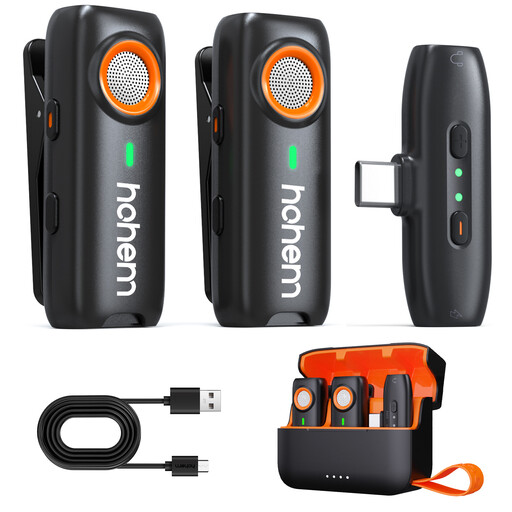
hohem Wireless Lavalier Microphone, 3-Level DSP Noise Cancelling
This wireless set may be a good choice if you want freedom to move while recording; check that it connects to your recording device before buying.
The description lists three DSP levels, up to 20 hours of use with the charging case and TF card recording. The TF card is not included.
View at Joybuy
Frequently asked questions
How should I position the microphone for a diary entry?
RØDE generally recommends placing lavalier microphones around the chest, about 20–30 cm from your mouth. Keep the capsule clear of rubbing clothing and listen back to a short recording made in your actual workspace.
Can I simply record conversations at the next table?
You must not record other people’s private conversations without permission. Section 201(1) of the German Criminal Code (StGB) makes this a criminal offence; whether it applies in a particular situation depends on the circumstances. Choose a recording spot where other people’s conversations won’t be captured.
Does noise reduction reliably prevent other people’s voices from being recorded?
No. Noise reduction doesn’t guarantee that other people’s voices will be removed. DJI describes two levels of background noise reduction for the Mic Mini, but doesn’t claim that other people’s voices will disappear from every recording. Listen back to the result and follow the rules on recording other people’s conversations.
What should I check about adapters and batteries?
Check whether your device needs a suitable adapter and which accessories come with the specific model. BOYA lists an LR44 battery for the BY-M1; the BY-M1S is a different version that doesn’t need a battery.
What can I do if my microphone is faulty?
If a product is faulty, distinguish your statutory rights against the seller from any voluntary manufacturer’s guarantee. The consumer advice centre lists repair or replacement as possible first steps.


