
Lieferung heute & morgen

Qualitätsgarantie

Willkommens-Angebote freischalten: KOSTENLOSE Lieferung | Bis zu 80 % RABATT | Kostenlose 30-Tage-JoyPlus-Testphase
App herunterladen
A wireless Bluetooth keyboard can free up space on your desk, make using a tablet easier and simplify switching between several devices. At the same time, unclear layout details, exaggerated battery-life claims and missing connectivity options often lead to disappointing purchases. If you are looking for a Bluetooth keyboard for your PC, laptop, tablet or smartphone in Germany, you should therefore look beyond the design.
Many models sold internationally feature a US layout (QWERTY). On a German QWERTZ keyboard, the Y and Z keys are in different positions, among other differences, and the special characters and key labels also vary. Although you can often switch the operating system to a German layout, the labels printed on the keycaps remain unchanged.
For regular typing in German, a model explicitly marked as having a DE layout or QWERTZ is usually less complicated. If a product is listed with a US layout, this difference should be taken into account before buying.
A wireless keyboard may work via Bluetooth, a 2.4 GHz receiver or several connection types. A USB receiver is practical for many desktop PCs, while tablets and smartphones often require a direct Bluetooth connection. A multi-device keyboard can store several devices, but it does not always support the same operating systems with identical function keys.
It is therefore important to check the Bluetooth version, supported systems and the maximum number of devices that can be stored at the same time. A newer Bluetooth version is a technical specification, but on its own it does not guarantee range or an interference-free connection in every environment.
Manufacturer claims such as “up to 18 months” depend on usage, lighting and the type of connection. Keyboards with RGB lighting generally use more energy than models without lighting. Battery-powered keyboards and those with an integrated rechargeable battery also have different implications: AAA batteries can be replaced quickly, while a rechargeable battery is charged via USB-C.
You should therefore check whether the stated figure refers to continuous use, standby time or a specific amount of daily usage. For products with a lithium battery, you should also consider the charging time and guidance on safe use.
Also pay attention to dimensions and weight. A keyboard around 13 millimetres high is easier to fit into a bag than a tall mechanical model. For long texts, key spacing, key travel and the typing angle are more important than a striking case colour.
A mechanical keyboard uses an individual switch for each key. It can provide clear feedback and is suitable for users who prefer a particular typing feel. On some mechanical models, the switches can be replaced thanks to the hot-swap function. This improves customisation, but often also means greater weight and a taller design.
Scissor mechanisms, as used in many slim office keyboards, feel more like laptop keyboards when typing. They are often space-saving and appealing in shared spaces where a low noise level is preferred. An ergonomic keyboard with a curved shape or wrist rest can alter the position of your hands, but it cannot replace a suitable sitting posture and regular breaks.
For PCs and tablets, a combination of Bluetooth and 2.4 GHz offers flexibility. Bluetooth is suitable for devices without a spare USB port, while a USB receiver provides an alternative connection for compatible PCs. In gaming, a wired USB-C mode can be useful if you prefer a direct connection.
If you switch between a laptop, tablet and smartphone, look for dedicated channel keys. Three or four stored devices are more practical in everyday use when switching can be done with a single key rather than pairing again every time.
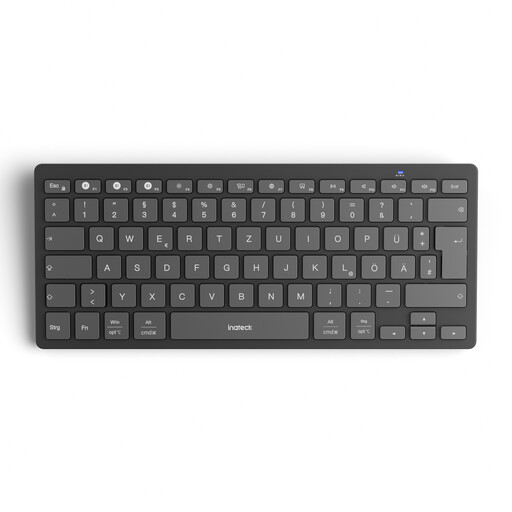
Why this product suits the profile: The slim model supports Windows, iPadOS, Android and iOS. Weighing 217 g, with 1.5 mm key travel and support for three devices, it is suitable for straightforward work and study situations.
The product details explicitly state Bluetooth 5.3, three channels and the compatible operating systems. Power is supplied by two AAA batteries included in the box.
Switching between three devices, compact dimensions and a stated battery life of 18 months with two hours of daily use.
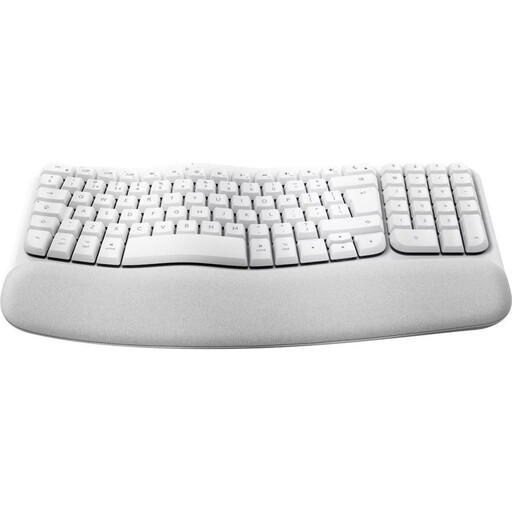
Why this product suits the profile: This model features a German QWERTZ layout, a curved key arrangement, a padded wrist rest and nine media keys.
The DE layout is specified in the product details. Power supplied by two AAA batteries prevents interruptions caused by an empty integrated battery.
Bluetooth connection, QWERTZ layout and a quiet membrane mechanism with a curved design.
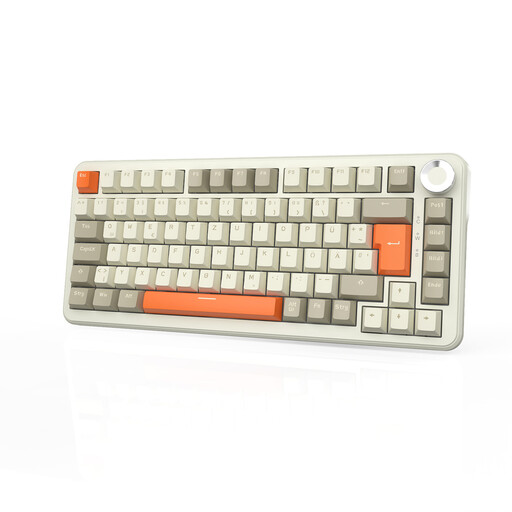
Why this product suits the profile: The 75 per cent form factor combines a German QWERTZ layout with arrow keys and a function row. Tri-mode connectivity, an 8000-mAh battery and hot-swap support are aimed at users with changing requirements.
The specifications explicitly state QWERTZ, Bluetooth, 2.4 GHz and USB-C. This means a wired option remains available alongside wireless use.
75 per cent layout, hot-swap function, volume control and a stated battery life of up to 120 hours without lighting.
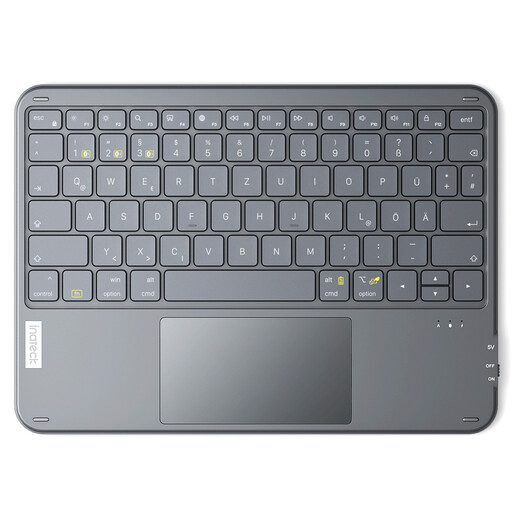
Why this product suits the profile: This model combines a slim design with an integrated trackpad and support for three Bluetooth devices. It is designed for iPadOS, Windows and Android tablets.
On Android, the QWERTZ layout may need to be selected in the system settings. This adjustment prevents incorrect characters when typing.
Integrated touchpad, 5 mm height, 228 g weight and a stated standby time of up to 150 days.
We have put together a complete, regularly updated list of products that fully meet these strict selection criteria and the safety regulations applicable in the EU.
Switch on the keyboard and activate Bluetooth in the tablet’s settings. Start pairing mode using the Bluetooth button or the designated channel, then select the device from the list. With a QWERTZ keyboard, you may also need to select the German physical keyboard layout under Android or iPadOS.
Battery life depends on the switch type, battery, lighting and daily use. Depending on the product, models with AAA batteries can last for several months or reach a stated battery life of up to 18 months. For integrated rechargeable batteries, compare the capacity, charging time and usage with the lighting switched on.
Bluetooth may be sufficient for casual gaming. If you need fast input and an alternative connection, consider a gaming keyboard with 2.4 GHz mode and USB-C wired operation. Anti-ghosting, N-key rollover, switch type and the arrangement of the arrow and function keys are also relevant criteria.