
Lieferung heute & morgen

Qualitätsgarantie

Willkommens-Angebote freischalten: KOSTENLOSE Lieferung | Bis zu 80 % RABATT | Kostenlose 30-Tage-JoyPlus-Testphase
App herunterladen
An unreliable mouse, constant cable clutter, or an imprecise cursor can significantly disrupt your workflow in the office and at home. Choosing the right wireless business mouse is therefore not a trivial matter, but a decision that directly impacts productivity and comfort. This guide is designed to help you make an informed decision by highlighting key criteria and presenting a selection of models designed for professional demands.
Selecting the right model depends on your individual work habits and requirements. You should consider three central aspects in your decision.
Anyone who spends many hours at the computer each day should prioritise an ergonomic mouse. The shape should fit your hand size and grip style to minimise fatigue and wrist strain. Models with a contoured design, thumb rests, and textured side grips often provide greater comfort during extended use.
A modern professional wireless mouse typically offers two connection options: Bluetooth and a USB receiver. A Bluetooth mouse for office environments can connect to laptops and tablets without an extra dongle. Technologies like Logi Bolt provide a dedicated, encrypted, and low-interference wireless connection, which is advantageous in environments with many wireless devices. For users working across multiple systems, a multi-device mouse is a significant convenience, allowing you to switch between a PC, laptop, and tablet at the touch of a button.
A high-quality sensor is crucial for precise cursor control. Standard mice often only work reliably on a mousepad. Models with advanced sensors, such as Darkfield technology, enable precise tracking on almost any surface, even glass. This is particularly relevant for a mobile mouse for laptop users who work at various workstations without a mousepad.
Based on the criteria mentioned, we have compiled a selection of wireless mice suitable for different professional user profiles.
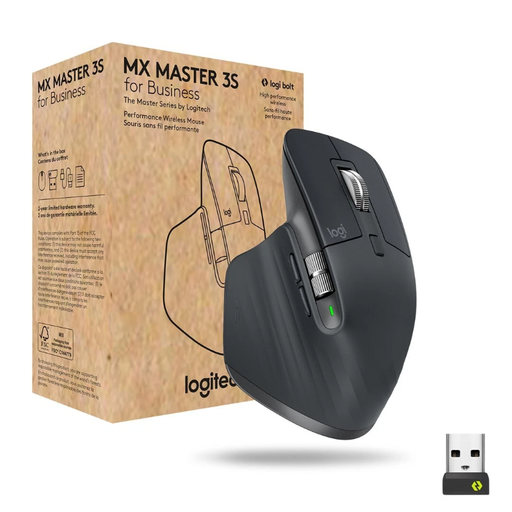
Why It Stands Out
The Logitech MX Master 3S for Business is engineered for maximum productivity and precision. Its electromagnetic MagSpeed scroll wheel allows you to rapidly scroll through long documents while maintaining pixel-perfect control. The 8000 DPI Darkfield sensor ensures reliable tracking on challenging surfaces like glass. The Quiet Clicks technology reduces click noise, contributing to a quieter work environment.
Pros
Who It's For
This model is aimed at power users, developers, designers, and any professional who requires the highest level of control, customisation, and comfort for intensive daily work.
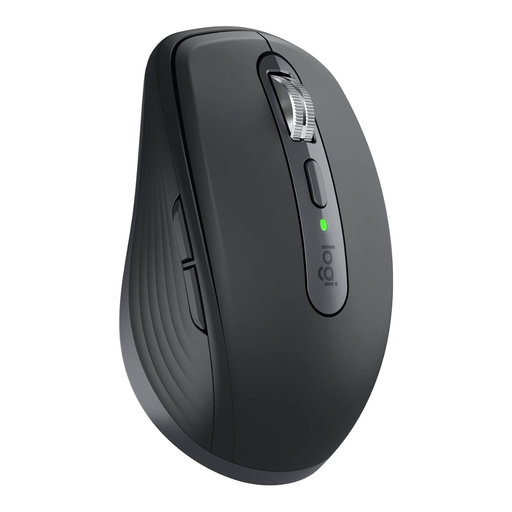
Why It Stands Out
The Logitech MX Anywhere 3S for Business offers many of the premium features of the Master series in a compact form factor. It is designed as a mobile mouse for laptop users who are frequently on the move but don't want to compromise on performance. It also features the precise 8000 DPI Darkfield sensor, the MagSpeed scroll wheel, and quiet clicks.
Pros
Who It's For
Ideal for mobile professionals, consultants, sales representatives, and anyone who regularly switches between the office, home office, and external meetings and needs a powerful yet portable mouse.
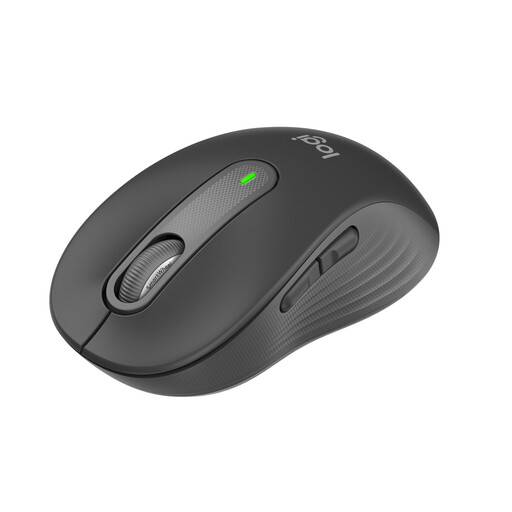
Why It Stands Out
The Logitech Signature M650 focuses on comfort and exceptionally quiet operation. According to the manufacturer, its SilentTouch technology reduces click noise by up to 90%, making it an excellent choice for open-plan offices or quiet work environments. The SmartWheel automatically switches between line-by-line precision and rapid scrolling.
Pros
Who It's For
This model is a great choice for office employees, students, and home office users who prioritise a low-noise work environment and need a reliable, comfortable mouse for everyday productivity tasks.
The models presented cover common professional requirements. However, the market offers a wide variety of other specialised mice that differ in shape, function, and price. If you are looking for a different type of mouse or wish to compare more models, you are sure to find the right device in our broader selection.
Discover our entire range of quiet computer mice and find the perfect model for your needs.
Bluetooth Low Energy allows for a direct connection to compatible devices without needing a USB port. This is convenient for laptops and tablets. A Logi Bolt receiver, on the other hand, establishes a dedicated, encrypted wireless connection based on the Logitech protocol. This is often more stable and secure in environments with heavy wireless traffic, such as large offices.
Standard optical mice struggle on glass and other highly reflective surfaces because the sensor cannot track the surface properly. However, a professional wireless mouse with specialised sensors, like Logitech's Darkfield laser technology, is explicitly designed to ensure precise and reliable cursor movement even on these challenging surfaces.
A quiet mouse with quiet-click PC mouse technology significantly reduces the ambient noise in work environments. In open-plan offices, libraries, or during video conferences, it minimises distractions for both colleagues and yourself. This contributes to a more focused and considerate work atmosphere.