
Lieferung heute & morgen

Qualitätsgarantie

Willkommens-Angebote freischalten: KOSTENLOSE Lieferung | Bis zu 80 % RABATT | Kostenlose 30-Tage-JoyPlus-Testphase
App herunterladen
As a Joybuy Product Recommendation Officer, my job is to provide you with clear and objective information so you can make an informed decision for your home. An indoor Wi-Fi camera can enhance your sense of security, whether it's for monitoring a room, serving as a baby monitor with a camera and app, or keeping an eye on your pets. This guide objectively presents various models and their features to help you make your choice.
The selection of cameras is vast, and technical specifications can quickly become overwhelming. Focus on the following three key areas to find the right device for your needs.
Resolution determines how detailed the recorded image is. While Full HD (1080p) is sufficient for many applications, cameras with higher resolutions, such as 3 megapixels (MP) or even a 4K security camera, deliver a significantly sharper picture. This is especially useful when you need to zoom in on the image to identify details.
A powerful indoor camera with night vision is just as important. Pay attention to the specified range of the infrared LEDs. A good night vision function ensures that clear black-and-white images are produced even in complete darkness, which is essential for continuous monitoring.
A static camera has a fixed field of view. It is well-suited for monitoring a specific area, such as an entryway or a baby's crib.
A PTZ camera (Pan-Tilt-Zoom), on the other hand, can be controlled remotely via an app. You can pan, tilt, and zoom the camera to cover an entire room. Some models also offer automatic motion tracking, where the camera follows a detected person or pet. This flexibility is ideal for larger living areas or when you require dynamic surveillance.
Video footage needs to be stored somewhere. There are two common methods for this:
Many cameras offer both options. A switchable privacy mode, which physically or digitally deactivates the lens, is another important feature for protecting your privacy.
Here is a selection of cameras that stand out for their specific features and use cases.
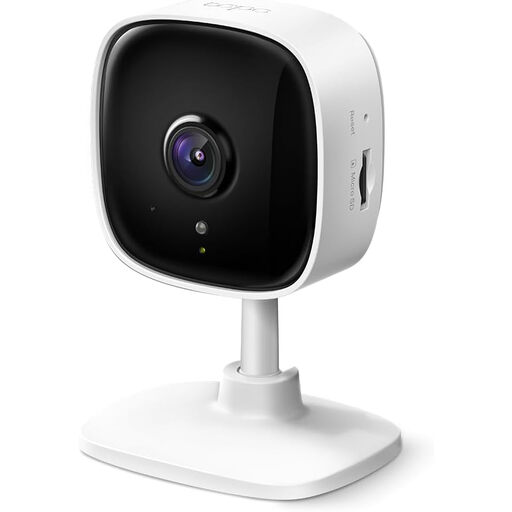
What Sets It Apart The TP-Link Tapo C110 is a straightforward home security camera that focuses on the essentials. With its 3 MP resolution (2304 x 1296 pixels), it delivers sharper images than conventional Full HD cameras. The ability to store recordings locally on a microSD card makes it a cost-effective solution with no recurring fees.
Pros
Who Is It For? This model is an excellent choice for users looking for a reliable and easy-to-install camera for basic room monitoring, who also value a solution without subscription costs.
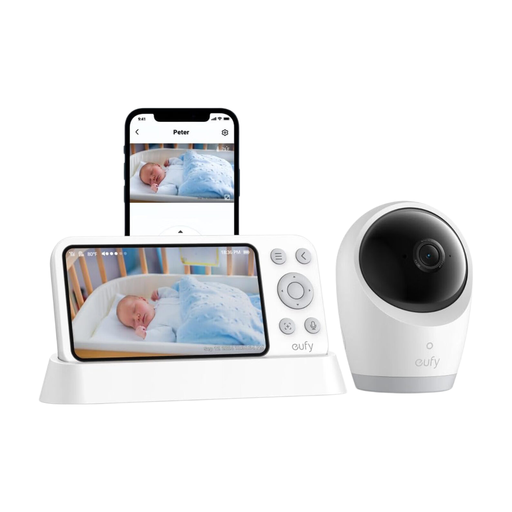
What Sets It Apart The eufy Camera E21 is more than just a security camera; it's a thoughtfully designed system for parents. Its standout feature is its hybrid operation: it works either via a direct, private connection to the included 5-inch monitor (without Wi-Fi) or via the app for worldwide access over the internet. The camera itself is portable, thanks to an integrated 5,000 mAh battery, and can be placed flexibly around the house or while travelling.
Pros
Who Is It For? Ideal for parents seeking a flexible and secure solution as a baby monitor with a camera and app. The combination of a local monitor and optional app access offers a high degree of security and convenience.
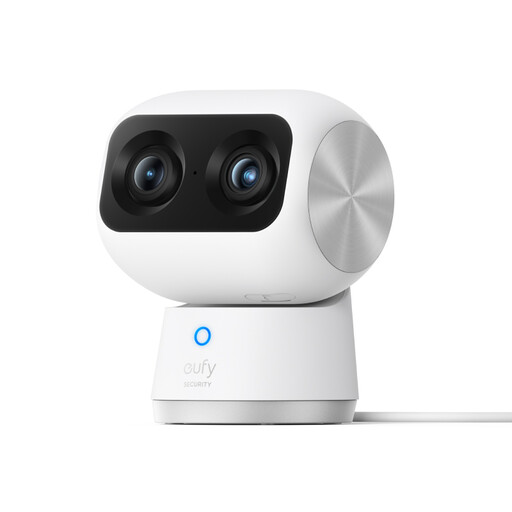
What Sets It Apart The eufy Security Indoor Cam S350 sets new standards with its dual-lens system. It combines a 4K wide-angle lens for a broad overview with a 2K telephoto lens for detailed zoom. The 360° PTZ function and AI-powered tracking of people and pets make it a powerful surveillance hub for large rooms.
Pros
Who Is It For? This model is aimed at tech-savvy users, pet owners, or anyone who needs an uncompromising 4K security camera with advanced tracking features and outstanding image quality for monitoring large or complex indoor spaces.
The models presented cover specific use cases. If you haven't found the right solution for your needs yet, you might find the right device in our broader selection.
? Discover more models in the Camera and Monitor category
With local storage, videos are saved on a physical microSD card in the camera. This is a one-time investment with no recurring costs. The data remains in your possession and on your network. With cloud storage, recordings are stored on the manufacturer's external servers, which usually requires a subscription. The advantage is that the data remains accessible even if the camera is damaged or stolen.
For most functions, such as remote access via an app, sending notifications, and cloud storage, an active internet connection is required. However, some models, like the eufy Baby Monitor E21, offer an offline mode where the camera establishes a direct connection to an included monitor, allowing it to function without the internet.
A PTZ camera is useful when you want to completely monitor a large or irregularly shaped room with just one camera. You can remotely control the camera to view different areas. For monitoring a fixed point, like a door or a baby's crib, a static camera is often sufficient.