
Lieferung heute & morgen

Qualitätsgarantie

Willkommens-Angebote freischalten: KOSTENLOSE Lieferung | Bis zu 80 % RABATT | Kostenlose 30-Tage-JoyPlus-Testphase
App herunterladen
Published: July 17, 2026 | By: Joybuy Product Recommendation Officer
Getting in the car, fumbling for the USB cable, plugging in your smartphone—it's a ritual that repeats with every drive. While modern vehicles with factory-installed Apple CarPlay or Android Auto offer excellent smartphone integration, the wired connection can be cumbersome in daily use. A Wireless CarPlay Adapter or a Wireless Android Auto Adapter solves this exact problem. It enables an automatic, wireless connection as soon as you start your vehicle.
This article serves as your guide. We'll explain how these adapters work, highlight the key criteria to consider when buying, and present a selection of devices for different needs. Our goal is to provide you with an informed basis for making a worthwhile car infotainment upgrade.
The selection of adapters is vast. To find the right device for you, you should consider three key aspects.
The most important prerequisite is that your vehicle already has factory-installed, wired CarPlay or Android Auto. Most vehicles from model year 2016 onwards are equipped with it. Also, check the adapter's system requirements for your smartphone. Typically, CarPlay requires at least iOS 10, and Android Auto requires at least Android 11. Also, note the USB port in your car (USB-A or USB-C) and whether the adapter includes the appropriate cables or converters.
Consider which features you need:
A stable and fast connection is crucial for a smooth user experience. Look for adapters that use the 5 GHz Wi-Fi standard. This frequency band is less congested than the 2.4 GHz band and allows for a higher data transfer rate, resulting in lower latency for controls and audio streams. The initial setup should be straightforward (plug-and-play), ensuring the smartphone connects automatically on future drives.
Based on the criteria mentioned, we have compiled a selection of products that cover different use cases.
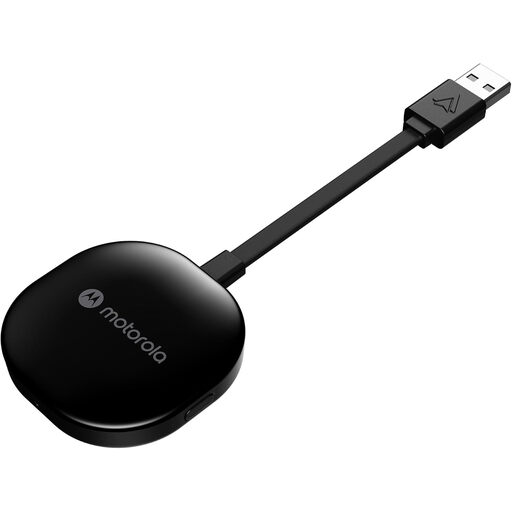
What makes it stand out The Motorola MA1 is a specialized solution for Android users. Developed in collaboration with Google, it focuses exclusively on establishing a stable and fast wireless Android Auto connection. The setup is incredibly simple, and the connection is established via 5 GHz WiFi for rapid data transfer.
Pros
Who is it for? The Motorola MA1 is the ideal choice for Android users seeking a straightforward and reliable solution to make their existing wired Android Auto wireless. It is a pure functional adapter with no extra features.

What makes it stand out The Ottocast adapter in its mini version offers flexibility. It's a 2-in-1 device compatible with both Apple CarPlay and Android Auto. This makes it a practical solution for vehicles used by multiple people with different smartphones. The connection uses 5.8 GHz WiFi and Bluetooth 5.2, ensuring low latency.
Pros
Who is it for? This adapter is designed for users who need a flexible solution for different smartphone systems. It's perfect for families or drivers who switch between an iPhone and an Android device and are looking for an easy way to retrofit wireless CarPlay.
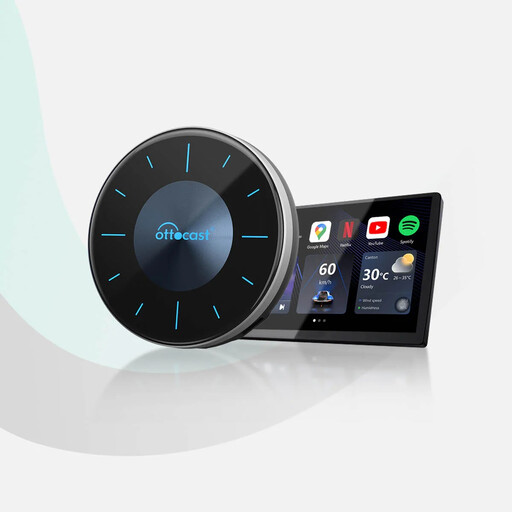
What makes it stand out The OTTOCAST P3 is more than just an adapter—it's a fully-fledged CarPlay AI Box. It runs on a standalone Android 12 operating system and transforms your car's screen into an entertainment hub. Thanks to the Qualcomm Snapdragon 665 processor, 8 GB of RAM, and 128 GB of ROM, you can install and use apps like YouTube, Netflix, or Disney+ directly on the display. An HDMI output also allows for screen sharing to a second monitor, e.g., for the rear seats.
Pros
Who is it for? The P3 AI Box is aimed at tech enthusiasts and families who want to maximally expand their vehicle's infotainment system. It's the right choice for anyone who wants not only a wireless connection but also video streaming and a wide selection of apps in their car.
The products presented here cover the most common use cases. However, the market offers a variety of other models with specific features. If you are looking for alternatives or want to compare different devices in detail, you can find a broader selection in our Android Auto Car Adapters category.
Such an adapter plugs into the vehicle's USB port designated for wired CarPlay/Android Auto. It establishes an initial connection with the smartphone via Bluetooth (pairing). Subsequently, the actual data transfer for screen content, audio, and controls is handled over a direct Wi-Fi network between the adapter and the smartphone. The adapter thus acts as a bridge.
Yes, using wireless CarPlay or Android Auto puts more strain on the smartphone's battery than a wired connection. This is because both Bluetooth and Wi-Fi are constantly active and transmitting data. With a wired connection, the smartphone is charged simultaneously. For longer journeys, it is therefore advisable to have a separate charging option (e.g., via a 12V adapter or a wireless charging pad) available in the vehicle.
No. Standard adapters for wireless CarPlay or Android Auto only mirror the apps approved by Apple and Google for use while driving. These include navigation, music, and communication apps, but not video streaming services. To use apps like YouTube or Netflix on your car screen, you need a special CarPlay AI Box like the OTTOCAST P3, which has its own Android operating system and allows the installation of such apps. For safety reasons, the use of video content by the driver is intended only when the vehicle is stationary.