
Lieferung heute & morgen

Qualitätsgarantie

Willkommens-Angebote freischalten: KOSTENLOSE Lieferung | Bis zu 80 % RABATT | Kostenlose 30-Tage-JoyPlus-Testphase
App herunterladen
A Wireless CarPlay Adapter can make a factory-fitted wired infotainment system work wirelessly without changing the radio. That sounds like a simple plug-and-play solution, but not every Apple CarPlay adapter works with every vehicle. If you only look for terms like “universal”, “instant connection” or “AI Box”, you risk buying the wrong product.
This buyer’s guide from the Joybuy Product Recommendation Officer explains the most important technical requirements and shows which adapter suits which usage profile.
A wireless CarPlay adapter usually requires a vehicle where Apple CarPlay is already activated via a factory-fitted wired connection. Having a USB port alone is not enough. The same principle applies to Android Auto: your vehicle must support wired Android Auto.
Not every adapter is suitable for aftermarket radios either. Some models explicitly exclude BMW and Tesla vehicles, as well as non-original head units. So before you buy, you should check your vehicle model, year of manufacture, smartphone operating system and the type of infotainment system.
A simple dongle transmits your smartphone’s existing functions wirelessly to the vehicle display. A CarPlay AI Box, on the other hand, runs its own operating system and can – depending on the model – provide additional apps.
This is an important difference: if you only want to navigate, make calls and listen to music wirelessly, you usually don’t need a large internal memory. If you want to use CarPlay with Netflix and YouTube or other apps, you should check the app support, storage and operating logic more carefully. Video apps should only be used when the vehicle is safely parked.
A CarPlay Adapter USB can come with USB-A or USB-C. What matters is which port in your vehicle is intended for CarPlay. A mechanically fitting plug does not guarantee it will work. In addition, many models first pair the smartphone via Bluetooth and then transmit data via Wi-Fi.
The position in the vehicle is also important. An adapter should not lie loose in the footwell or obstruct the use of other ports. For devices with an adhesive pad or mount, make sure you have a vibration-free, dry mounting surface.
First, check:
For example, the Motorola MA1 requires an Android Auto-compatible vehicle and a compatible Android smartphone. The OTTOCAST Mini Dongle lists iOS 10 or higher and Android 11 or higher as system requirements.
For stable use, Bluetooth pairing and Wi-Fi connection are crucial. The Motorola MA1 uses 5 GHz Wi-Fi. The OTTOCAST Mini Dongle uses 5.8 GHz Wi-Fi and Bluetooth 5.2. These details describe the technical connection, but they are not a guarantee of identical performance in every vehicle.
Also look out for:
A classic adapter continues to use the original display. An AI Box can offer additional apps, storage and, depending on the model, HDMI output. A portable car display is a different product category: it is mounted separately in the vehicle and comes with its own screen.
For an external screen, resolution, screen size, power supply, Bluetooth and mounting are crucial. A 7-inch display may be suitable for limited space, while a 10.26-inch model offers more viewing area. However, the larger format must be mounted securely and must not obstruct the field of view or controls.
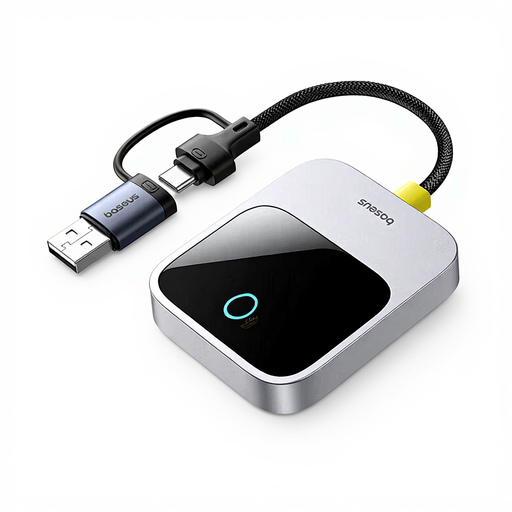
Why this product suits the profile: This adapter is aimed at iPhone users who want to use their existing vehicle display wirelessly for navigation, calls and music, without replacing the radio.
The product description mentions simple setup and use of the original vehicle display. However, factory-fitted CarPlay support should still be confirmed before purchase.
Wireless CarPlay use via the original display; compact design in a Space Grey housing.
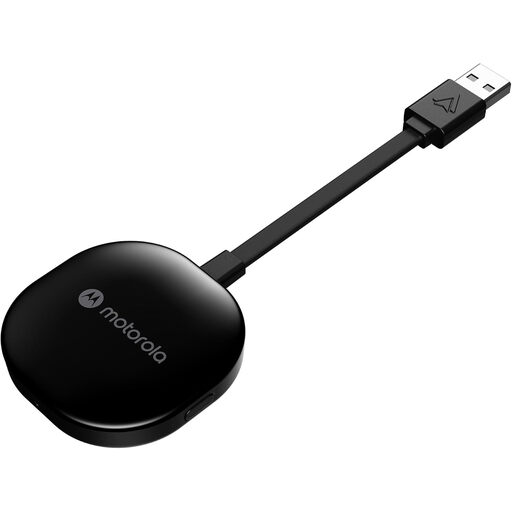
Why this product suits the profile: Android users with a compatible vehicle get a clearly described USB adapter for the wireless transmission of navigation, media and messages.
Compatibility is limited to Android Auto vehicles and Android smartphones. This restriction prevents the adapter from being mistakenly bought as an Apple CarPlay solution.
5 GHz Wi-Fi, USB-A connection, 70 gram weight and a gel pad for mounting.
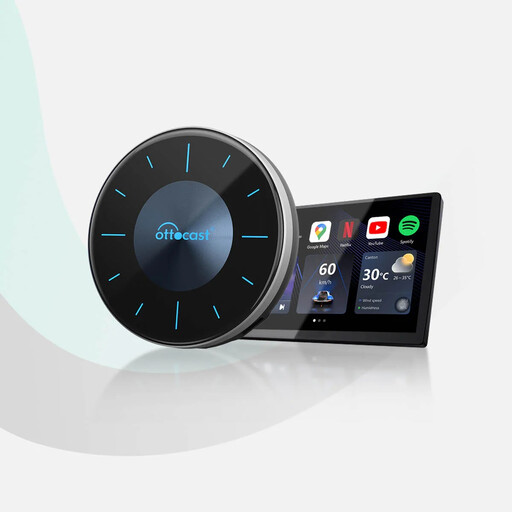
Why this product suits the profile: The AI Box is designed for users who need additional apps, more storage or an HDMI connection to a rear-seat monitor, alongside wireless CarPlay and Android Auto.
The product details explicitly mention factory-fitted wired CarPlay and the exclusion of BMW, Tesla and aftermarket head units. The HDMI cable is not included.
Android 12, 8 GB RAM, 128 GB storage, Qualcomm Snapdragon 665 and support for a Micro-SD card up to 256 GB.
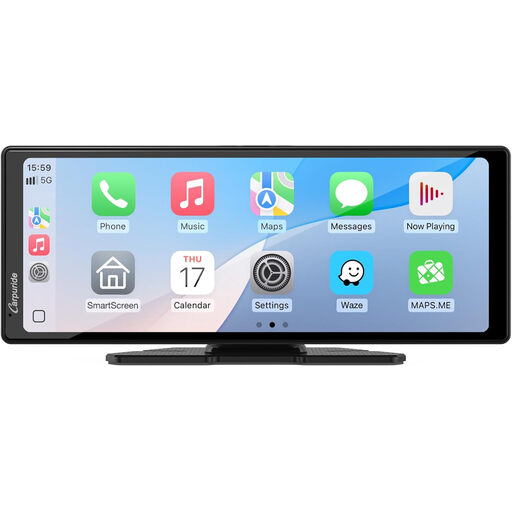
Why this product suits the profile: This separate display is aimed at drivers who want to use wireless CarPlay and Android Auto on an additional 10.26-inch screen.
It is not classified as an invisible upgrade of the original radio, but as a portable car display. This means the mounting location, power supply and field of view can be planned in advance.
10.26-inch touchscreen, 1080p resolution, Bluetooth 5.0, wireless CarPlay, Android Auto and MirrorLink.
For an original infotainment system with wired CarPlay, a compact Wireless CarPlay Adapter is usually sufficient. Android users should specifically look for an Android Auto Adapter. A combined device like the OTTOCAST Mini Dongle can be interesting if both an iPhone and an Android smartphone are used in the household.
If you want to retrofit CarPlay or retrofit Android Auto without replacing your existing radio, you should distinguish between a dongle and a portable display. An external screen does not necessarily require a compatible original display, but it does need secure mounting and a separate power supply.
We have put together a complete, regularly updated list of products that fully meet these strict selection criteria and the safety regulations in force in the EU.
No. As a rule, the vehicle must already support factory-fitted wired Apple CarPlay. The same applies to the wired version of Android Auto. Aftermarket head units and certain brand models may be excluded.
Typically, you plug the adapter into the designated USB port. Then the first pairing takes place via Bluetooth and Wi-Fi. The exact steps vary by model. After successful setup, automatic reconnection may occur.
For the pure use of Apple CarPlay or Android Auto, there are usually no monthly device fees incurred by the adapter. However, costs can arise from mobile data usage, streaming subscriptions or additional apps. With an AI Box, you should also consider storage management and available app versions.