
Lieferung heute & morgen

Qualitätsgarantie

Willkommens-Angebote freischalten: KOSTENLOSE Lieferung | Bis zu 80 % RABATT | Kostenlose 30-Tage-JoyPlus-Testphase
App herunterladen
A wireless CarPlay adapter can make using your smartphone in the car much more convenient: your iPhone connects to the vehicle display without having to plug it in every time, and on compatible models you can also use Android Auto wirelessly. However, not every wireless CarPlay adapter works with every car stereo. Many purchases go wrong because the technical requirements in the product descriptions are overlooked.
An adapter for wired CarPlay typically just makes the existing connection wireless. It does not replace your car stereo and it will not automatically add CarPlay to a vehicle that does not have factory-fitted Apple CarPlay.
Before buying, you should check:
The OTTOCAST model explicitly requires a vehicle with factory-fitted wired CarPlay or Android Auto. According to the product information, it is not intended for BMW, Tesla or aftermarket head units.
The setup may simply involve plugging it in and pairing via Bluetooth. However, the operating system, vehicle and port all need to be compatible. The OTTOCAST Mini Dongle lists iPhones from iOS 10 and Android devices from Android 11. You should check these details against your own smartphone before buying.
The USB port is also important. A USB-C CarPlay adapter will not simply fit into a USB-A socket unless a suitable adapter is included. Furthermore, depending on the model, the USB port in your vehicle may only provide power, or it may also support data transfer.
A low-lag connection does not depend solely on the adapter. Factors such as the Wi-Fi and Bluetooth connection, the vehicle's software, the distance to your smartphone and the load on the infotainment system all play a part. Claims like "Low Latency" should therefore be understood as a product feature, not a guarantee for every vehicle configuration.
A wireless CarPlay adapter is usually a bridge between your smartphone and an infotainment system that is already compatible. If you want to retrofit wireless CarPlay, you should first test whether your iPhone connects directly via USB and starts Apple CarPlay. The same principle applies to Android Auto.
Vehicles without CarPlay or Android Auto support will need a different solution, such as a new car stereo or a separate infotainment device.
Wireless transmission typically uses a combination of Bluetooth and Wi-Fi. Bluetooth usually handles detection and pairing, while Wi-Fi supports the actual data transfer. The OTTOCAST Mini Dongle lists Bluetooth 5.2 and 5.8 GHz Wi-Fi as its technical specifications. According to the product description, the device automatically connects when the vehicle starts, after the initial setup.
A stable connection can be supported by up-to-date smartphone software, a sufficient battery level and a free USB port. If you experience connection drops, restarting the infotainment system, deleting old Bluetooth pairings or installing a firmware update (if the manufacturer offers this feature) can often help.
A CarPlay adapter transmits navigation, phone calls and compatible apps to your vehicle's display. A Bluetooth AUX adapter for cars works differently: it sends audio signals to an older car stereo with a 3.5 mm AUX input. Such a device will not normally offer an Apple CarPlay menu or display navigation maps on the car stereo.
For pure music streaming and a hands-free kit for the car, a Bluetooth receiver for cars with an AUX port may be sufficient. The key factors are battery life, charging port, range and the position of the microphone.

Why this product suits the profile: This compact 2-in-1 adapter is aimed at users whose vehicle already supports factory-fitted wired CarPlay or Android Auto and who want to use both systems wirelessly.
The product information lists the required operating systems, the vehicle requirements and the excluded brands. This allows you to check compatibility before buying.
Supports Apple CarPlay and Android Auto according to the product information, Bluetooth 5.2, 5.8 GHz Wi-Fi and firmware updates via FOTA.
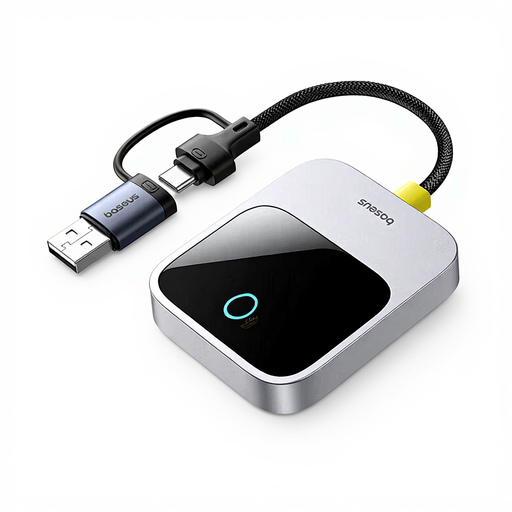
Why this product suits the profile: This solution is designed for users who want to continue using the original vehicle display for navigation, phone calls and music, and who value a compact design.
Using it still requires a compatible vehicle infotainment system. Buyers should therefore check the vehicle list and the details in the listing, rather than assuming it is a universal retrofit.
Wireless CarPlay function for use via the original display; discreet Space Grey housing according to the product information.
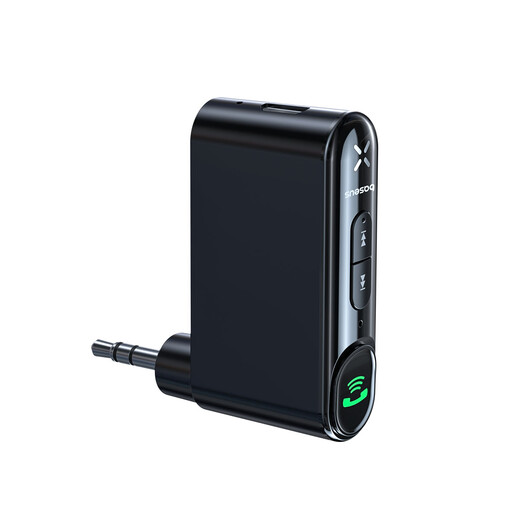
Why this product suits the profile: For older car stereos with a 3.5 mm AUX input, this Bluetooth receiver for cars is a suitable alternative to a CarPlay dongle when wireless music streaming and hands-free calling are the main priorities.
It is not used as a CarPlay retrofit, but specifically for AUX audio systems. This clearly distinguishes its functionality from a wireless CarPlay adapter.
3.5 mm jack output, Bluetooth 5.0, up to 10 hours of playback according to the product information and support for hands-free calls.
We have put together a complete, regularly updated list of products that fully meet these strict selection criteria and the safety regulations in force in the EU.
After connecting, the vehicle should be stationary. Plug the adapter into the designated USB port, then pair your smartphone via Bluetooth. The remaining steps will normally appear on the vehicle display or in the Bluetooth settings.
For use on the road, please note:
No. Typically, the vehicle must already support factory-fitted wired Apple CarPlay. With 2-in-1 models, you also need to check the vehicle's and smartphone's Android Auto compatibility. Vehicles without this function require a different retrofit solution.
Yes, provided the adapter is compatible with the vehicle's infotainment system. It converts the existing USB connection into a wireless one. The display, control via steering wheel buttons and touchscreen, as well as the supported apps, still depend on the vehicle and smartphone.
The lifespan depends on operating temperature, power supply, software and frequency of use. A fixed USB port, up-to-date firmware and positioning away from direct strong sunlight can support everyday use. With a Bluetooth AUX receiver, battery capacity is also a key factor; the Baseus BSBA-02 is stated to offer up to 10 hours of playback.