
Lieferung heute & morgen

Qualitätsgarantie

Willkommens-Angebote freischalten: KOSTENLOSE Lieferung | Bis zu 80 % RABATT | Kostenlose 30-Tage-JoyPlus-Testphase
App herunterladen
A Wireless CarPlay Adapter can convert a wired Apple CarPlay connection into a wireless one. Your smartphone stays in your pocket while you control navigation, calls, music and voice commands through your vehicle’s existing display. For Android users, there are equivalent solutions available as a Wireless Android Auto Adapter or Android Auto dongle.
What really matters, however, isn’t just the advertised features. Many purchases go wrong because people overlook vehicle requirements, connection types, or the difference between an adapter and a portable display.
An adapter can normally only provide Wireless CarPlay or Wireless Android Auto if your vehicle already supports factory-fitted wired Apple CarPlay or Android Auto. A USB port alone isn’t enough.
Crucially, the product information for some models explicitly excludes BMW and Tesla. Retrofitted car radios or non-original head units may also be incompatible. So before you buy, check your vehicle’s make, model year, trim level and existing infotainment functionality.
A CarPlay adapter for iPhone typically uses your car’s existing screen. It doesn’t replace the infotainment system, nor does it add a display to a vehicle that doesn’t already have CarPlay.
If you want to upgrade an older car without a compatible original system, you’re better off with a portable CarPlay display. These devices have their own screen and, depending on the model, can support Wireless CarPlay, Android Auto, Bluetooth, MirrorLink or a reversing camera.
A CarPlay AI Box can expand your infotainment with an Android-based system and additional apps. However, this means more setup, more storage space, and greater dependence on your original system’s compatibility. Features like video streaming should only be used when the vehicle is safely parked.
First, check whether your vehicle supports wired CarPlay or Android Auto from the factory. For example, the OTTOCAST Mini Dongle is listed as compatible with vehicles from 2016 onwards that have factory-fitted CarPlay or Android Auto. Smartphone requirements are given as iOS 10 or later or Android 11 or later.
A wireless Apple CarPlay adapter is designed for iPhones. A 2-in-1 model can also support Android Auto. But that doesn’t automatically mean both systems will work in every vehicle. Always refer to the specific product details and your vehicle manufacturer’s specifications.
A CarPlay adapter USB-C plugs directly into your vehicle’s USB-C port. Older vehicles may have a USB-A port instead. Some models come with an adapter or offer different connection options, but you should still check the connector type before buying.
Also, bear in mind that the USB port must support data transfer. A charging-only port won’t establish a connection to the infotainment system.
Many adapters use Bluetooth for the initial pairing, while Wi-Fi handles the data connection. The OTTOCAST Mini Dongle, for instance, features Bluetooth 5.2 and 5.8 GHz Wi-Fi. It also supports FOTA updates – firmware updates over the internet.
Automatic reconnection after starting the vehicle is a handy feature. Steering wheel controls, the touchscreen and rotary dials should continue to work, provided your vehicle supports these functions. No adapter can guarantee a completely lag-free connection; actual performance also depends on your smartphone, vehicle software and wireless environment.

Why it fits: Ideal for commuters who want to use their existing wired system wirelessly without complicated installation.
The vehicle requirement is clearly stated: factory-fitted CarPlay or Android Auto. BMW, Tesla and retrofitted head units are excluded according to the product details.
Supports iOS 10+, Android 11+, Bluetooth 5.2, 5.8 GHz Wi-Fi and automatic reconnection after setup.
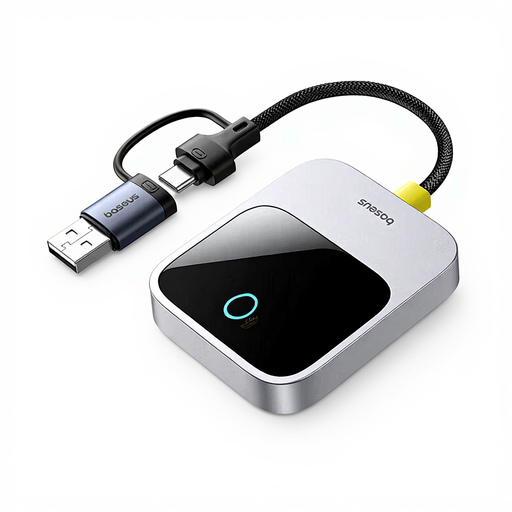
Why it fits: Perfect for iPhone users who want to use navigation, hands-free calling and music through their original vehicle display.
The adapter is positioned as a solution for your existing infotainment system, not as a replacement for a missing vehicle display.
Wireless CarPlay usage, compact design and a Space Grey finish according to the product description.
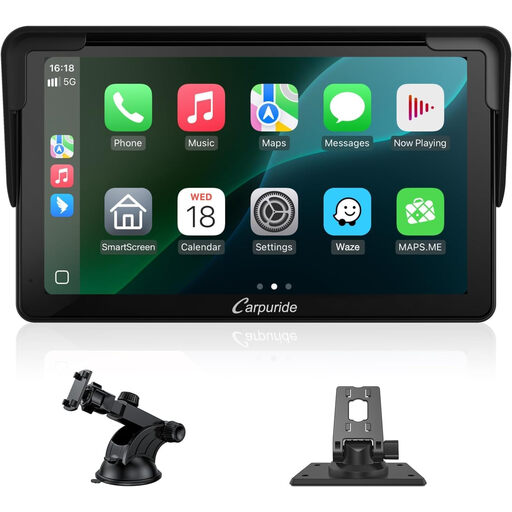
Why it fits: Great for older vehicles where a portable display offers more flexibility than an adapter for a non-existent original system.
The device is designed as a standalone, portable CarPlay display and doesn’t require your vehicle’s display to already support CarPlay.
7-inch touchscreen, 1080p resolution plus Wireless CarPlay, Android Auto, Bluetooth 5.0 and MirrorLink according to the product name.
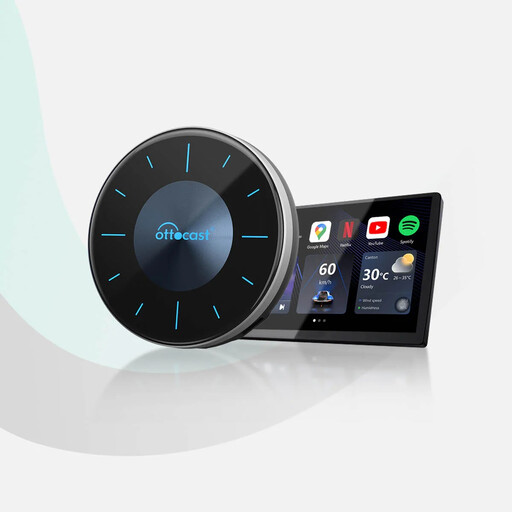
Why it fits: Ideal for users who need additional Android apps or HDMI output alongside CarPlay and Android Auto.
The box requires activated factory-fitted CarPlay and, according to the product details, is not compatible with BMW, Tesla or retrofitted head units.
Android 12, 8 GB RAM, 128 GB storage, Micro-SD expansion up to 256 GB and HDMI output; the HDMI cable is not included according to the description.
Browse the full selection to find more products for different vehicle and smartphone configurations. Always check the compatibility details before buying.
No. Generally, your vehicle must already support factory-fitted wired Apple CarPlay. For 2-in-1 models, the same applies to Android Auto. BMW, Tesla and retrofitted car radios may be excluded depending on the model.
Connect the adapter to your vehicle’s USB data port. Then pair your iPhone via Bluetooth initially. After that, the system establishes the wireless connection. Depending on the model, the connection may be established automatically on subsequent journeys.
There are usually no regular fees for the adapter itself. However, costs may arise from mobile data usage, streaming services, navigation apps or paid apps. With an AI Box, you should also check whether its functions require a separate internet connection.