
Lieferung heute & morgen

Qualitätsgarantie

Willkommens-Angebote freischalten: KOSTENLOSE Lieferung | Bis zu 80 % RABATT | Kostenlose 30-Tage-JoyPlus-Testphase
App herunterladen
By: Joybuy Product Recommendation OfficerDate: July 5, 2026
Many drivers appreciate the reliability of their older vehicle but miss modern infotainment features like seamless smartphone integration or advanced navigation. Retrofitting a permanently installed system is often costly and complex. A practical alternative is a retrofit CarPlay screen. These devices offer a straightforward way to enjoy current technology without professional installation.
This article serves as a buying guide. We will introduce various solutions and explain the key features to consider when choosing a portable display for your car.
The right device depends on your individual needs. The following three criteria will help you make an informed decision.
The connection type between your smartphone and the display is a central criterion.
A key advantage of these devices is their simple installation. A good no-install car screen can be mounted directly on the dashboard or windscreen using a sturdy stand or suction cup mount. Power is typically supplied via the vehicle's 12V-24V cigarette lighter. Look for a robust mount that keeps the display secure, even on bumpy roads.
Modern retrofit screens are often more than just an external display for car navigation. Many models combine multiple functions in one device:
Based on the criteria mentioned, we have compiled a selection of devices that cater to different needs.

What makes it stand out: This device is a comprehensive all-in-one solution. It combines a portable CarPlay monitor with an integrated 4K front dash cam and a 1080p reversing camera. The wireless connectivity for CarPlay and Android Auto ensures an automatic connection as soon as you start your journey.
Pros:
Best for: Drivers looking for a complete and easy-to-install retrofit solution that combines navigation, entertainment, and safety features (dash cam) in a single device.
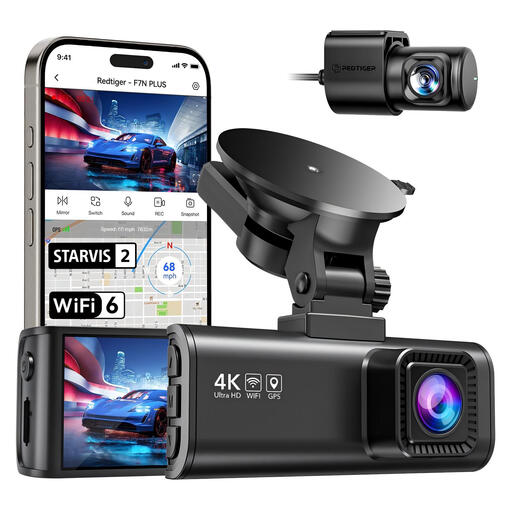
What makes it stand out: The REDTIGER F7NP is a specialised dash cam designed for the highest recording quality. It does not have a CarPlay screen but focuses on seamlessly documenting your drive in 4K resolution with a high-quality Sony STARVIS 2 sensor.
Pros:
Important Note: A memory card is not included. A separate card with a speed class of U3 or higher is required.
Best for: Drivers whose priority is high-resolution, reliable drive recording for security purposes and who do not need an integrated infotainment upgrade.
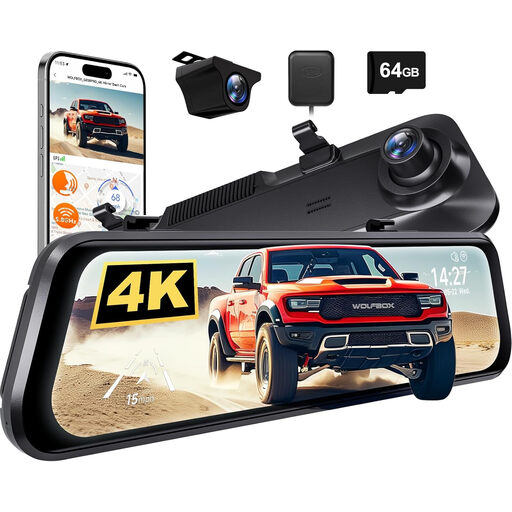
What makes it stand out: The WOLFBOX G850 PRO is a dash cam that discreetly replaces your existing rearview mirror. It functions as a digital rearview mirror, displaying the image from the reversing camera while simultaneously recording traffic in 4K.
Pros:
Best for: Users who prefer an elegant, factory-installed look and value additional driver assistance systems as well as an enhanced rear view.
Some devices, like the REDTIGER F7NP Dash Cam, require a separate memory card to save recordings. It is important to choose a card suitable for continuous high-resolution recording (Class U3/V30 or higher).
? Explore a selection of compatible memory cards here
1. How is a portable CarPlay screen installed? Installation is typically very simple. The device is attached to the dashboard or windscreen with a mount. Power is supplied by plugging the included cable into your vehicle's cigarette lighter. No hardwiring is necessary.
2. Do these devices also work with Android Auto? Yes, most modern retrofit screens, like the featured ESSGOO model, are compatible with both Apple CarPlay and Android Auto. Look for "Wireless Android Auto" in the product description to ensure wireless use with Android smartphones.
3. How is the audio played back from the device? There are several options. The simplest is the built-in speaker, but its sound quality may be limited. For better sound, you can send the audio to your car radio via an FM transmitter, connect the device directly to the car's audio system with an AUX cable, or establish a Bluetooth connection to the vehicle's speakers. The connection via AUX or Bluetooth generally delivers the best audio quality.