
Lieferung heute & morgen

Qualitätsgarantie

Willkommens-Angebote freischalten: KOSTENLOSE Lieferung | Bis zu 80 % RABATT | Kostenlose 30-Tage-JoyPlus-Testphase
App herunterladen
An unsuitable mouse can significantly detract from your workday, causing anything from minor tension to persistent wrist pain. The market for ergonomic, wireless mice is vast, but many products fail to deliver on their promises. As your Joybuy Product Recommendation Officer, I'll help you separate marketing hype from genuinely useful features and find a mouse that boosts your productivity and enhances your desk comfort.
Before you make a decision, you should be aware of the three most common pitfalls that lead to buyer's remorse:
To avoid these pitfalls, you should focus on three core parameters. These objective criteria will help you make an informed decision.
The shape is the most important criterion. There are three main designs, each suited for different needs:
Your hand size and grip style (whether you use a palm, fingertip, or claw grip) are crucial for choosing the right size and shape.
A smooth workflow depends on the right connection technology. Look for a multi-device mouse if you regularly switch between your PC, laptop, or tablet.
These technical details determine the precision and user experience in daily use.
Based on the criteria above, we have identified a few models that are particularly well-suited for specific user profiles.
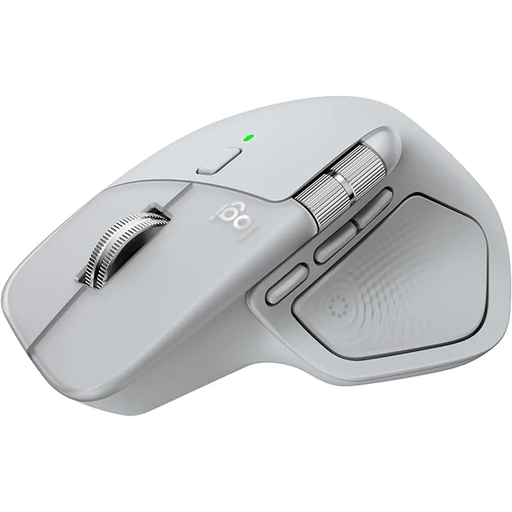
Why This Fits Their Persona: Ideal for users who switch between multiple programs and devices daily. The combination of a thumb wheel, customizable buttons, and seamless multi-device switching boosts efficiency in complex workflows like video editing or programming.
It bypasses the connectivity trap with stable Logi Bolt technology and easy switching between up to three devices. The USB-C port and long battery life also prevent hidden operating costs.
The MagSpeed scroll wheel for ultra-fast scrolling and the additional thumb wheel for horizontal navigation are clear productivity advantages. According to the manufacturer, the 8K DPI sensor even works on glass.
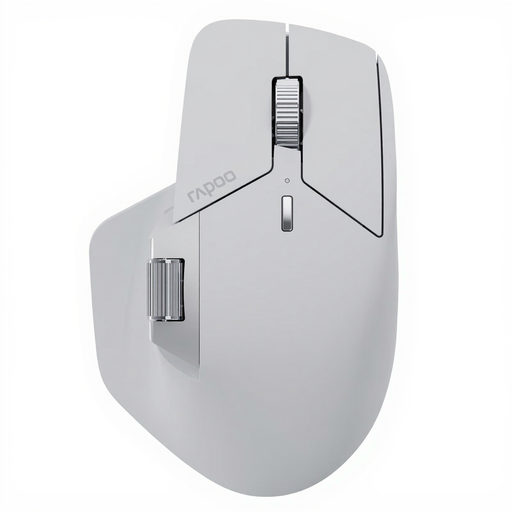
Why This Fits Their Persona: Perfect for users who work across a wide variety of devices and operating systems. The ability to connect and seamlessly switch between up to seven devices is a standout feature for complex setups.
This mouse radically solves the connectivity problem by supporting NearLink, Bluetooth, and a wired connection. Its M+ Cross-Computer technology even allows file transfers between computers, going far beyond standard multi-device functions.
Its huge range of connectivity options (up to 7 devices) and long battery life of up to 120 days (per the manufacturer) are outstanding. 11 programmable buttons offer maximum customization.
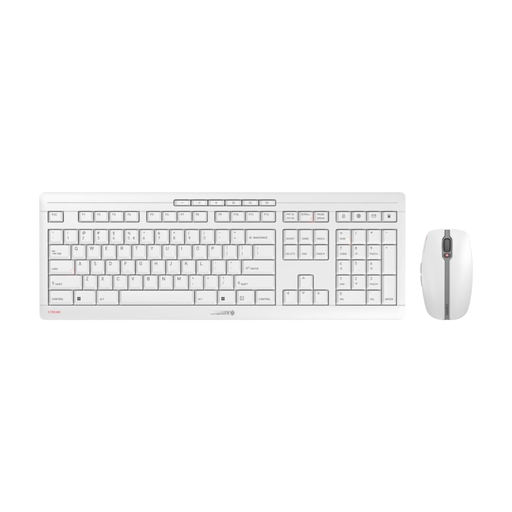
Why This Fits Their Persona: This set offers a solid, reliable mouse for daily office use. The ambidextrous shape is straightforward, and the silent clicks are ideal for work environments where quiet is appreciated. A great entry point into a wireless, rechargeable workspace.
The mouse avoids the hidden cost trap by using rechargeable NiMH batteries and a modern USB-C charging port. While its ergonomics aren't highly specialized, the ambidextrous shape avoids the "one-size-fits-all" trap of contoured models.
The 6-button mouse features silent clicks and an adjustable DPI sensor (1000/1600/2400). The stable 2.4 GHz connection with AES-128 encryption ensures secure and reliable use.
We have compiled a complete, up-to-date list of products that fully meet these strict selection criteria and local regulations.
1. How long does the battery of a wireless ergonomic mouse last? Battery life varies greatly depending on the model and usage. Simpler models often last several weeks, while high-end mice like the Logitech MX Master 4 can last up to 70 days on a full charge, according to the manufacturer. An important feature is fast-charging: many modern mice can provide enough power for a full workday after just a few minutes of charging.
2. Can I use an ergonomic mouse with multiple devices simultaneously? Yes, many modern ergonomic mice are designed as a multi-device mouse. They can typically be paired with up to three devices (e.g., desktop PC, laptop, and tablet) via Bluetooth or a dedicated receiver. A special switch on the mouse then allows for quick and easy switching between the connected devices.
3. Is a higher DPI always better for an office mouse? Not necessarily. A very high DPI means the mouse cursor moves a long distance with only a small hand movement. This is useful for gamers or users with very large monitors. For most office work on a standard or WQHD monitor, a value between 1,200 and 2,400 DPI is ideal for precise and controlled navigation. More important than an extremely high maximum value is the ability to easily adjust the DPI levels to suit your needs.