
Lieferung heute & morgen

Qualitätsgarantie

Willkommens-Angebote freischalten: KOSTENLOSE Lieferung | Bis zu 80 % RABATT | Kostenlose 30-Tage-JoyPlus-Testphase
App herunterladen
Anyone who spends many hours a day at the computer knows the strain it can put on their hand, wrist, and arm. Using a wireless ergonomic mouse is often the first step toward alleviating discomfort and boosting productivity. However, the market is flooded with models whose marketing promises often create more confusion than clarity. As your Joybuy Product Recommendation Officer, I'll help you identify the crucial features and avoid common purchasing traps.
Before you make a decision, you should be aware of the most common marketing tactics that often lead to an unsuitable purchase.
To make an informed decision, focus on the following three objective criteria that determine the true value of a mouse in daily use.
The shape is the most critical ergonomic feature. There are two basic designs:
In modern work environments, switching between a laptop, desktop PC, and tablet is a daily occurrence. A multi-device mouse is therefore not a luxury, but a necessity for efficient work. Pay attention to the following points:
The internal components of a mouse are just as crucial for daily work as its external shape.
Here are three models tailored to different needs that avoid the pitfalls mentioned above.
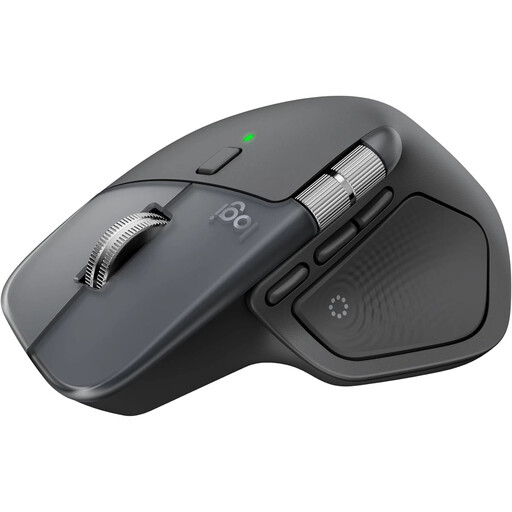
Why This Fits Their Persona: Ideal for power users, developers, and creatives who manage complex workflows across multiple devices and demand the highest standards of precision and customisation.
Its form, refined over generations, offers proven ergonomics. The 8K DPI sensor delivers real value with precise tracking on glass, rather than just being a high number.
The MagSpeed scroll wheel for ultra-fast scrolling and the extensive customisation options via the Logi Options+ software are clear productivity advantages.

Why This Fits Their Persona: Perfect for office workers and users who specifically want to reduce wrist strain and are looking for a mouse designed to promote a natural posture.
Its design isn't just a marketing claim. The 57° angle is a specific design choice based on objective considerations to reduce muscle strain.
Promotes a natural "handshake" position that can reduce pressure on the wrist. Also offers multi-device connectivity for up to three devices.
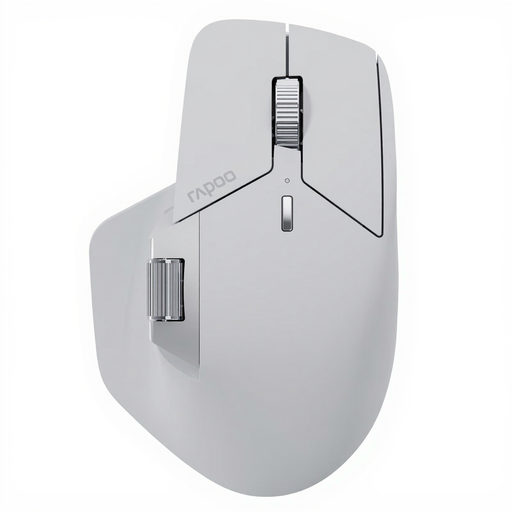
Why This Fits Their Persona: Suitable for users who work with a wide variety of devices and operating systems and are looking for a technologically advanced solution with maximum connectivity and customisation.
Directly addresses the connectivity trap with NearLink technology and the ability to connect up to 7 devices. The M+ Cross-Computer feature is a practical benefit, not an empty promise.
Outstanding connectivity for up to 7 devices and M+ Cross-Computer technology for seamless cursor flow and file transfer between different computers.
We've compiled a complete, real-time updated list of products that fully meet these strict selection criteria.
The battery life of a rechargeable mouse varies depending on the model and usage. Many premium models, like the Logitech MX Master series, offer up to 70 days of use on a full charge. Most modern mice are charged via USB-C and feature a quick-charge function, where just a few minutes of charging can provide several hours or even a full day of work.
Yes, a quiet-click mouse significantly reduces the clicking sound. Manufacturers like Logitech claim a noise reduction of up to 90% compared to their standard mice. The tactile feedback, the feeling of the click, is still preserved. This is particularly beneficial in open-plan offices, libraries, or home offices to avoid disturbing colleagues or family members.
Most modern ergonomic Bluetooth mice are cross-platform compatible and work seamlessly with the most common operating systems, including a mouse for Mac and Windows. Many models also support Linux, iPadOS, ChromeOS, and Android. However, it is always advisable to check the manufacturer's specific compatibility information on the product page to ensure full functionality, especially regarding the companion software.