
Lieferung heute & morgen

Qualitätsgarantie

Willkommens-Angebote freischalten: KOSTENLOSE Lieferung | Bis zu 80 % RABATT | Kostenlose 30-Tage-JoyPlus-Testphase
App herunterladen
Long working days at a computer place particular demands on a mouse. A wireless ergonomic mouse should not only be free from cables, but also suit your hand size, grip style and intended use. For office workers, quiet clicks and comfortable scrolling are often priorities, while creatives, developers and gamers also need precise sensor control.
Marketing claims can make comparisons difficult. A high DPI figure, for example, does not automatically mean better performance in the office. Battery life figures also depend on the connection, usage and power source. By checking a few technical details before buying, you can avoid the wrong purchase and find a wireless mouse that suits you more easily.
“Ergonomic” does not refer to one standard design. A large right-handed mouse may be impractical for smaller hands, while a compact mouse is convenient for travel but may be less suitable for long sessions. Pay attention to the dimensions, weight and intended hand position.
A vertical mouse places your hand in a different position from a traditional design. This can feel natural for some users, but it does take time to get used to. A trackball mouse, meanwhile, moves the cursor with your thumb while the body remains on the desk.
DPI describes the sensitivity of the sensor, not automatically how practical it is in everyday use. Moderate settings are generally sufficient for word processing, spreadsheets and web browsing. A high-DPI mouse, on the other hand, may be useful with large monitors, image editing or gaming, provided the sensitivity can be adjusted precisely.
A precise tracking system, a suitable speed range and an available DPI switch are more important than a single maximum figure. Also check whether the software works with your operating system.
With a rechargeable mouse, the charging port, charging time and whether you can use it while charging all matter. AA-battery models can offer long battery life and can be put back into use quickly, but you will need replacement batteries. The manufacturer's battery-life figure should be treated as a guide and may vary depending on the connection type and usage.
A Bluetooth mouse can be paired directly with many laptops, tablets and modern PCs. This is useful when USB ports are in short supply. A 2.4 GHz connection usually requires a USB receiver and can be a good choice for fixed workstations or gaming. Some models combine both options.
For use with several devices, a multi-device mouse with a switching button is particularly useful. Check how many devices can be stored and whether Bluetooth, a USB receiver or both connection types are supported.
A quiet mouse is pleasant to use in open-plan offices, libraries and shared living spaces. Terms such as “SilentTouch” or “Silent Click” refer to the noise produced by the buttons. They do not automatically indicate anything about durability or tactile feedback.
Additional side buttons can help with browser navigation, switching programmes or gaming. What matters is whether they can be used without software or require a configuration application.
Optical sensors are common in many wireless mice. Figures such as 4,000 or 8,000 DPI should be considered alongside the intended surface. According to the relevant manufacturer's product description, certain sensors can also be used on more challenging surfaces; however, their suitability still depends on the material of your desk.
For gaming, polling rate, response time, weight and button layout are also important in addition to DPI. For office and home-office use, scrolling performance, palm support, noise levels and multi-device features are often more practical.
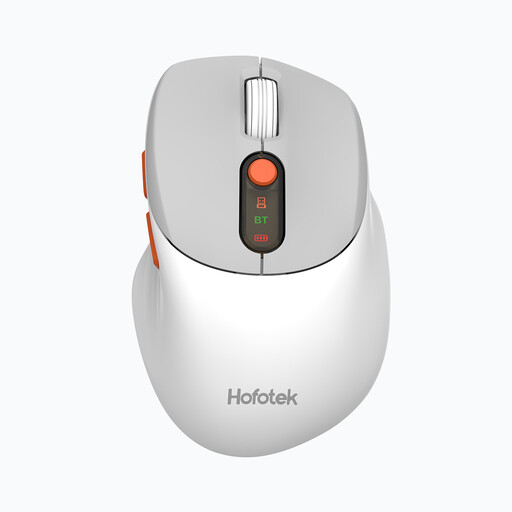
Why this product suits this profile: According to the product details, this compact mouse weighs around 62 g and connects via 2.4 GHz or Bluetooth 5.1. It can be used with up to three devices, making it an appealing option for straightforward office and home-office setups.
Several DPI levels from 800 to 4,000 allow you to adjust the sensitivity instead of being stuck with an unnecessarily high fixed setting. Quiet buttons can also be practical in shared spaces.
2.4 GHz and Bluetooth connectivity, three device channels, AA battery and optical sensor.
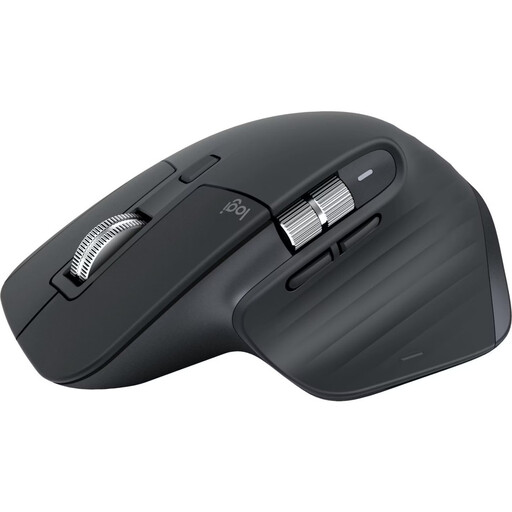
Why this product suits this profile: This right-handed mouse offers Bluetooth for up to three devices, an 8,000-DPI sensor, programmable buttons and an electromagnetic MagSpeed scroll wheel. According to the product details, the USB-C rechargeable battery is designed to last for up to 70 days.
The mouse connects directly via Bluetooth, so compatible devices do not require a USB receiver. The DPI specification is complemented by customisable buttons and scroll modes.
Multi-device support, quiet clicks, USB-C battery and 8,000 DPI according to the manufacturer's specifications.

Why this product suits this profile: The vertical design, angled at 57 degrees, is aimed at users who want to try a different hand position. Bluetooth, a USB receiver, support for up to three devices and a rechargeable battery help to support longer workflows.
The distinctive shape makes the ergonomic design easy to assess: the dimensions, angle and grip style are specified. Before buying, you should compare your hand size with the mouse body.
57-degree design, 400 to 4,000 DPI, USB-C charging and multi-device functionality according to the product description.
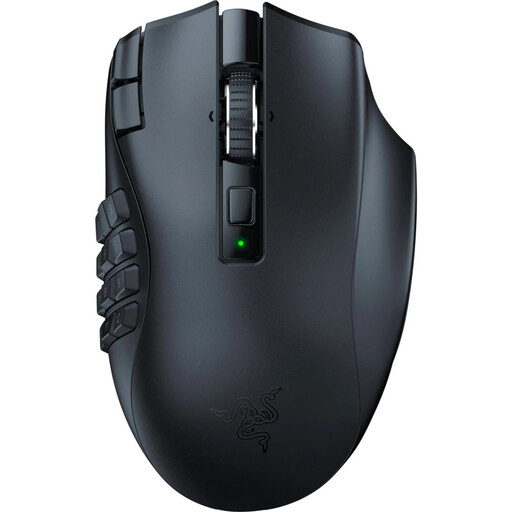
Why this product suits this profile: This ergonomic wireless mouse features 19 programmable buttons, 2.4 GHz wireless connectivity and Bluetooth. With up to 30,000 DPI and stated battery life of up to 250 hours via HyperSpeed and 400 hours via Bluetooth, it is aimed at MMO players and users who need numerous commands.
The high DPI figure is supported by profiles, software settings and a clear button layout. For office tasks alone, however, 19 buttons may be more than you need.
19 programmable buttons, 1,000 Hz polling rate and two wireless connection options.
We have put together a complete, regularly updated list of products that fully meet these strict selection criteria and the safety regulations applicable in the EU.
Switch on the mouse, activate pairing mode and open your computer's Bluetooth settings. Select the product name shown on screen. With a 2.4 GHz mouse, you connect the USB receiver instead. The exact procedure is detailed in the relevant user manual.
Battery life depends on the battery, rechargeable cell, connection type and usage. AA models are often specified as lasting for months or years, while rechargeable mice can last for several weeks or months, depending on the model. Manufacturer figures are guidelines and should not be treated as a guaranteed operating time.
Technically, a gaming mouse can also be used in the office. However, numerous buttons, high DPI settings or specialist software are not necessarily required there. For focused work, quiet clicks, a suitable shape and a straightforward connection may be more important than maximum sensor figures.