
Lieferung heute & morgen

Qualitätsgarantie

Willkommens-Angebote freischalten: KOSTENLOSE Lieferung | Bis zu 80 % RABATT | Kostenlose 30-Tage-JoyPlus-Testphase
App herunterladen
By the Joybuy Product Recommendation Officer, August 29, 2026
The search for a suitable wireless gaming mouse can be a challenge. The market is flooded with technical specs and marketing terms that often create more confusion than clarity. Many serious gamers invest in a model only to find that it doesn't hold up to their demands after just a few months. Before you make a decision, it's crucial to understand the most common pitfalls that can lead to buyer's remorse.
To avoid these issues, you should focus on the core parameters that truly make a difference.
Instead of being swayed by marketing buzzwords, you should closely examine three technical aspects. These determine the real-world performance and longevity of your future gaming mouse.
A mouse's precision depends on the quality of its optical sensor. Look for the following specs:
A modern tri-mode mouse offers maximum flexibility for various use cases:
Some models also use advanced chips like the NearLink Starflash Chip, which, according to the manufacturer, further improves the interference resistance and stability of the wireless connection.
A lightweight gaming mouse (typically under 75 grams) reduces arm fatigue and allows for faster, more agile movements. The shape is just as important. An ergonomic gaming mouse should fit well in the hand and support the user's preferred grip style (e.g., palm or claw grip). Models with a pronounced back curve and tapered sides are often a good fit for users with medium to large hands.
Based on the criteria above, we have identified several models suitable for specific user profiles.
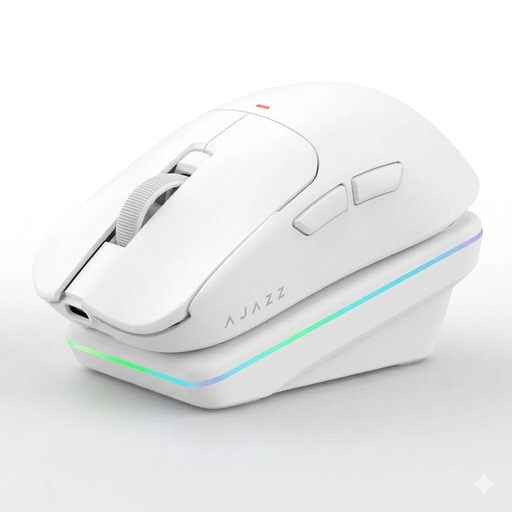
Why This Fits Their Persona: This model is aimed at gamers who refuse to compromise in competitive titles like CS2 and Valorant. The combination of low weight, a precise sensor, and an ergonomic shape for medium to large hands is designed for maximum performance. Those looking for an AI mouse with additional features will also find added value here.
It avoids the DPI trap by using the proven PAW3311 sensor. The 2.4G connection with NearLink technology addresses the latency problem, while the lightweight and ergonomic "Dragonbone" structure enhances comfort during long sessions.
Tri-mode connectivity, a low weight of approx. 65g, and a convenient magnetic charging dock that doubles as an RGB-lit stand. The AI functions offer additional utility for productivity tasks.
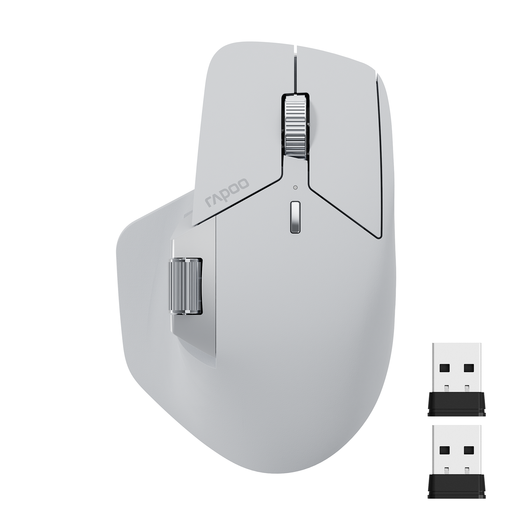
Why This Fits Their Persona: Perfect for users who want a single mouse for both work and occasional gaming. The ability to seamlessly switch between up to four devices and its M+ Cross-Computer technology make it a high-productivity tool.
This model focuses on practical features for daily work rather than over-the-top gaming specs. The ergonomics are designed for long-lasting comfort during office tasks and include a thumb rest for a relaxed hand posture.
Supports control of up to 4 devices, features 11 programmable buttons, and a side scroll wheel. According to the manufacturer, the battery offers a runtime of up to 90 days.
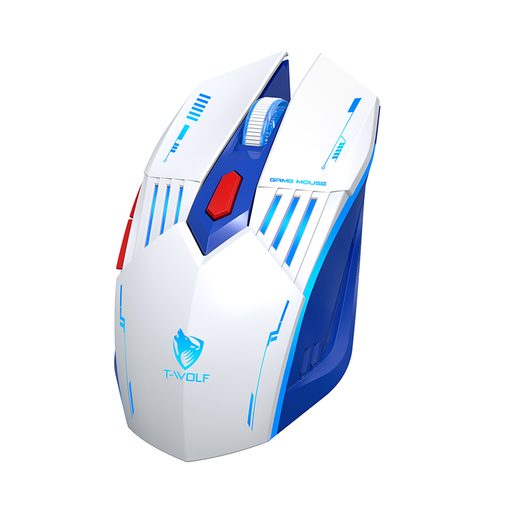
Why This Fits Their Persona: A solid choice for anyone looking to venture into wireless gaming without a large investment. It offers essential features like tri-mode connectivity and adjustable DPI in an accessible package.
This model forgoes exaggerated marketing specs and focuses on functional basics. The DPI levels up to 3600 are perfectly sufficient and realistic for most games and users.
Offers flexible tri-mode connectivity (2.4G, Bluetooth, wired) and a rechargeable battery with a modern Type-C port. The RGB lighting provides an appealing aesthetic.
We have compiled a complete, real-time updated list of products that fully meet these strict selection criteria and local regulations.
For competitive gaming, a polling rate of 1000 Hz is the de facto standard. It ensures a near-instantaneous transmission of mouse movements to the PC. Higher rates (e.g., 4000 Hz or 8000 Hz) exist, but they offer only marginal benefits for the majority of gamers while consuming more system resources and battery power. For most users, 1000 Hz is the ideal trade-off between performance and efficiency.
AI features, like those found in the AJAZZ AJ200, represent an interesting innovation. Functions such as voice commands to control applications, real-time translation, or content creation via voice input can boost productivity at work or during streaming. However, for pure in-game performance, they are secondary. They are a useful extra for tech-savvy users who want to use their mouse versatilely outside of gaming.
Regular maintenance ensures longevity and proper function. Gently clean the charging contacts on the mouse and the dock with a dry, soft cloth to ensure a reliable charge. Keep the optical sensor on the underside free of dust and hair. It is recommended to turn off the mouse via its physical switch when not in use for extended periods to preserve battery life.