
Lieferung heute & morgen

Qualitätsgarantie

Willkommens-Angebote freischalten: KOSTENLOSE Lieferung | Bis zu 80 % RABATT | Kostenlose 30-Tage-JoyPlus-Testphase
App herunterladen
A wireless gaming mouse 26,000 DPI is aimed at PC gamers who want to combine high sensor resolution, low input lag and the freedom of movement that comes with no mouse cable. In practice, however, the DPI number alone doesn't determine suitability. Polling rate, weight, connection type, shape and software all need to match your play style and existing hardware.
DPI describes how many on-screen pixels the cursor moves for a given physical movement. A high value offers flexibility, but many gamers actually use much lower sensitivities in shooters. What really matters is the sensor processing, the chosen sampling rate and consistent motion tracking.
Check whether you can store multiple DPI levels or switch between them directly on the mouse. A gaming mouse with 26,000 DPI can be useful if it also supports lower profiles for different games.
An 8,000 Hz gaming mouse theoretically transmits its position data more frequently than a 1,000 Hz model. This can reduce the temporal stepping of cursor movement. At the same time, the high polling rate demands more system resources and needs proper support from the mouse, driver and game.
For office programs or Bluetooth use, this value is usually less relevant. Pay attention to the available modes and whether the polling rate can be adjusted via software.
A lightweight gaming mouse is easier to accelerate during fast movements. However, a very low weight alone doesn't automatically make a mouse comfortable. Width, height, thumb rest and button placement all need to suit your hand size and grip style.
With an ergonomic gaming mouse for right-handed users, the shape should be explicitly designed for the right hand. Left-handed users typically need a symmetrical model or a specially adapted design.
Look for an adjustable range and the ability to save profiles for different games. A high sensor resolution is a technical maximum value, not necessarily the recommended everyday setting. For competitive gaming, stable low or medium DPI values can be more practical.
The polling rate is measured in Hertz. 1,000 Hz theoretically corresponds to an update every 1 millisecond, while 8,000 Hz updates roughly every 0.125 milliseconds. The actual system response also depends on the wireless connection, firmware, USB port, operating system and game engine.
A stated response time of 0.125 ms should therefore be understood as the manufacturer's figure for the respective operating mode. Also check whether the 8,000 Hz mode is available via 2.4 GHz wireless, USB cable or both connection types.
A 2.4 GHz receiver is often the most suitable wireless connection for PC gaming, offering low latency. Gaming mice with Bluetooth are practical for laptops and switching between devices, but depending on the model they may have a different polling rate or response characteristics.
A USB-C port makes charging easier and, on many models, allows wired use while charging. Battery life is usually given as an "up to" value. Lighting, polling rate, wireless mode and usage frequency all affect the actual runtime.
It's also worth looking at the number of buttons. A gaming mouse with 6 programmable buttons offers a manageable layout for macros, melee attacks, inventory or media controls, without cluttering the sides unnecessarily.
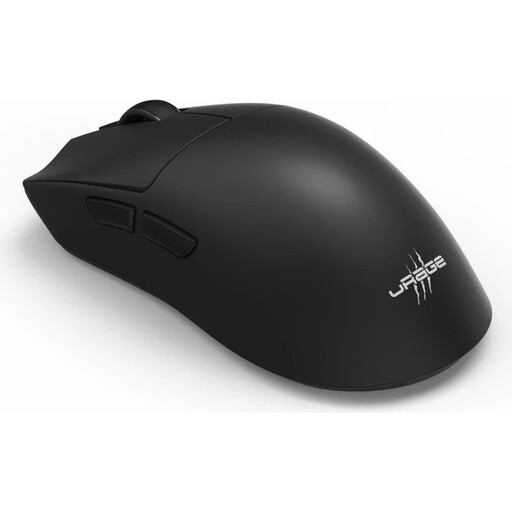
Why this product fits the profile: This mouse combines 26,000 DPI, 8,000 Hz, 57 g weight and multiple connection types in one model for Windows 10 and Windows 11.
The technical specifications separately list sensor resolution, polling rate, response time and battery life. This makes it easier to compare the features against your own requirements.
57 g weight, six programmable buttons, 2.4 GHz wireless, Bluetooth 5.3 and USB-C charging port; battery life is stated as up to 72 hours.
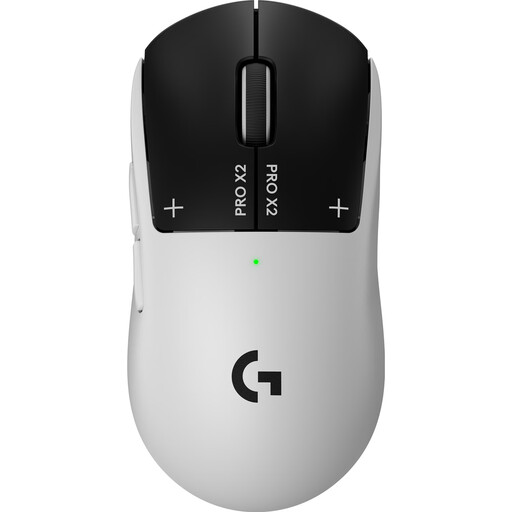
Why this product fits the profile: This model is aimed at gamers looking for extensive software customisation, an 8,000 Hz mode and a lightweight design at 61 g.
The manufacturer's specifications distinguish between sensor resolution, polling rate, button functions and battery operation. This means the features aren't judged by a single DPI value alone.
HERO 2 sensor with up to 44,000 DPI, 8,000 Hz polling rate, five programmable buttons, USB-C and up to 90 hours battery life according to product specifications.
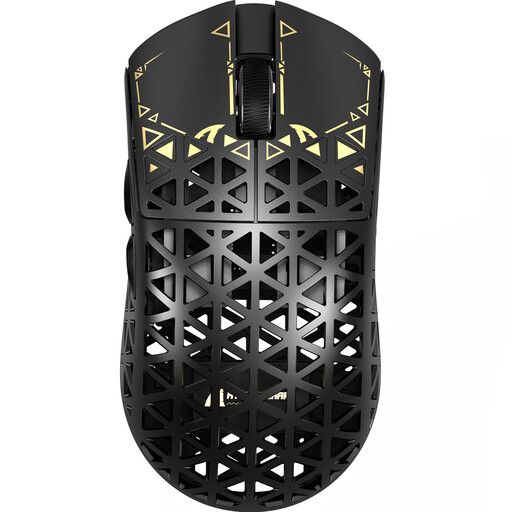
Why this product fits the profile: This mouse is ideal for users who need a very low weight, 2.4 GHz wireless, plus wired and Bluetooth connectivity all in one device.
The connection modes and polling rates are listed separately. According to the specifications, a lower polling rate is intended in Bluetooth mode compared to 2.4 GHz mode.
PAW3950 sensor, 8,000 Hz in 2.4 GHz mode, USB-C, grip tape and a very low weight of approximately 42 g according to the product description.
We've put together a complete, regularly updated list of products that fully meet these strict selection criteria and the safety regulations in force in the EU.
For competitive gaming, a 2.4 GHz wireless connection with a suitable nano receiver is usually more practical than Bluetooth. Bluetooth, on the other hand, is better suited to mobile devices or switching between multiple platforms. Before you buy, check whether your PC has USB-A or USB-C ports and whether the software requires an internet connection.
During longer gaming and work sessions, a low weight, a comfortable hand rest and easily reachable buttons are more important than extra features you won't use. Clean the mouse with a soft, dry cloth and protect it from liquids. Built-in lithium batteries must not be disposed of with household waste; use designated collection points instead.
No. This figure describes the possible sensor range. Many gamers use lower settings and benefit more from a stable sensor, suitable mouse feet and controllable sensitivity. What matters is that you can save multiple DPI profiles.
The higher polling rate can increase the temporal resolution of position transmission. However, the difference depends on the game, monitor, system performance and connection mode. For many applications, 1,000 Hz is sufficient; 8,000 Hz is an additional option for compatible setups.
The runtime depends on polling rate, lighting, wireless mode and usage. Manufacturers often state a value "up to" a certain number of hours. A USB-C cable that allows simultaneous use can be practical if you want to charge the mouse while gaming.