
Lieferung heute & morgen

Qualitätsgarantie

Willkommens-Angebote freischalten: KOSTENLOSE Lieferung | Bis zu 80 % RABATT | Kostenlose 30-Tage-JoyPlus-Testphase
App herunterladen
By Joybuy Product Recommendation Officer, August 29, 2026
The search for the right wireless gaming mouse can quickly become overwhelming. Manufacturers advertise ever-higher DPI counts, extremely lightweight designs, and new technologies. But not every innovation is a genuine advantage. Many supposed premium features turn out to be marketing traps that offer no added value for most users or can even impair performance. This guide will help you distinguish the important specifications from the unimportant ones and make an informed decision.
Before we turn to recommended models, it's important to understand the most common marketing promises that often lead to poor purchasing decisions.
Focus on the following three core areas in your selection process to find a mouse that truly fits your needs.
Weight is a crucial factor for a fast gaming mouse for shooters. Models under 65 grams are considered ultralight and allow for quick, fatigue-free movements. However, the shape is at least as important. An ergonomic gaming mouse is adapted to the natural posture of the hand and prevents fatigue during long gaming sessions. Pay attention to whether the shape is suitable for your grip style (Palm, Claw, or Fingertip Grip) and your hand size. Symmetrical mice offer flexibility, while asymmetrical, right-handed models often provide more comfort for the majority of users.
The sensor is the heart of every gaming mouse. Models from PixArt (e.g., PAW3395 or PAW3311) are an established standard for precise tracking. Look for the following values:
For gaming, a stable 2.4 GHz wireless connection is essential, as it has significantly lower latency than Bluetooth. Battery life is another key point. Modern mice often offer over 70 hours of playtime on a single charge. A gaming mouse with a charging dock significantly enhances convenience, as the mouse can simply be placed on the dock to charge after use and is always ready to go.
Here are some recommendations tailored to different user profiles and their specific requirements.
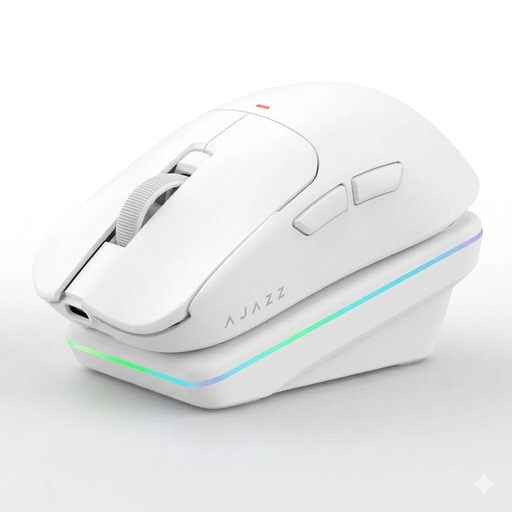
Why This Fits Their Persona: This model offers a balanced combination of modern performance features and an accessible price point. It's ideal for gamers looking to upgrade their gear without stretching their budget for absolute high-end equipment.
It avoids the lightweight trap with a solid, closed-shell design at just 63g and relies on a proven PAW3311 sensor instead of inflated DPI numbers.
The magnetic charging dock offers great convenience. Its tri-mode connectivity (2.4G, BT, wired) ensures maximum flexibility between a gaming PC and other devices.
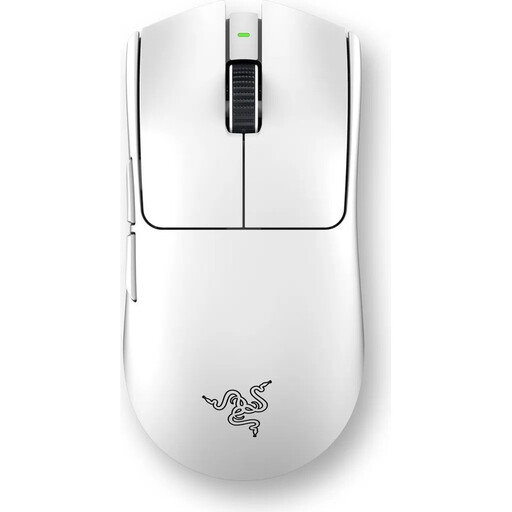
Why This Fits Their Persona: For players where every millisecond counts. This mouse is rigorously designed for maximum performance, combining minimal weight with an esports-grade sensor and switches.
It leverages its 8K polling rate as an option for pros with matching hardware, rather than forcing it on the user. The ultralight 54g weight is achieved through smart engineering, not a perforated shell.
The Focus Pro 35K Sensor Gen-2 delivers superior precision. The 3rd-gen optical switches prevent double-clicks and offer an extremely fast 0.2ms actuation time.
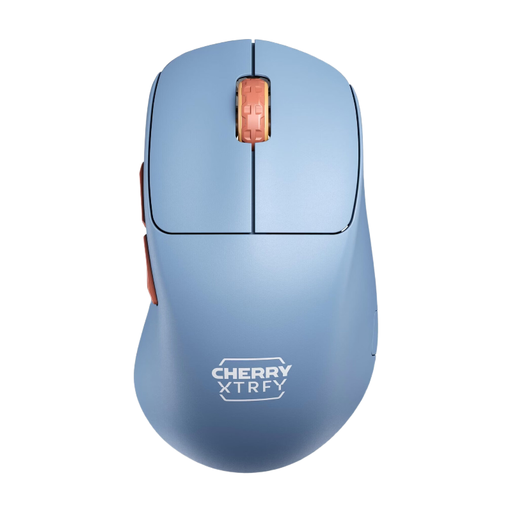
Why This Fits Their Persona: Perfect for gamers who engage in hours-long sessions and prioritise maximum comfort and control. Its unique shape is optimised for right-handed users and supports a relaxed hand posture.
Instead of a symmetrical, one-size-fits-all approach, this model focuses on thoughtful, right-handed ergonomics. The low 53g weight is achieved without compromising structural integrity.
The unique design with an extra-low front brings the fingers closer to the mousepad for enhanced control. Its long battery life of up to 90 hours is ideal for endurance gamers.
We have compiled a complete, up-to-date list of products that fully meet these strict selection criteria.
Battery life varies greatly depending on the model, usage, and settings (e.g., lighting and polling rate). Modern, efficient models often achieve 70 to 100 hours of active playtime at a 1,000 Hz polling rate. Some models with particularly large batteries and no RGB lighting can even last several hundred hours. A full charge typically takes 1 to 2 hours.
For the vast majority of players, including many ambitious hobbyist gamers, an 8K polling rate is not necessary. A stable 1,000 Hz connection already provides a latency of 1ms, which is imperceptible to the human eye. An 8K rate can only offer a minimal, measurable advantage on high-end PCs with a powerful CPU and a monitor with a very high refresh rate (240 Hz or more). On weaker systems, it can even negatively impact performance.
Turn off the mouse before cleaning. Use a slightly damp microfibre cloth for the shell and buttons. For hard-to-reach areas like crevices or around the mouse buttons, a soft brush or canned air (used from a distance) is suitable. Avoid aggressive cleaning agents or spraying liquids directly onto the mouse. The PTFE glide feet should be kept clean to ensure smooth movement. Many models come with replacement feet that can be swapped out when they wear down.