
Lieferung heute & morgen

Qualitätsgarantie

Willkommens-Angebote freischalten: KOSTENLOSE Lieferung | Bis zu 80 % RABATT | Kostenlose 30-Tage-JoyPlus-Testphase
App herunterladen
As a Joybuy Product Recommendation Officer, I analyse the market to provide you with objective and practical buying guides. When searching for a wireless gaming mouse for competitive use, it's crucial to distinguish marketing hype from genuine performance features. The wrong choice here leads not only to a waste of money but also to a disadvantage in-game.
Many ambitious gamers invest in a new mouse only to find, with frustration, that their performance stagnates or even worsens. This is often due to three common purchasing pitfalls, which we will explore below.
Pitfall 1: Focusing on Low Weight at the Expense of Stability The trend towards the ultra-lightweight gaming mouse has led to weight often being the sole purchasing criterion. Mice under 60 grams promise faster reactions, but many budget models achieve this weight with thin plastic or a perforated shell, compromising stability and durability. A mouse that flexes or creaks under pressure significantly impairs precision.
Pitfall 2: The Wrong Shape for Your Grip Style A symmetrical esports mouse is often marketed as a one-size-fits-all solution. In practice, however, the shape is critical for control and comfort. A player with a palm grip requires different support than a player with a fingertip grip. Buying an unsuitable shape leads to faster fatigue and inaccurate movements.
Pitfall 3: Underestimating Wireless Connection Technology Not all wireless technology is suitable for gaming. Many buyers only look for the "wireless" label, overlooking the critical difference between a low-latency 2.4 GHz wireless connection and a standard Bluetooth connection. The latter can introduce noticeable delay (latency), which is unacceptable in competitive games.
To avoid these pitfalls, you should check three core technical parameters before buying. These define the true performance of a professional gaming mouse.
The combination of the sensor and transmission technology determines how accurately and quickly your movements are translated in-game.
The physical characteristics of the mouse must match your hand and playstyle.
A gaming mouse with a battery must not fail you in the middle of a match.
Based on the criteria mentioned, we have identified products that are suitable for different user profiles.
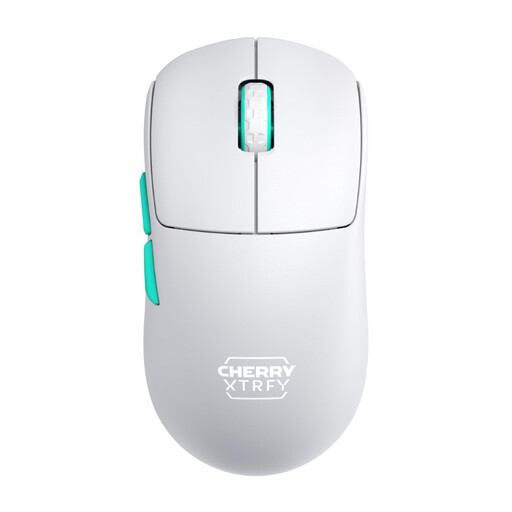
Why This Fits Their Persona: Ideal for gamers who play various genres and use a flexible grip style (claw/fingertip). The symmetrical shape allows for quick adjustments and versatile handling.
Solves the "improper shape" pitfall by offering a refined symmetrical design suitable for many grip styles. The 2.4 GHz technology prevents latency issues.
Ultra-light 53g design for effortless speed. The low front profile enhances precision for fine control.
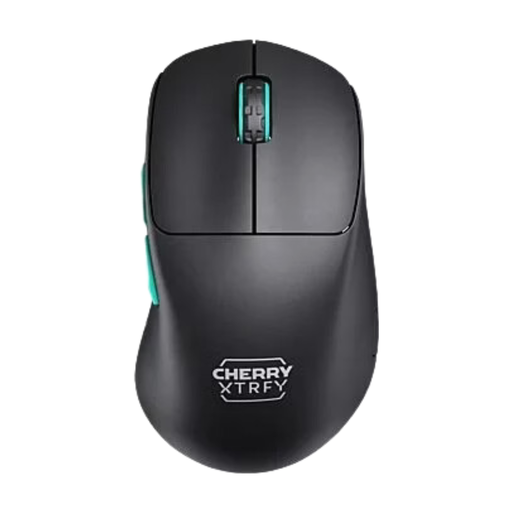
Why This Fits Their Persona: Perfect for right-handed users who prioritise comfort during long gaming sessions (e.g., in tactical shooters or MMOs) and prefer a palm or hybrid grip.
Bypasses the "one-size-fits-all" trap of symmetrical mice with a purpose-built ergonomic shape that supports the hand and prevents fatigue. The Pixart 3395 sensor guarantees top-tier performance.
Combines an extremely light 53g weight with a supportive, ergonomic shape. The battery life of up to 75 hours is ideal for marathon sessions.
We have compiled a complete, real-time updated list of products that fully meet these strict selection criteria and safety regulations.
The actual battery life depends heavily on usage, especially the set polling rate and any RGB lighting. High-performance models like the CHERRY XTRFY mouse are designed for a runtime of up to 75 hours, which corresponds to several days of average use. However, more important than the maximum runtime is the ability to continue playing without interruption while charging.
Yes, as long as it comes from an established manufacturer. Leading brands like CHERRY XTRFY use advanced construction methods and high-quality materials to achieve a low weight without sacrificing structural integrity. Modern ultra-lightweight mice rely on a closed, solid chassis instead of easily deformable perforated designs, making them robust and durable.
For competitive gamers, the difference is noticeable. A polling rate of 1000 Hz means the mouse reports its position to the computer 1000 times per second (1 ms interval). Lower rates, such as 125 Hz (8 ms interval), can create a visible delay between your movement and the cursor's reaction. In the esports scene, 1000 Hz is considered the essential standard for direct, lag-free control.