
Lieferung heute & morgen

Qualitätsgarantie

Willkommens-Angebote freischalten: KOSTENLOSE Lieferung | Bis zu 80 % RABATT | Kostenlose 30-Tage-JoyPlus-Testphase
App herunterladen
The search for the right wireless gaming mouse can quickly become overwhelming. Manufacturers advertise ever-higher DPI counts and ultra-lightweight designs. But not every new feature is a real advantage. Often, exaggerated marketing promises lead to purchasing decisions you later regret. This guide will help you identify the crucial features and avoid common purchasing traps.
As a Joybuy Product Recommendation Officer, I filter the relevant information for you, so you can make an informed decision based on facts, not hype.
Before we dive into the important specifications, let's shed light on the marketing traps that often lead to disappointment.
lightweight gaming mouse is advantageous for fast-paced FPS games. However, some models achieve their low weight through a fragile honeycomb structure that attracts dust and dirt, or through a build that compromises structural integrity and can lead to creaking or defects after just a few months.To avoid a bad purchase, focus on these three objective criteria. They determine the actual performance and longevity of your mouse.
Instead of just focusing on the maximum DPI, the sensor model is the decisive factor for precision. Modern optical sensors like the PixArt PAW3395 or PAW3311 offer flawless tracking without artificial acceleration or smoothing. Another important value is the maximum speed in IPS (Inches Per Second). A value of 300 IPS or more ensures that the mouse accurately captures every movement, even the fastest flicks typical for a mouse for CS2 Valorant. A high DPI gaming mouse is only useful if the underlying sensor is high-quality.
The ideal weight depends on your personal preferences and the games you play. Mice under 70 grams are considered a lightweight gaming mouse and are excellent for players who use low sensitivity and frequently lift their mouse. However, the shape is at least as important. An ergonomic gaming mouse should feel comfortable in your hand even after hours of use. Look for a shape that suits your grip style (Palm, Claw, or Fingertip Grip) and hand size. Good ergonomics prevent fatigue and, in the long run, discomfort.
Modern wireless mice often offer multiple connection modes. A Tri-Mode mouse is particularly flexible here:
A gaming mouse with a charging dock significantly increases convenience. Instead of searching for a cable, you can simply place the mouse on the dock after use, and it will always be ready for the next session.
Here are some recommendations tailored to different user profiles that take the above criteria into account.
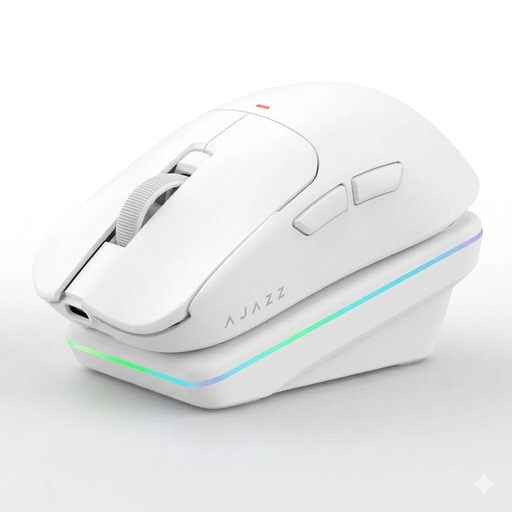
Why This Fits Their Persona: Ideal for players who want to leverage every millisecond in fast-paced FPS titles like CS2 or Valorant. The low weight of just 63 grams allows for quick changes in direction, while the precise PAW3311 sensor ensures pixel-perfect aiming.
Instead of just advertising a high DPI number, this model relies on a proven sensor and a stable, lightweight "Dragonbone" structure. It bypasses the trap of fragile, lightweight constructions.
A combination of low weight, a precise sensor, and a convenient magnetic charging dock. The Tri-Mode connectivity also makes it highly versatile.
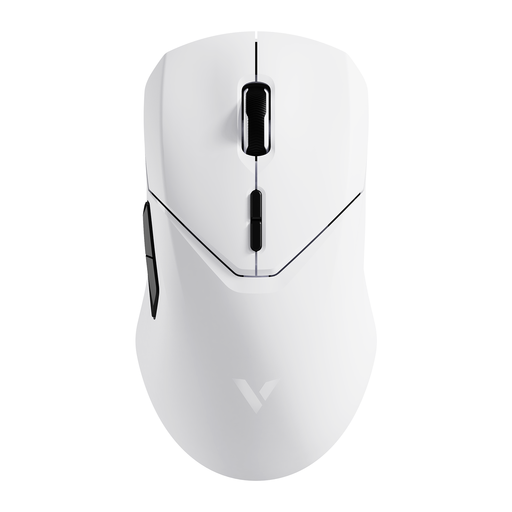
Why This Fits Their Persona: For users who need both top-tier precision in-game and efficiency at work. The 4K Hz polling rate offers extremely responsive control, while the long battery life and 10 programmable buttons optimize workflow.
The stated battery life of up to 180 hours is realistic and supported by a large 800 mAh battery. Its performance (4K Hz) is an objectively measurable advantage, not an empty marketing promise.
Extremely high polling rate (4000 Hz) for maximum responsiveness and a very long battery life. The top-tier PAW3398 sensor ensures maximum precision.
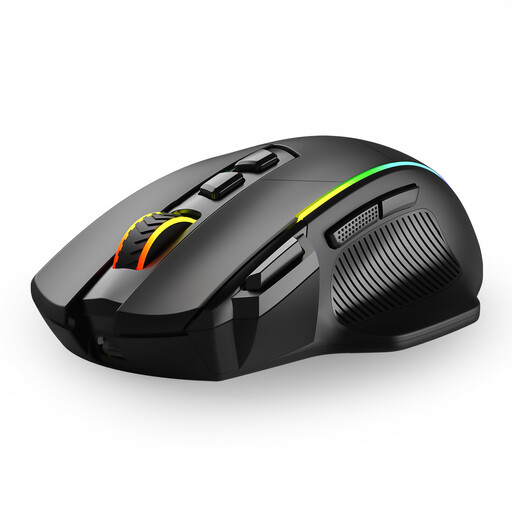
Why This Fits Their Persona: A solid entry into the world of wireless gaming mice. It offers key features like Tri-Mode connectivity, adjustable DPI levels, and programmable buttons without breaking the bank.
This model focuses on a balanced feature set. The DPI levels up to 10,000 are more than sufficient for most gaming scenarios and are realistically usable, rather than advertising utopian numbers.
Excellent value for money. The flexible Tri-Mode connectivity and 8 programmable buttons offer a range of features not commonly found in this price bracket.
We have compiled a complete, real-time list of products that fully satisfy these strict selection criteria and UK safety regulations.
The polling rate indicates how often the mouse reports its position to the computer. A rate of 1000 Hz (1ms response time) is the established standard for smooth and responsive gaming. Models with 4000 Hz or more theoretically offer even lower latency, but the noticeable difference is primarily relevant for highly competitive players on monitors with extremely high refresh rates. For most users, a stable 1000 Hz connection via 2.4 GHz wireless is perfectly sufficient.
A difference of 30 grams is clearly noticeable. A lighter mouse (approx. 60g) reduces wrist fatigue during long gaming sessions and facilitates quick, wide movements. This is particularly beneficial for players who use a low DPI setting. A heavier mouse (approx. 90g) can feel more stable and controlled to some users, especially at high DPI settings where only minimal hand movements are required.
No, not without limitations. For competitive gaming, you should exclusively use the 2.4 GHz wireless mode, as it offers the lowest latency. The Bluetooth mode is practical for office work or connecting to mobile devices, but it has a noticeably higher latency that can lead to delays in-game. The wired mode is also an option for gaming, as it eliminates latency and battery concerns, but it negates the advantage of wireless freedom.