
Lieferung heute & morgen

Qualitätsgarantie

Willkommens-Angebote freischalten: KOSTENLOSE Lieferung | Bis zu 80 % RABATT | Kostenlose 30-Tage-JoyPlus-Testphase
App herunterladen
Choosing a new wireless gaming mouse means navigating a flood of technical specs and marketing promises. The freedom of a cable-free setup is tempting, but not every model delivers on its claims. Many users invest in features that offer no real-world value or encounter flaws that only become apparent after weeks of use. This guide will help you identify the crucial criteria and sidestep common purchasing pitfalls.
Manufacturers often advertise impressive numbers that don't always reflect real-world performance. Two of the most common traps are inflated DPI values and unclear battery life specifications.
To find the right wireless gaming mouse, you should focus on three core technical aspects that directly impact performance: sensor and polling rate, weight and ergonomics, and connectivity.
The sensor is the heart of any gaming mouse. Modern optical sensors, like those in the Pixart 33xx series, offer precise, error-free tracking on most surfaces. More important than the maximum DPI value is the polling rate, measured in Hertz (Hz). It indicates how often the mouse reports its position to the computer.
The weight and shape of the mouse are crucial for comfort and control, especially during long gaming sessions.
Wireless mice primarily use two technologies to connect to a PC.
Based on the criteria above, we have identified a few models that are well-suited for different user profiles and requirements.
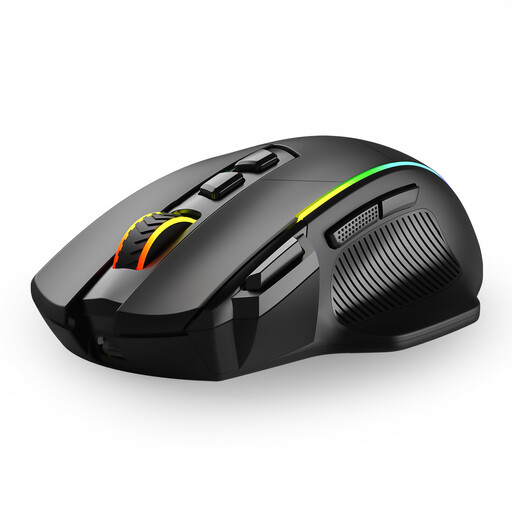
Why This Fits Their Persona: This model is ideal for gamers who want a versatile and feature-rich mouse without needing a premium budget. It's suitable for both casual gaming and everyday PC tasks.
It offers a solid DPI range up to 10,000 without pushing into unrealistic territory. The tri-mode connectivity (2.4G, Bluetooth, Cable) provides flexibility rather than being limited to just one option.
8 programmable buttons and customizable RGB mouse lighting offer features often found only in more expensive models. The ergonomic shape is designed for medium to large hands.
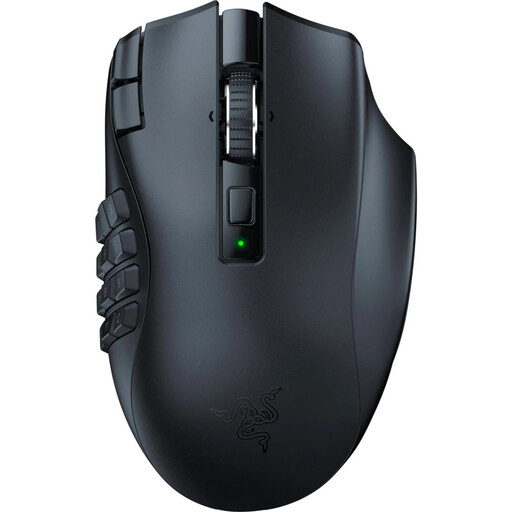
Why This Fits Their Persona: Perfect for players of MMOs (e.g., World of Warcraft) or MOBAs who need quick access to a wide range of abilities and macros. The high number of buttons is the deciding factor here.
Instead of focusing on an extremely high DPI, this model concentrates on a specific function: 19 programmable buttons. The battery life is transparently stated for HyperSpeed (up to 250h) and Bluetooth (up to 400h).
The main advantage is the thumb grid for maximum control in complex games. The Focus Pro 30K sensor ensures precision, while Razer HyperSpeed technology provides a low-latency connection.
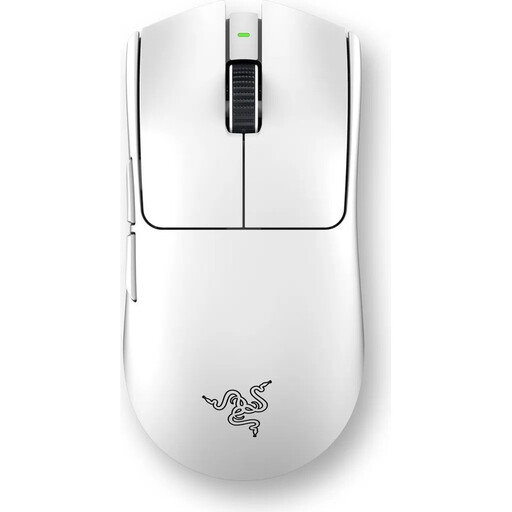
Why This Fits Their Persona: Designed for players where every millisecond and every movement counts. The extremely low weight and high polling rate are engineered for maximum competitive performance.
This model avoids the "one-size-fits-all" ergonomics trap by offering a specific shape developed with esports pros. It forgoes heavy gimmicks and focuses on what matters: weight, sensor, and latency.
At just 54g, it is an extremely lightweight gaming mouse. Razer HyperPolling technology enables a true 8000Hz polling rate for minimal latency. The Focus Pro 35K sensor provides best-in-class precision.
We've compiled a complete, real-time updated list of products that fully meet these strict selection criteria and safety regulations.
Battery life varies greatly depending on the model and usage. For mice with a 1000 Hz polling rate and active RGB lighting, you can expect 20 to 60 hours of active gameplay. Models without lighting or in Bluetooth mode can exceed 100 hours. Many modern mice, such as those with a gaming mouse with a charging dock, offer convenient charging options.
For casual gaming or productivity tasks, a Bluetooth gaming mouse is perfectly adequate. However, for competitive games, especially fast-paced shooters, a 2.4GHz wireless connection is recommended. It offers significantly lower latency and a more stable connection, which is essential for precise and rapid reactions.
Not necessarily. Many mice work via plug-and-play. However, software is often required to customize advanced features like button mapping (for a programmable mouse), DPI levels, RGB lighting, or the polling rate. Some models, like those from CHERRY XTRFY, allow these settings to be configured directly on the mouse via switches and button combinations, eliminating the need for software installation.