
Lieferung heute & morgen

Qualitätsgarantie

Willkommens-Angebote freischalten: KOSTENLOSE Lieferung | Bis zu 80 % RABATT | Kostenlose 30-Tage-JoyPlus-Testphase
App herunterladen
For competitive gamers, especially in fast-paced FPS games like Valorant or Apex Legends, a wireless gaming mouse is no longer a compromise—it's a strategic choice. The freedom of a wireless setup can significantly improve your precision of movement. But the market is flooded with marketing buzzwords and technical specs that often confuse more than they clarify. Many players invest in expensive models only to find they don't deliver the expected performance edge.
As your Joybuy Product Recommendation Officer, I'll help you separate the crucial features from the superfluous ones. We'll highlight the most common pitfalls and show you what truly matters when choosing a pro gaming mouse, ensuring your next investment gives you a real in-game advantage.
Before we dive into the technical details, it's crucial to understand the common misconceptions that can lead to a poor purchasing decision.
To make an informed decision, you should focus on three core technical aspects that directly impact the performance of an esports mouse.
For fast-paced, reaction-heavy games, a lightweight gaming mouse under 65 grams is a clear recommendation. Lower weight reduces inertia, allowing for quicker changes in direction and more precise aim tracking with less effort. The shape of the mouse must also suit your grip style (Palm, Claw, or Fingertip Grip) to ensure comfort and control for hours on end. Symmetrical mice are often suitable for multiple grip styles, while ergonomic, right-handed shapes can offer more support.
The optical sensor is the heart of any gaming mouse. Models like the PixArt PAW3395 or the Razer Focus Pro are considered the industry standard for flawless tracking without any unwanted acceleration or smoothing. These sensors ensure that every hand movement is translated 1:1 on-screen. Pay attention to the maximum tracking speed (measured in IPS – Inches Per Second) and maximum acceleration (G). High values ensure the mouse won't lose track even during the fastest movements.
Modern wireless gaming mice use a stable 2.4 GHz connection with latency that is on par with their wired counterparts. However, the decisive factor for response time is the polling rate. While 1000 Hz (1 ms response time) is the standard, high-end models offer a 4K or 8K polling rate (0.25 ms and 0.125 ms, respectively). This results in visibly smoother cursor movement and can provide a decisive advantage in critical moments. Note, however, that a higher polling rate also consumes more CPU power.
Here are a few recommendations tailored to the different needs and budgets of competitive players.
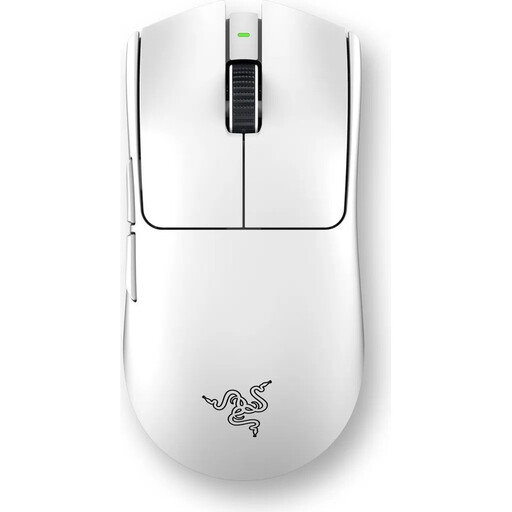
Why This Fits Their Persona: For players who refuse to compromise. This model was developed in collaboration with esports pros and is engineered for maximum performance in competitive environments.
This model sidesteps the DPI myth by combining a top-tier sensor (Focus Pro 35K) with true 8000Hz HyperPolling Technology. The focus is on real-world latency reduction and tracking accuracy, not marketing numbers.
The ultra-lightweight 54-gram design allows for maximum agility. The 3rd-gen optical switches offer extremely fast actuation without double-clicking issues.
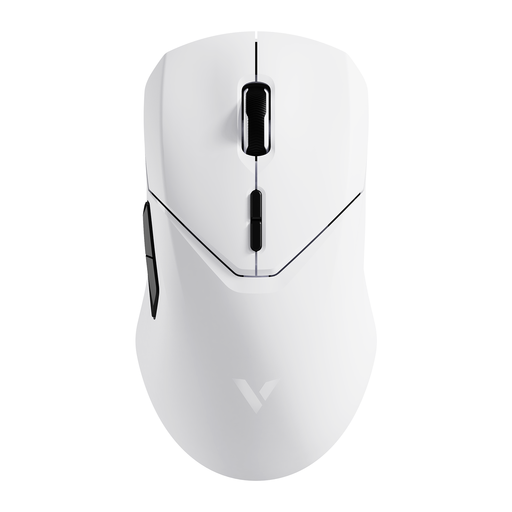
Why This Fits Their Persona: Ideal for gamers who want a high-performance mouse for competitive play but also value extra programmable buttons for other genres or productivity tasks.
This model offers a 4K polling rate and a proven PAW3398 sensor. It focuses on balanced, high-end performance rather than hyping a single specification.
At 68 grams, it's still very lightweight. The 10 programmable buttons and on-board memory offer great flexibility for different games and applications.
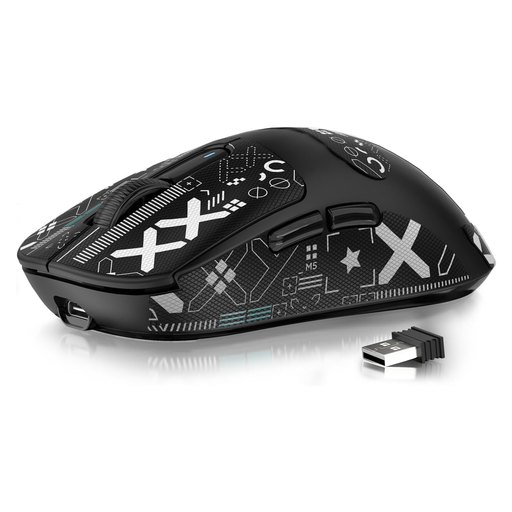
Why This Fits Their Persona: Perfect for players seeking competitive specs like an extremely low weight and a top-tier sensor without having to spend the premium for established brands.
This model proves you don't have to break the bank for core performance. It avoids the mistake of neglecting weight, delivering extremely agile handling at just 49 grams.
Equipped with the high-end PAW3395 sensor, which is also found in much more expensive mice. The tri-mode connectivity (USB, 2.4G, Bluetooth) offers added versatility.
We've compiled a complete, real-time updated list of products that fully meet these strict selection criteria and all relevant safety regulations.
Yes, the difference can be noticeable, especially if you use a high-refresh-rate monitor (144Hz or higher). Cursor movement feels smoother, and the latency between your hand movement and the on-screen response is further minimized. This can offer a small but potentially decisive advantage in fast-paced games. However, keep in mind that an 8K polling rate requires more CPU power than the 1000 Hz standard.
Battery life varies greatly depending on the model and usage. Mice with high polling rates (4K/8K) and active RGB lighting will have a shorter runtime, often between 50 and 100 hours. In contrast, models designed for energy efficiency using a standard 1000 Hz polling rate can last for several hundred hours. Always check the manufacturer's specifications for the specific configuration you plan to use.
Not necessarily. While premium models from well-known brands often fall into this price range, there are a growing number of alternatives that offer high-end sensors like the PAW3395 and a lightweight design at a more accessible price point. As our recommendations show, it's crucial to focus on core specifications like weight, sensor, and polling rate, rather than just the brand name.