
Lieferung heute & morgen

Qualitätsgarantie

Willkommens-Angebote freischalten: KOSTENLOSE Lieferung | Bis zu 80 % RABATT | Kostenlose 30-Tage-JoyPlus-Testphase
App herunterladen
A wireless gaming mouse can keep your desk tidier and give you greater freedom of movement while gaming. However, not every model is equally suited to fast-paced shooters, long working days or competitive gaming. Terms such as “8K”, “44,000 DPI” and “ultra-light” sound convincing, but on their own they say little about how practical a mouse is for everyday use.
That is why the Joybuy Product Recommendation Officer focuses on verifiable data: connection, sensor, polling rate, weight, shape, battery life and software features.
A high-DPI gaming mouse can offer very fine sensitivity adjustments. However, 24,000 or 44,000 DPI do not prove that a mouse works more precisely at every setting. Many players use considerably lower sensitivities for CS2, Valorant or Apex Legends.
A reliable sensor, stable tracking and a suitable setup are more important. Also check whether the manufacturer distinguishes between the sensor’s maximum resolution and the profiles it actually recommends.
An 8K polling-rate mouse theoretically reports its position to the computer more frequently than a 1,000 Hz model. This can increase the temporal resolution of inputs, but requires a compatible receiver, up-to-date software and sufficient system resources. Battery life also often decreases at higher polling rates.
If you mainly work or only play occasionally, you do not necessarily need 8,000 Hz. A reliable 2.4 GHz gaming mouse running at 1,000 Hz can be a well-balanced choice for many setups.
A lightweight gaming mouse requires little effort to move. However, very compact or flat shells can be uncomfortable for people with larger hands. Length, width, height and your preferred grip style – palm, claw or fingertip – are the key considerations.
You should also check whether the mouse is suitable for your dominant hand. Some models are designed exclusively for right-handed users, while others have a symmetrical shape or interchangeable side buttons.
A Bluetooth gaming mouse is practical for laptops, tablets and multiple devices. Bluetooth usually does not require a separate receiver, but some models operate at a lower polling rate. For competitive gaming, a dedicated 2.4 GHz gaming mouse with a USB receiver is often the better choice.
A tri-mode model combines Bluetooth, 2.4 GHz and wired operation. This allows you to use the mouse flexibly for PC gaming, office tasks and mobile devices. Before buying, check whether the receiver is included and whether your PC has a suitable USB port.
DPI describes the adjustable sensitivity. IPS indicates the movement speed the sensor can process according to the product specifications. A plausible IPS value is relevant for fast mouse movements. A high DPI figure alone cannot replace a well-balanced combination of sensor, mouse mat and in-game settings.
Also look for an adjustable lift-off distance if you frequently lift the mouse when repositioning it. This feature is particularly useful when playing with low in-game sensitivity.
Polling rate is measured in hertz. According to the technical definition, 1,000 Hz corresponds to one report every millisecond, while 8,000 Hz corresponds to one report every 0.125 milliseconds. In practice, the perceived benefit also depends on the game, monitor, system and wireless connection.
When it comes to weight, the number of grams is not the only factor that matters. A 53 g model may be appealing for fast changes of direction, while a 102 g model with several buttons and an ergonomic palm rest may be better suited to productivity and MMO games.
A gaming mouse with USB-C can be charged using widely available cables and can usually continue to be used while charging. The stated battery life is a guideline and depends, among other things, on the polling rate, lighting, wireless mode and usage.
Also check whether the battery is permanently installed. With integrated lithium batteries, you should follow the manufacturer’s safety and disposal instructions. Damaged cables or an unusually hot casing are reasons to stop using the device.
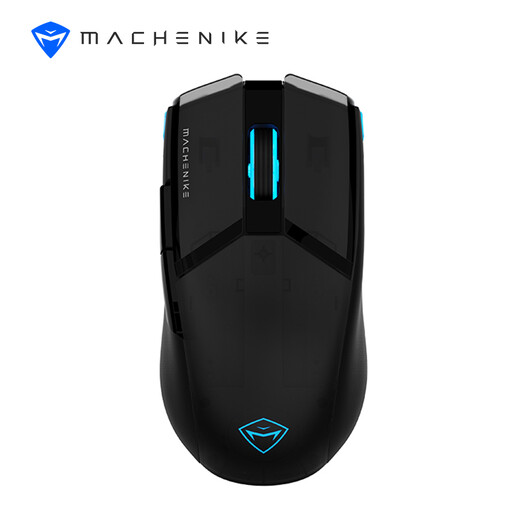
Why this product suits this profile: The combination of wired and 2.4 GHz operation covers both gaming and office tasks. According to the product specifications, it weighs 75 g and offers a resolution of up to 8,000 DPI.
The sensor, connection and battery specifications are clearly separated. USB-C wired operation lets you continue using the mouse when the battery needs charging.
A 600 mAh battery according to the product description, up to 85 hours of stated battery life and three-zone RGB lighting.
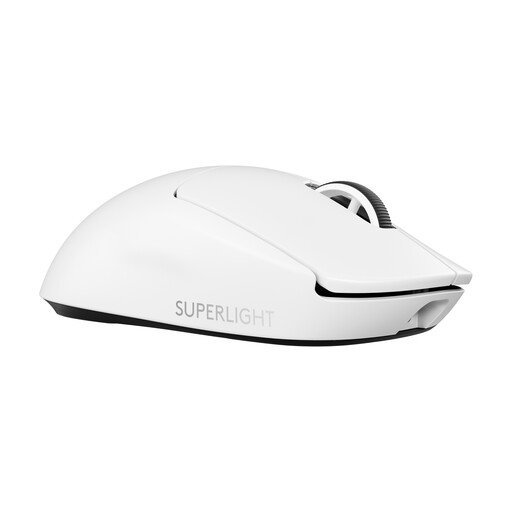
Why this product suits this profile: This model is aimed at users who want to combine a lightweight shell, USB-C and a high configurable polling rate in a PC setup.
The advertised figures are supported by specific data: a HERO-2 sensor, USB-C, a weight of 60 g and 8,000 Hz in compatible operation.
Up to 44,000 DPI, up to 95 hours of stated battery life and programmable settings via Logitech G HUB.
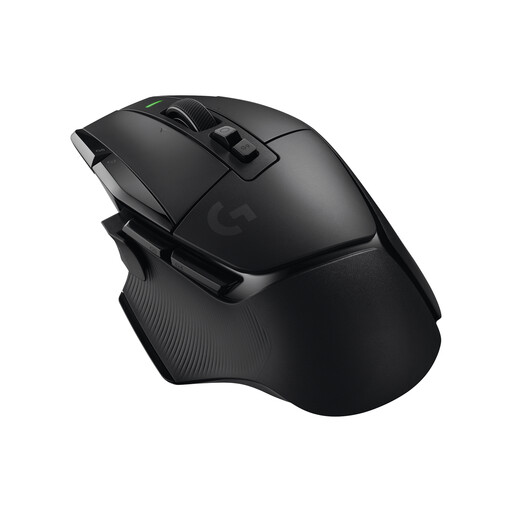
Why this product suits this profile: The ergonomic right-handed shape, 13 programmable buttons and dual-mode scroll wheel are well suited to MMO games, creative software and long office tasks.
If you are not solely looking for minimum weight, you get additional controls instead of paying for headline specifications you will not use.
Up to 140 hours of stated battery life, 25,600 DPI and five integrated profiles according to the product specifications.
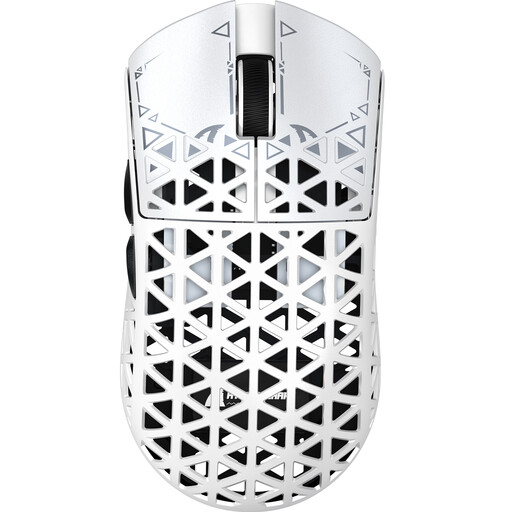
Why this product suits this profile: Its low weight and choice of USB, 2.4 GHz and Bluetooth appeal to users who want to combine fast movements with several connection options.
You are not limited to Bluetooth. According to the specifications, up to 8,000 Hz can be selected in 2.4 GHz and wired modes; different values apply in Bluetooth mode.
PAW3950 sensor, approximately 42 g product weight according to the specifications, up to 750 IPS and a USB-C connection.
We have put together a complete, regularly updated list of products that fully meet these strict selection criteria and the safety regulations applicable in the EU.
Before buying a wireless gaming mouse, check the following:
Yes, provided the mouse offers a stable 2.4 GHz connection, a suitable sensor and sufficiently low latency. For choosing the right model, the specific wireless technology, receiver distance and polling rate used are more important than the maximum DPI figure.
Depending on usage, the manufacturers’ stated figures for the models mentioned range from around 75 to 140 hours. Lighting and high polling rates can reduce battery life. A mouse with USB-C and wired operation remains usable even when the battery level is low.
For office tasks, the difference is generally less relevant than a suitable shape and long battery life. In competitive gaming, a high polling rate can be worthwhile if your monitor, PC, game and receiver support the setting. For this reason, check the system requirements before budgeting for the extra cost.