
Lieferung heute & morgen

Qualitätsgarantie

Willkommens-Angebote freischalten: KOSTENLOSE Lieferung | Bis zu 80 % RABATT | Kostenlose 30-Tage-JoyPlus-Testphase
App herunterladen
A wireless gaming mouse gives you freedom of movement at your PC and, depending on the model, can also be used in the office, with a laptop or across several devices. However, high DPI values, an extensive feature set or the label “wireless gaming mouse” do not automatically make a product the right choice.
Typical buying mistakes stem from three points:
With a high-DPI gaming mouse, you can adapt pointer sensitivity to different games and screen resolutions. For many PC gamers, a significantly lower setting is sufficient than the maximum resolution advertised. The following features are therefore important:
A gaming mouse with an 8,000 Hz polling rate reports its position to the computer more frequently than a model with 1,000 Hz. According to the relevant product specifications, the ATTACK SHARK R5 ULTRA, Razer Viper V3 Pro and Reaper 820 Wireless, for example, support up to 8,000 Hz. Bluetooth connections may have a lower rate, however: according to its specifications, the R5 Ultra is limited to 125 Hz in Bluetooth mode.
A lightweight gaming mouse weighing less than 60 grams may be appealing for fast movements. However, weight alone says little about how comfortable it is to use. You should also check:
An ergonomic gaming mouse with side buttons can be comfortable during longer gaming sessions, while a compact shape may be better suited to smaller hands or carrying around.
A 2.4 GHz gaming mouse normally uses a USB receiver and is often the more practical wireless option for gaming. Bluetooth gaming mice do not require a separate receiver, but may have a lower polling rate depending on the model. For flexible use, a mouse with several connection options is ideal:
You should also consider the actual power supply. Rechargeable models require a USB-C cable and need to be charged regularly. Mice with AA batteries can offer long runtimes, but involve ongoing battery costs. For integrated lithium batteries, follow the manufacturer’s guidance on safe use and disposal.
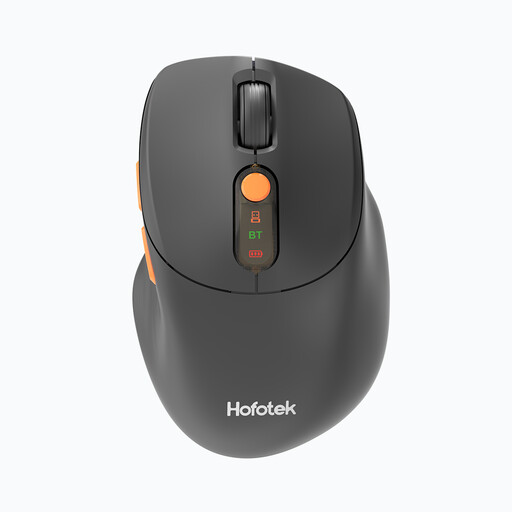
Why this product suits the profile: This mouse combines 2.4 GHz and Bluetooth 5.1, supports up to three devices and has a stated weight of 62 g. It is suitable for office work, laptops and occasional gaming.
The DPI levels from 800 to 4,000 can be configured clearly for everyday tasks and simple games, rather than relying solely on a high maximum value in its marketing.
Quiet clicking, two wireless modes and a supplied AA battery.
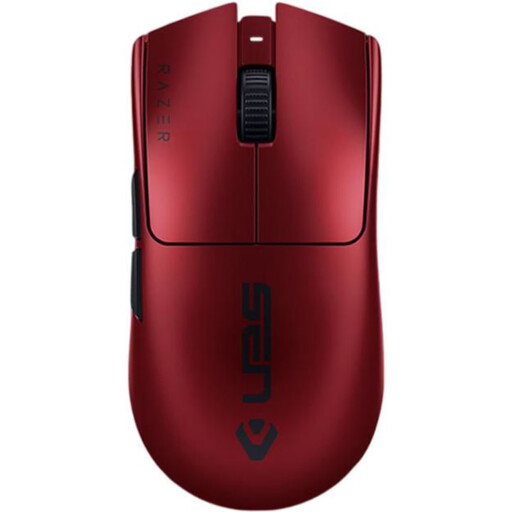
Why this product suits the profile: According to the product specifications, this right-handed mouse weighs 54 g, supports up to 35,000 DPI and has a polling rate of 8,000 Hz. It connects via 2.4 GHz wireless or USB-C.
The high polling rate is limited to 2.4 GHz mode, so it should be considered alongside your system performance and preferred software configuration.
A weight of 54 g, six programmable buttons and a stated battery life of up to 95 hours.

Why this product suits the profile: According to the supplier’s specifications, this right-handed MMO mouse has 19 programmable buttons, 2.4 GHz wireless and Bluetooth. This lets you assign frequently used commands and profiles directly to the mouse.
The many buttons are clearly designed for MMO and MOBA scenarios. If you mainly use your mouse for office tasks or fast-paced FPS matches, consider whether the extra width and 95 g weight are right for you.
19 programmable buttons, a scroll wheel with two modes and a stated battery life of up to 250 hours in HyperSpeed mode.
We have put together a complete, regularly updated list of products that fully meet these strict selection criteria and the safety regulations applicable in the EU.
That depends on the wireless standard, polling rate, receiver position and system configuration. A 2.4 GHz receiver is generally more suitable for gaming than Bluetooth, as many models use a lower polling rate in Bluetooth mode. For a stable connection, position the receiver as close to the mouse as possible and avoid placing it behind several potential sources of interference.
Battery life varies depending on the model, polling rate, lighting and usage profile. In the product specifications available here, runtimes range from up to 72 hours for the Reaper 820 Wireless to considerably longer runtimes for models with AA batteries. Actual battery life may vary. A USB-C cable allows rechargeable mice to be used while they are charging.
Additional buttons can be useful for MMO games, complex applications and frequently used key combinations. For FPS games or office tasks, five or six buttons are often sufficient. The key question is whether the associated software is compatible with your operating system and whether profiles can be saved permanently.