
Lieferung heute & morgen

Qualitätsgarantie

Willkommens-Angebote freischalten: KOSTENLOSE Lieferung | Bis zu 80 % RABATT | Kostenlose 30-Tage-JoyPlus-Testphase
App herunterladen
A wireless gaming mouse gives you more freedom to move at your desk and can be just as responsive in games as a wired model. However, wireless gaming mice vary considerably in their sensors, weight, wireless technology, software and battery life. If you focus only on a high DPI figure or eye-catching RGB lighting, you may end up paying for features that offer little practical benefit.
This buying guide explains which technical specifications really matter and which common marketing pitfalls to watch out for before you buy.
A high-DPI gaming mouse lets you fine-tune its sensitivity. However, a maximum resolution of 26,000 or 44,000 DPI does not automatically mean better control. Many players use much lower settings and place greater importance on consistent tracking, a comfortable shape and a stable wireless connection.
What matters is how the sensor, surface, polling rate and your personal settings work together. Also check whether you can save your preferred DPI setting in the software or directly on the mouse.
A gaming mouse with an 8 kHz polling rate can theoretically send up to 8,000 position reports per second. This can shorten the intervals between signals, but requires a compatible receiver, up-to-date software and sufficient system resources. Not every game visibly benefits from such a high polling rate.
Check whether 8,000 Hz is available only in 2.4 GHz mode, over a wired connection as well, or with a receiver sold separately. Some models have a standard polling rate of 1,000 Hz.
Manufacturers usually quote battery life as an ‘up to’ figure. Bluetooth, 2.4 GHz wireless, lighting and a high polling rate all affect power consumption. An RGB gaming mouse may run for less time with the lighting on than in power-saving mode.
A USB-C port, the option to use the mouse while it charges and an easy-to-reach on/off switch are all useful features. If the mouse has a built-in battery, be sure to check the safety information and dispose of it responsibly.
An optical sensor should track movement consistently, without unwanted acceleration or filtering. Specifications such as IPS describe the potential tracking speed, while G indicates the maximum acceleration. Both figures are most relevant when making fast movements.
For most games, several saveable DPI settings are enough. A dedicated DPI button is useful if you want to switch between standard control, precision work and different games.
For competitive gaming, a consistent connection matters more than a single peak figure. 2.4 GHz RF wireless is commonly used with a USB receiver and is suited to low latency. Bluetooth is handy for laptops, tablets or switching between devices, but depending on the model, it may have a lower polling rate.
A Bluetooth gaming mouse is therefore particularly versatile, while an esports mouse is usually designed around a dedicated wireless receiver and the shortest possible signal intervals. Check the specifications for:
A lightweight gaming mouse weighing around 50 to 70 g can make fast movements easier. A heavier mouse may feel more comfortable if you have larger hands or prefer a steadier playing style. The shape should suit your grip: palm, claw and fingertip grips all have different requirements when it comes to length, width and height.
The number of buttons you need depends on how you use the mouse. A gaming mouse with programmable buttons is useful for MMOs, strategy games and productivity. Many players prefer fewer buttons for fast-paced shooters, so the mouse stays uncluttered and buttons are less likely to be pressed by accident.
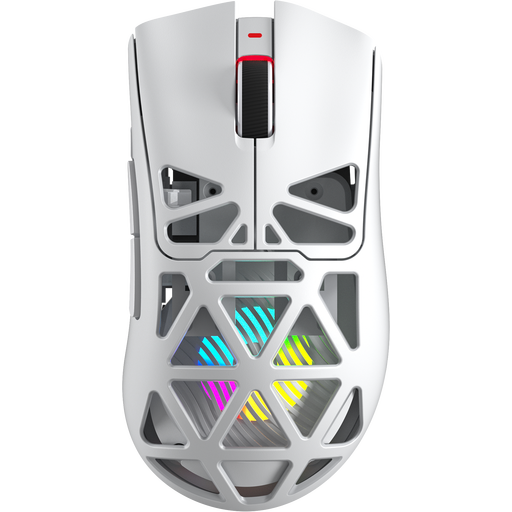
Why this product suits this profile: This mouse combines Bluetooth 5.0, 2.4 GHz wireless and USB-C. Weighing 67 g, it offers 12,000 DPI, 8,000 Hz and seven programmable buttons, making it suitable for a range of uses.
Its three connection options reduce your reliance on a single wireless mode. The 400 mAh battery and USB-C port make it easy to use while charging.
PixArt PAW3311, seven programmable buttons and three connection options.
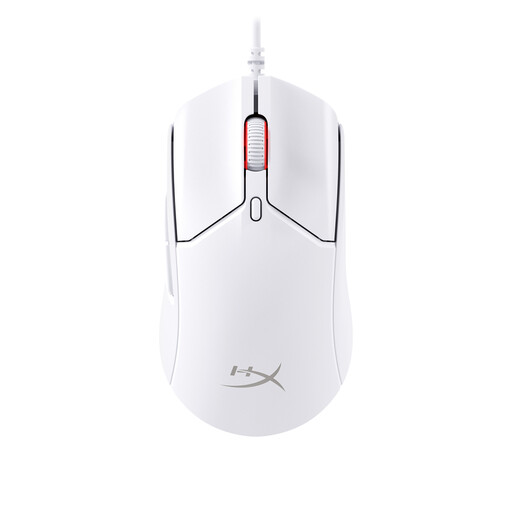
Why this product suits this profile: This model weighs around 61 g and offers 2.4 GHz wireless, Bluetooth 5.1 and USB connectivity. Its 26,000 DPI sensor and six programmable buttons make it suitable for a range of game genres.
Battery life over Bluetooth is listed separately, making the ‘up to 100 hours’ figure easier to put into context.
Three connection modes, USB-C charging and six programmable buttons.

Why this product suits this profile: This right-handed mouse is designed for users who need lots of commands at their fingertips. It has 13 programmable buttons, built-in profile storage and up to 140 hours of battery life.
The number of buttons is clearly stated, while built-in profile storage means you are less reliant on software running in the background.
13 programmable buttons, 25,600 DPI and USB-C charging.
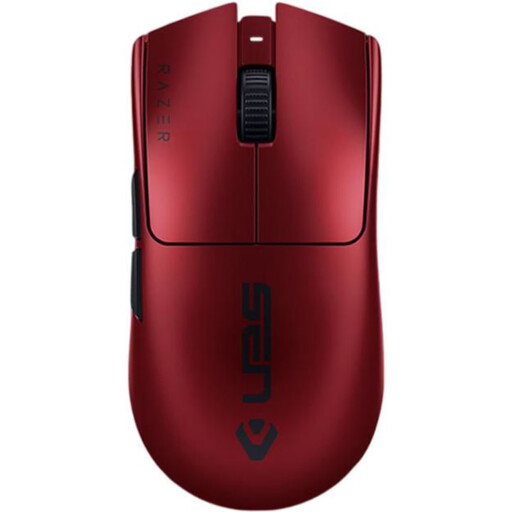
Why this product suits this profile: Weighing 54 g, this model features a Focus Pro sensor with up to 35,000 DPI, an 8,000 Hz polling rate, six programmable buttons and a USB-C port.
The specifications distinguish between 2.4 GHz wireless and USB-C operation. This lets you choose a polling rate and connection to suit your hardware.
54 g weight, an 8,000 Hz polling rate and up to 95 hours of battery life.
We’ve put together a complete, regularly updated list of products that meet these strict selection criteria and fully comply with the safety regulations in force in the EU.
Yes, as long as it offers a stable 2.4 GHz connection, a suitable receiver and an adjustable polling rate. For particularly fast-paced games, keep the receiver as close to the mouse as possible. Bluetooth is better suited to switching between devices and everyday use.
It depends on the wireless mode, polling rate, lighting and how you use the mouse. The manufacturer’s ‘up to’ figure is a useful guide. A USB-C port and the option to use the mouse while charging help avoid long interruptions. Models that take AA batteries do not need recharging, but the batteries will need replacing.
Not necessarily. A rate of 1,000 Hz is enough for many gaming setups. An 8,000 Hz rate may appeal if you prefer very short intervals between signals and have a compatible PC and a game that can make good use of this setting. A comfortable shape, reliable tracking and a stable connection are still what matter most.