
Lieferung heute & morgen

Qualitätsgarantie

Willkommens-Angebote freischalten: KOSTENLOSE Lieferung | Bis zu 80 % RABATT | Kostenlose 30-Tage-JoyPlus-Testphase
App herunterladen
A wireless gaming mouse can give you greater freedom of movement at your desk and eliminate distracting cables during fast-paced games. For competitive gamers and esports players, however, wireless operation is only part of the picture. The sensor, polling rate, shape, button layout and power supply all need to suit your playing style and hand.
Many products advertise extremely high DPI values or particularly long battery life. These specifications cannot always be compared directly. If you focus only on individual figures, you may overlook an unsuitable shape, missing side buttons or a receiver that needs to be purchased separately.
A resolution of 44,000 DPI sounds impressive at first. In practice, many players use significantly lower sensitivities. What matters is whether the DPI levels can be adjusted sensibly and whether the sensor remains stable during fast movements. A high maximum value alone says little about ergonomics or how suitable the mouse really is for gaming.
When buying a wireless gaming mouse, check which connection is actually included in the package. A 2.4 GHz receiver may offer different latency characteristics from Bluetooth when gaming. In addition, an advertised 8 kHz polling rate may not be available out of the box. According to the product description, the PRO LIGHTSPEED RECEIVER for 8 kHz is available separately for the Logitech model; the technical specifications state a maximum signal rate of 1,000 Hz.
Symmetrical designs are generally suitable for both left- and right-handed users. Even so, the exact width, height and position of the thumb buttons remain important. Magnetic side buttons can be fitted flexibly, but must be stored safely when not in use. Keep small parts out of the reach of children and pets.
Pay attention to the sensor type, adjustable resolution and maximum speed. According to Logitech, the HERO-2 sensor in the Logitech G PRO 2 LIGHTSPEED can be configured from 100 to 44,000 DPI. It is also specified as offering acceleration of over 88 g and a speed of over 888 IPS. These figures represent technical limits and should not be taken as a guarantee of a particular gaming experience.
The following are more important when choosing:
According to the product specifications, the PRO 2 LIGHTSPEED weighs 80 g and measures 125.0 × 63.5 × 40.0 mm.
The polling rate describes how often the mouse sends its position data to the computer. 1,000 Hz corresponds to one report per millisecond. Higher values can make updates more finely graduated, but depending on the system they may increase the load and may not be noticeable in every game.
With LIGHTSPEED technology, check whether the correct USB receiver is included in the package. According to the product description, the PRO 2 LIGHTSPEED comes with a LIGHTSPEED receiver, a charging cable and a USB-A-to-USB-C adapter for extension. 8 kHz operation is listed separately and requires the additionally available PRO LIGHTSPEED RECEIVER.
Programmable side buttons are particularly useful if you want frequently used commands, macros or alternative functions to be readily accessible. The PRO 2 LIGHTSPEED can be configured with four to eight buttons. The magnetic side buttons can be fitted on the left, right, both sides or not at all.
When considering battery life, remember to factor in the lighting. According to Logitech, the model offers up to 60 hours with standard lighting or up to 95 hours without lighting. Actual battery life depends on the lighting profile, polling rate and usage. An RGB gaming mouse generally uses more power than a model without lighting. USB-C charging and the ability to use the mouse while it is charging can be important in everyday use. PowerPlay compatibility is available, but the charging system is sold separately.
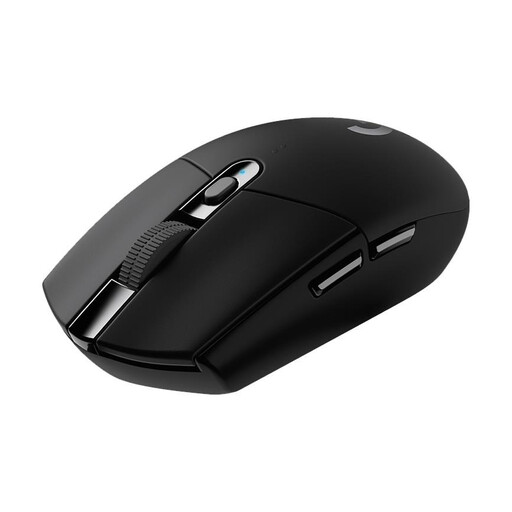
Why this product suits this profile: This mouse combines a wireless LIGHTSPEED connection with a HERO sensor and is aimed at players looking for essential gaming features without an integrated battery.
The AA battery can be replaced. This removes the reliance on an integrated battery and regular charging breaks.
According to Logitech: up to 12,000 DPI, six programmable buttons and up to 250 hours of battery life in Performance mode.
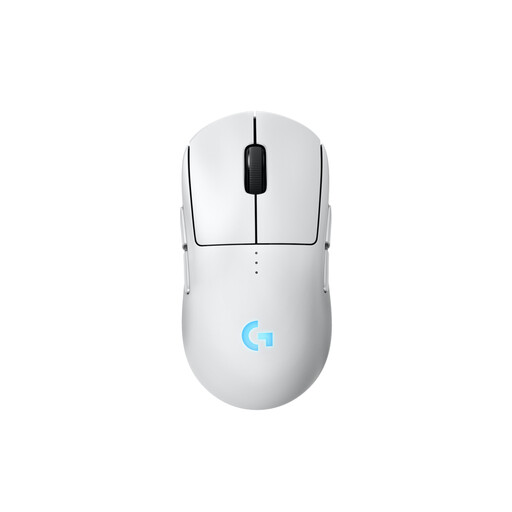
Why this product suits this profile: The symmetrical design is suitable for both left- and right-handed users. The modular button layout can be adapted to different grip styles.
The side buttons can be swapped, allowing protruding buttons on the unused side to be covered. Before buying, check the 8 kHz polling rate specifications against the separately available receiver.
According to Logitech: HERO 2 with up to 44,000 DPI, LIGHTFORCE switches, USB-C charging and up to 95 hours of operation without lighting.
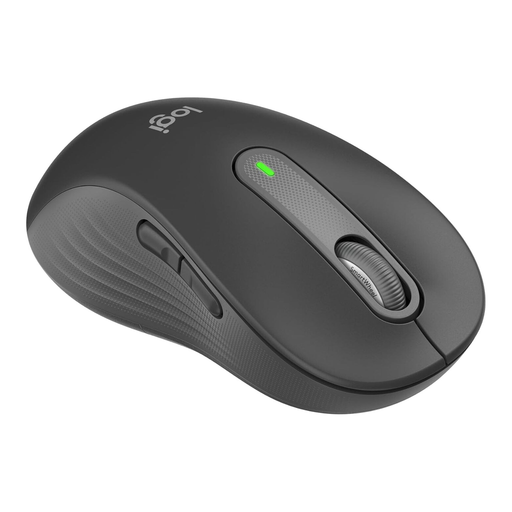
Why this product suits this profile: Designed for larger left hands and mixed office-and-gaming use, this model offers a left-handed shape, Bluetooth and a Logi-Bolt receiver.
The clearly defined orientation prevents a symmetrical design from offering insufficient support for a large left hand.
According to Logitech: up to 24 months of battery life, customisable side buttons and two connection methods.
For initial set-up, plug the USB receiver directly into the PC or use the supplied adapter, then switch on the mouse. Logitech G HUB software can be used to customise DPI levels, button assignments, macros and RGB lighting. Check beforehand that your system meets the required specifications. For the PRO 2 LIGHTSPEED, Windows 10 or later and a USB 2.0 port are specified.
Ongoing costs include batteries or electricity, as well as optional accessories. A mouse with an AA battery incurs recurring battery costs. An integrated battery, on the other hand, requires charging time and loses capacity with increasing use. A separately available charging system such as PowerPlay can add convenience, but should be included in the total cost.
We have put together a complete, regularly updated list of products that fully meet these strict selection criteria and the safety regulations applicable in the EU.
That depends on the connection, signal rate, sensor and your personal preference. A 2.4 GHz connection with a suitable receiver can be suitable for fast-paced games. However, check whether the advertised polling rate is actually available with the included accessories.
Battery life varies depending on the model and lighting. According to Logitech, the Logitech G PRO 2 LIGHTSPEED offers up to 60 hours with standard lighting and up to 95 hours without lighting. These are manufacturer figures and may vary in actual use.
Yes, provided the shape is genuinely symmetrical and the side buttons can be fitted in the right positions. Also consider the width, weight and grip style. A gaming mouse for left- and right-handed users is not automatically equally suitable for every hand size.