
Lieferung heute & morgen

Qualitätsgarantie

Willkommens-Angebote freischalten: KOSTENLOSE Lieferung | Bis zu 80 % RABATT | Kostenlose 30-Tage-JoyPlus-Testphase
App herunterladen
The search for the right wireless gaming mouse can quickly become overwhelming. Manufacturers advertise ever-higher DPI figures, extremely lightweight designs, and long battery life. But not every one of these specifications guarantees a better gaming experience. Often, they hide marketing traps that lead to costly mistakes. As your Joybuy Product Recommendation Officer, I'll help you identify these pitfalls and make an informed decision.
Before we dive into the crucial criteria, let's debunk the most common marketing promises that often cost more than they're worth.
To make the right choice, focus on the following three technical features that directly impact performance.
The sensor is the heart of any gaming mouse. Instead of focusing on the maximum DPI number, you should check the quality of the installed sensor. Models from PixArt (e.g., PAW3395 or Focus Pro 30K) are generally an indicator of high precision and flawless tracking without unwanted acceleration or smoothing. A good wireless gaming mouse offers multiple adjustable DPI levels, allowing you to tailor the sensitivity to your game and screen resolution.
The polling rate, measured in Hertz (Hz), indicates how often the mouse reports its position to the computer. The standard for gaming mice is 1000 Hz (1-millisecond response time). For ambitious gamers and esports athletes, a 4K/8K polling rate mouse can provide a noticeable advantage by further minimizing input lag and making cursor movement smoother on high-refresh-rate monitors. However, note that a higher polling rate consumes more CPU power and shortens the battery life of the rechargeable gaming mouse.
The shape and weight of the mouse must match your hand size and grip style (Palm, Claw, or Fingertip). An ergonomic gaming mouse prevents fatigue during long sessions. Weight is a matter of preference: a lightweight gaming mouse (under 65g) is ideal for fast, wide movements in FPS games, while heavier models can offer more stability. Modern mice often provide multiple connection modes:
Here are some recommendations tailored to different needs and playstyles.
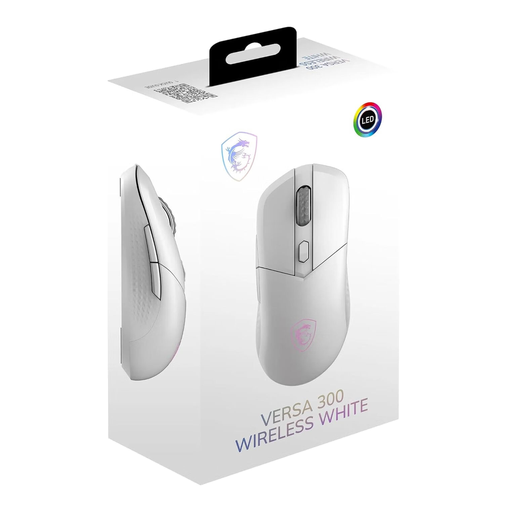
Why it's a great fit: Ideal for gamers looking for a high-performance, all-round package. The low weight of 60g, tri-mode connectivity, and reliable sensor provide a solid foundation for competitive play without breaking the bank.
The mouse focuses on a practical DPI of up to 8000 and a solid, closed-shell design instead of a fragile, lightweight construction. The 50-hour battery life is a realistic figure for everyday gaming.
Tri-Mode Connectivity: Flexible switching between 2.4 GHz, Bluetooth 5.3, and wired. Lightweight, Symmetrical Design: Very agile at 60g and suitable for various grip styles.
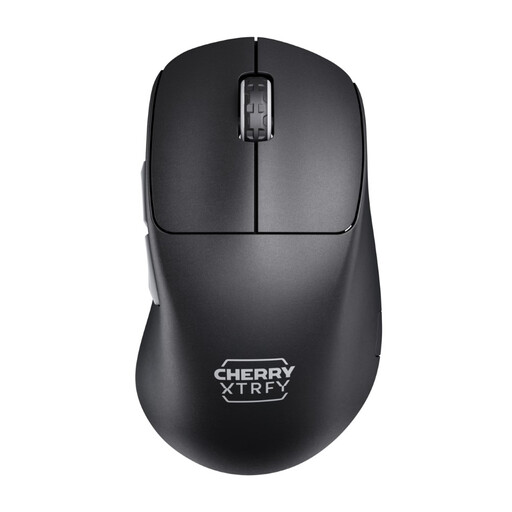
Why it's a great fit: Engineered for esports. The 8K polling rate, ultralight 55g weight, and unique low-front design offer maximum control and responsiveness for players where every millisecond counts.
Instead of a high DPI, this mouse focuses on an extremely high 8K polling rate, which offers a measurable performance advantage. The low weight is achieved through smart design, not a perforated shell.
8K Polling Rate: Ensures extremely low latency and fluid cursor movements. Ergonomic Low-Front Design: Provides exceptional control and precision.
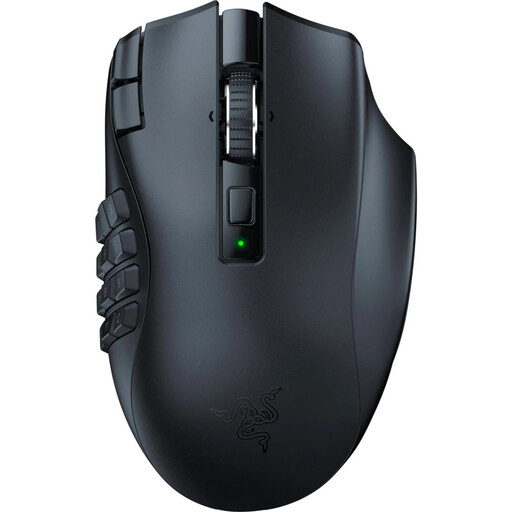
Why it's a great fit: The top choice for MMO and MOBA players. With 19 programmable buttons, you have all essential commands and macros right under your thumb. The ergonomic shape is designed for hours-long raids and sessions.
This mouse deliberately ignores the trend towards minimalism and ultralight construction. Its focus is on maximum functionality through its many buttons. The battery life is transparently stated for both HyperSpeed (250h) and Bluetooth (400h) modes.
19 Programmable Buttons: Offers unparalleled control in complex games. Razer HyperScroll Technology: Allows switching between tactile and free-spinning scroll wheel modes.
We have compiled a complete, up-to-date list of products that fully meet these strict selection criteria and UK/EU safety regulations.
For most gamers, a polling rate of 1000 Hz is perfectly sufficient. Upgrading to an esports mouse with 4000 Hz or 8000 Hz is primarily beneficial for competitive FPS players with a high-refresh-rate monitor (240 Hz or higher). In that scenario, the lower latency can provide a small but potentially decisive advantage. Keep in mind that a higher polling rate also puts more strain on the CPU.
To extend the battery's lifespan, you should avoid letting it fully discharge regularly. Charge the mouse when the battery level is low. Avoid extreme heat or cold. The easiest way to extend the runtime per charge is to disable or dim the RGB lighting, as it is a significant power consumer.
The 2.4 GHz connection via a dedicated USB dongle is the standard for lag-free, stable gaming. It offers a response time comparable to that of a wired mouse. A Bluetooth gaming mouse is convenient for mobile use and for connecting to devices without a free USB port. However, the latency is higher and the connection can be more prone to interference, making it less suitable for demanding gaming.