
Lieferung heute & morgen

Qualitätsgarantie

Willkommens-Angebote freischalten: KOSTENLOSE Lieferung | Bis zu 80 % RABATT | Kostenlose 30-Tage-JoyPlus-Testphase
App herunterladen
A wireless gaming mouse can respond just as instantly on a PC as a wired model. However, devices vary considerably in their wireless technology, shape, weight and software. If you focus only on a high DPI figure or eye-catching lighting, you may end up paying for features that offer little benefit in your everyday gaming.
The following points will help PC gamers, FPS and MOBA players, as well as esports users, assess technical specifications objectively and avoid common buying mistakes.
A high-DPI gaming mouse can offer very fine sensitivity adjustment. However, a maximum value of 26,000, 35,000 or 44,000 DPI does not automatically mean more accurate control. Sensor processing, consistent tracking, the sensitivity used in the game and the mouse-pad surface are also important.
For many games, the setting actually used is well below the maximum value. A high DPI figure is therefore mainly useful if you want multiple profiles or very fine adjustments.
A gaming mouse with an 8 kHz polling rate can theoretically transmit up to 8,000 position reports per second. This may improve the time resolution of input, but it also increases USB and system load. You also need the appropriate wireless receiver: with some models, a special 8 kHz dongle is available separately.
This is important when choosing a mouse: not every model supports 8 kHz wirelessly, and not every gaming situation benefits from it to the same extent. 1,000 Hz remains the standard wireless mode on many models.
A lightweight gaming mouse weighing around 53 to 65 g can make rapid changes of direction easier. However, it still needs to suit your hand size and grip style. A shape that is too flat may be uncomfortable with a palm grip, while a compact, symmetrical mouse may be better suited to a claw or fingertip grip.
The term ‘ergonomic’ is not consistently defined either. You should therefore check the length, width, height and whether the mouse is designed for the right or left hand.
A gaming mouse with 2.4 GHz wireless normally uses a USB receiver. The dongle should be positioned as close to the mouse pad as possible. A USB extension adapter can help if your PC is under the desk or other wireless sources are nearby.
Bluetooth is suitable for flexible use with several devices, but it is not the preferred mode for competitive gaming on every model. Tri-mode mice combine Bluetooth, 2.4 GHz wireless and a USB cable, making them more versatile.
Look out for the following specifications:
The stated battery life is generally a maximum figure and depends, among other things, on the polling rate, lighting and usage. A gaming mouse with long battery life reduces charging breaks, but it does not eliminate the need to check the charge level regularly.
USB-C is particularly convenient today. Some devices can be used while charging. If you want to avoid a charging cable altogether, compatible Logitech models can also be used with a suitable charging system purchased separately.

Why this product suits this profile: The tri-mode connection lets you switch between Bluetooth, 2.4 GHz wireless and USB-C. With up to 24,000 DPI, six buttons and a weight of around 63 to 65 g, it is suitable for both PC gaming and everyday use.
The technical specifications include not only the DPI figure, but also the sensor, connection types and polling rate of up to 1,000 Hz. This makes it easier to assess how the mouse will perform in real-world use.
Three connection modes, software-programmable buttons and a magnetic charging dock according to the product description.

Why this product suits this profile: The symmetrical shape, optical sensor with up to 35,000 DPI and selectable polling rates of up to 8,000 Hz are aimed at users who want to fine-tune a wide range of settings.
The 8 kHz function is explicitly linked to a HyperPolling dongle available separately. This prevents the assumption that every included receiver automatically supports this mode.
Around 54 to 55 g according to the product specifications, 2.4 GHz wireless, six programmable buttons and a battery offering up to 95 hours of use.
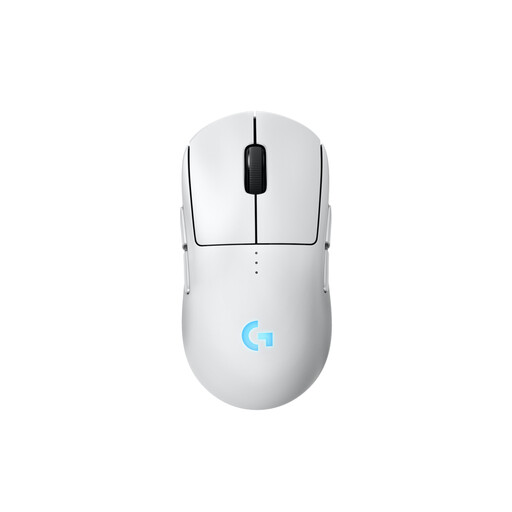
Why this product suits this profile: The symmetrical design is suitable for both right- and left-handed users. Magnetic side buttons can be attached or covered on either side.
Hand orientation is not simply described as ‘ergonomic’; the interchangeable side buttons provide specific details. This makes it easier to choose a mouse for different grip positions.
HERO-2 sensor, up to 95 hours of battery life, USB-C and integrated profile memory; the product specifications state a weight of 80 g.

Why this product suits this profile: With 13 programmable controls, a two-mode scroll wheel and a shape designed for right-handed users, it is well suited to games and applications with lots of commands.
The higher weight of 102 g is stated transparently. If you need lots of buttons, this lets you weigh the greater functionality against reduced agility.
13 programmable buttons, HERO-25K sensor, 2.4 GHz LIGHTSPEED and stated battery life of up to 140 hours.
Lightweight, symmetrical models are often worth considering for fast FPS movements. If you prefer an ergonomic gaming mouse for your right hand, compare the side contours, length and thumb rest. MOBA players and users with lots of software commands are generally more likely to benefit from additional programmable buttons than from an especially low weight.
We have put together a complete, regularly updated list of products that fully meet these strict selection criteria and the safety regulations applicable in the EU.
Plug the USB receiver directly into a USB port, or use the supplied adapter. Switch on the mouse and install the manufacturer’s software only if you want to change DPI levels, buttons, macros or the polling rate. For a stable connection, the receiver should be positioned as close to the mouse pad as possible.
The product specifications for the models mentioned range from around 75 to 140 hours. These are maximum figures under certain conditions. Higher polling rates, RGB lighting and intensive use can reduce battery life. USB-C charging while gaming is therefore a practical additional feature.
It may be of interest to users who want very high input time resolution and have a compatible PC. Before buying, check whether the required receiver is included, which polling rates the wireless connection actually supports and whether the higher system load suits your setup.