
Lieferung heute & morgen

Qualitätsgarantie

Willkommens-Angebote freischalten: KOSTENLOSE Lieferung | Bis zu 80 % RABATT | Kostenlose 30-Tage-JoyPlus-Testphase
App herunterladen
A wireless gaming mouse gives you freedom of movement at your desk and can be suitable for gaming, working from home and creative applications. However, technical specifications such as 24,000 DPI, 8,000 Hz or “AI-powered” do not automatically indicate that a product is the right choice. What matters is whether the sensor, connection, weight, shape and power supply suit the way you intend to use it.
The Joybuy Product Recommendation Officer’s selection therefore focuses on clear product data and common purchasing concerns.
A 24000 DPI gaming mouse can offer a wide range of sensitivity settings. However, the sensitivity actually used in many games is considerably lower. A high maximum value alone says little about the quality of the signal processing. You should also consider the sensor, possible polling rates and the software available.
For FPS games such as CS2, Valorant and Apex Legends, consistent tracking and controllable settings are often more important than the highest possible DPI value.
A Bluetooth gaming mouse is practical for laptops, tablets and everyday office use. For fast-paced online games, a dedicated 2.4 GHz gaming mouse with a receiver is often preferred, as this type of connection is designed for low latency. The difference is not just down to the wireless standard: the receiver’s position, sources of interference and polling rate also affect the experience.
A tri-mode mouse usually combines Bluetooth, 2.4 GHz and a USB-C cable. This is versatile, but it also means there are more details to check: does each mode support the same polling rate? Is the receiver included? Can you continue playing via cable while the mouse is charging?
A lightweight gaming mouse can make fast movements easier, but it will not automatically suit every hand. A shape that is too small can result in an uncomfortable grip for users with larger hands. Conversely, palm-grip users often need a more contoured mouse than players who use a fingertip grip.
You should therefore check the dimensions, weight, whether it is designed for right- or left-handed use, and the position of the side buttons. “Ergonomic” is a product feature that must be assessed individually, not a universal mark of quality.
The sensor determines how movements are detected. According to the product specifications, the PAW3311 sensor in the AJAZZ and AULA models offers an adjustable resolution of up to 24,000 DPI. This allows you to create different sensitivity profiles, but it does not replace choosing suitable settings in the game.
The polling rate indicates how often the mouse reports its position data to the computer. 1,000 Hz corresponds to one report every millisecond. Higher values such as 8,000 Hz can increase system load and require suitable hardware and software. For many users, a stable 1,000 Hz setting is already sufficient.
The following modes are relevant for flexible use:
You should also check whether the receiver can be positioned closer to the mouse using an extension cable. This can be useful when your PC is located under the desk.
A mouse with an integrated battery requires regular charging. A wireless gaming mouse with a charging dock reduces the effort involved, as you can place it straight on the dock after use. According to the product description, the AJAZZ AJ200 comes with a magnetic charging dock featuring a 5-W charging function for a smartphone. Before buying, check whether the docking station is included and whether it is actually suitable for your intended setup.
Battery life depends on factors including lighting, polling rate and intensity of use. Manufacturer figures should therefore be treated as indicative. If the mouse has a built-in lithium battery, you should also use safe chargers and avoid opening the device.
The following cards group products according to specific requirements. The information comes from the respective product descriptions.
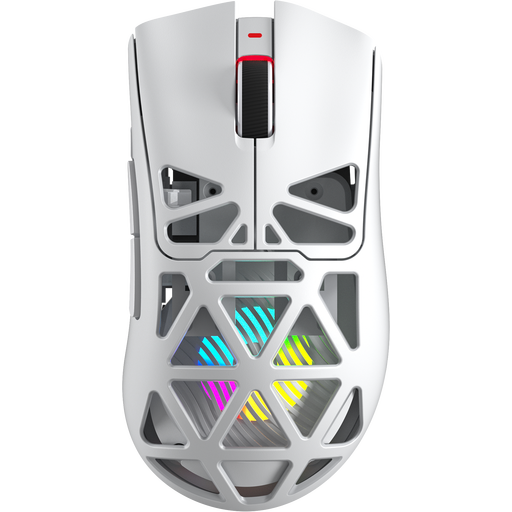
Why this product suits the profile: Bluetooth 5.0, 2.4 GHz wireless and USB-C provide several connection options for PC and Mac. According to the product name, the mouse features 12000 DPI, 7 programmable buttons and weighs 67 g.
The three connection types mean you are not tied to a single wireless standard. Before buying, you should check the listing for details about the 8-kHz function and software support.
PAW3311 sensor, 400-mAh battery according to the product name, and 7 programmable buttons. At 67 g, it is comparatively light for a gaming mouse.
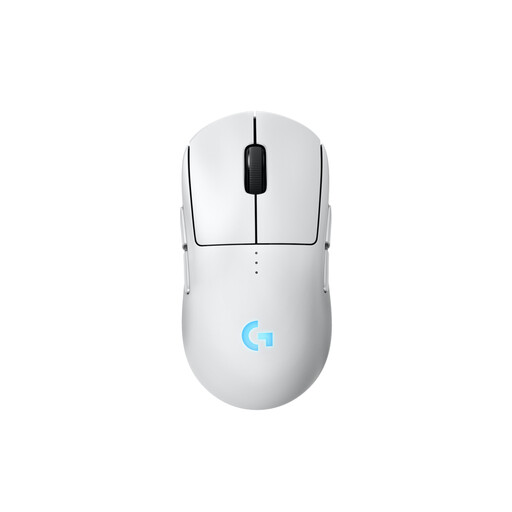
Why this product suits the profile: According to the product description, the symmetrical body can be configured for right- and left-handed users. Magnetic side buttons can be fitted or covered, depending on your preferred control layout.
The modular button layout reduces the risk of having to put up with a permanently unsuitable side-button position. You can use the mouse via LIGHTSPEED or USB-C.
HERO-2 sensor with up to 44,000 DPI according to the manufacturer, an 80 g weight and a stated battery life of up to 95 hours without lighting.
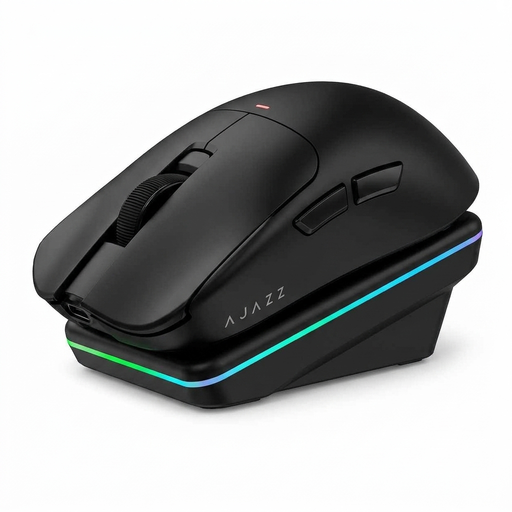
Why this product suits the profile: This AI gaming mouse combines gaming with office and creative applications. According to the product description, it supports voice interaction, commands, translation and text creation, as well as Bluetooth, 2.4 GHz and USB-C.
The charging dock makes regular charging easier. For gaming-related functions, note that the product specifications state that 1,000 Hz is available in wired and 2.4-GHz modes.
PAW3311 sensor with up to 24,000 DPI, tri-mode connectivity and a magnetic docking station. The stated weight is approximately 63 to 65 g, depending on the product specification.
We have put together a complete, regularly updated list of products that fully meet these strict selection criteria and the safety regulations applicable in the EU.
Bluetooth can be sufficient for office work, mobile devices and casual gaming. A 2.4-GHz connection with a USB receiver is often used for fast-paced FPS games. You should also check the polling rate and compatibility with your operating system.
Battery life depends on the model, lighting, polling rate and duration of use. Manufacturer figures such as “up to 95 hours” are indicative. A charging dock or a USB-C cable that lets you use the mouse while it is charging may be more practical in everyday use than the highest possible nominal battery capacity.
That depends on your game, screen resolution and preferred sensitivity. 24,000 DPI provides a broad adjustment range, but it is not essential. When making your decision, consider sensor performance, polling rate, shape and button layout together.