
Lieferung heute & morgen

Qualitätsgarantie

Willkommens-Angebote freischalten: KOSTENLOSE Lieferung | Bis zu 80 % RABATT | Kostenlose 30-Tage-JoyPlus-Testphase
App herunterladen
Choosing a new computer mouse can be more complicated than it first appears. The market is flooded with models advertising high DPI counts, countless buttons, and futuristic designs. But not every advertised feature is a genuine advantage. Often, these exaggerated marketing promises lead to a purchase you'll regret. As your Joybuy Product Recommendation Officer, I'll help you distinguish the essential features from the gimmicks and find a mouse that truly fits your needs.
Before you decide on a model, you should be aware of the most common traps that often lead to dissatisfaction.
Focus on the following three core aspects in your selection to make an informed decision.
The type of connection directly impacts performance and convenience.
The sensor is the heart of every mouse. Its quality determines its precision.
The shape of the mouse is crucial for comfortable use without fatigue.
Here are some recommendations tailored to specific user groups and their requirements.
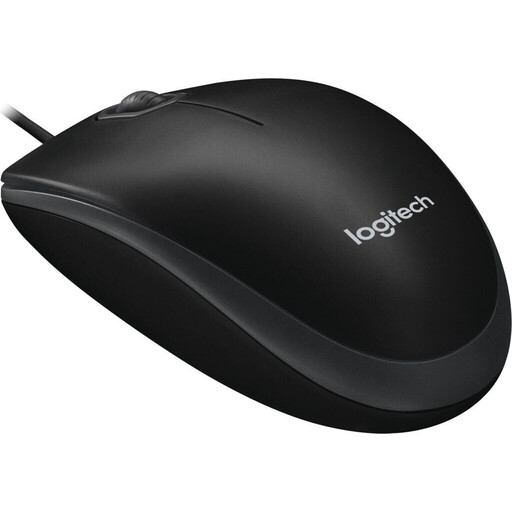
Why This Fits Their Persona: Ideal for users who need a reliable, straightforward, and affordable mouse for everyday office tasks. No unnecessary features, just solid performance.
This mouse ignores the DPI myth with a practical 800 DPI sensor. As a wired model, it bypasses all potential issues of wireless mice, such as latency or dead batteries.
Plug-and-play functionality without any driver installation. The ambidextrous design is equally comfortable for both left- and right-handed users.
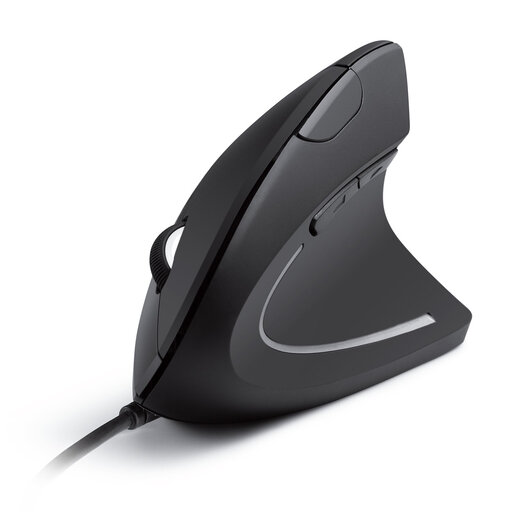
Why This Fits Their Persona: Perfect for people who spend many hours at their desk and want to proactively prevent wrist or arm discomfort.
This mouse solves the "misunderstood ergonomics" problem by offering a scientifically-backed vertical mouse shape that promotes a natural hand posture and reduces muscle strain.
The "handshake" position design provides noticeable relief. The switchable DPI levels (1000/1600) offer flexibility for different tasks.
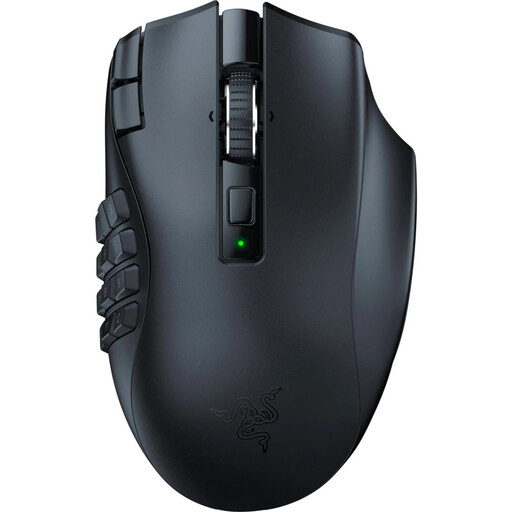
Why This Fits Their Persona: Specifically designed for MMO and MOBA players who need a multitude of commands and macros at their fingertips and rely on an extremely responsive connection.
This Razer mouse uses its high performance with purpose. The 19 programmable buttons are not a gimmick but a decisive advantage in complex games. The HyperSpeed wireless technology minimizes latency, a typical weakness of wireless mice.
Extensive customization options through programmable buttons. The optical sensor with 30,000 DPI and durable mechanical switches offer precision and longevity.
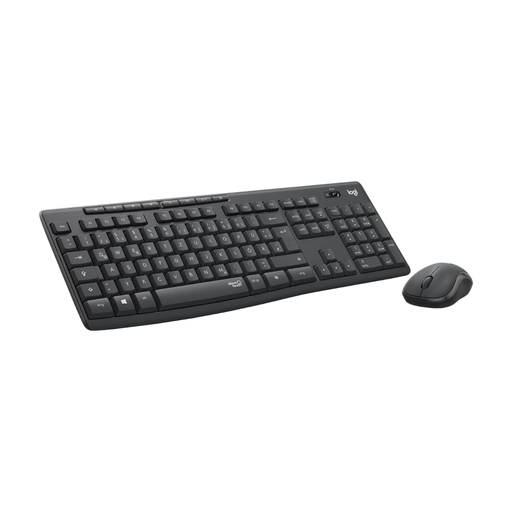
Why This Fits Their Persona: Ideal for users in home offices or noise-sensitive environments who want a ready-to-use, quiet, and reliable solution for both keyboard and mouse.
This keyboard and mouse combo focuses on a real practical benefit: noise reduction. Instead of high DPI values, the mouse features SilentTouch technology, which Logitech claims reduces click sounds by over 90%.
Extremely quiet operation for both mouse and keyboard. The long battery life and stable 2.4 GHz wireless connection make the combo a low-maintenance companion.
We have compiled a complete, up-to-date list of products that fully meet these strict selection criteria and German safety regulations.
1. What should the DPI be for a standard office mouse? For most office applications, web browsing, and general PC or laptop use, a DPI value between 800 and 1600 is perfectly adequate. Higher values are generally not necessary and can even make controlling the cursor less precise.
2. What is the difference between a 2.4 GHz wireless mouse and a Bluetooth mouse? A 2.4 GHz wireless mouse connects to the computer via a dedicated USB receiver (dongle). This connection is typically very stable and has low latency. A Bluetooth mouse connects directly to the computer's Bluetooth module without needing an additional receiver. This saves a USB port but can result in slightly higher latency and is more susceptible to interference in environments with many wireless devices.
3. How long does the battery of a wireless mouse last? Battery life varies greatly depending on the model, usage, and battery type. Simple models can last several months to over a year on a single AA or AAA battery, such as the mouse in the Logitech MK295 combo. Rechargeable gaming mice often need to be charged every few days or weeks, depending on the intensity of use. Pay attention to the manufacturer's specifications for battery life.