
Lieferung heute & morgen

Qualitätsgarantie

Willkommens-Angebote freischalten: KOSTENLOSE Lieferung | Bis zu 80 % RABATT | Kostenlose 30-Tage-JoyPlus-Testphase
App herunterladen
For competitive PC gamers, a precise and responsive mouse isn't a luxury—it's a necessity. However, the wireless gaming mouse market is flooded with marketing buzzwords and exaggerated specs that make an informed decision difficult. As your Joybuy Product Recommendation Officer, I'll help you identify the features that truly matter and avoid the common pitfalls that often lead to buyer's remorse.
Before we dive into the technical details, it's crucial to understand the most common marketing traps. These often lead users to pay for features that offer no noticeable real-world advantage.
To find the right PC gaming mouse, you should focus on three objective criteria that directly impact your performance.
Weight is a crucial factor, especially in fast-paced FPS or MOBA games. A lightweight gaming mouse (typically under 70 grams) reduces wrist fatigue and allows for faster, more precise movements ("flicks"). The shape is just as important. An ergonomic gaming mouse should fit your hand size and grip style (Palm, Claw, or Fingertip Grip). An asymmetrical shape for right-handers often provides more comfort during long sessions, while symmetrical mice are suitable for both left- and right-handed users.
The optical sensor is the heart of any gaming mouse. Models like the PixArt PAW3395 or PAW3398 are considered industry standards, offering flawless tracking without unwanted acceleration or smoothing. Look for a high maximum speed (measured in IPS – Inches Per Second) to ensure the mouse doesn't lose tracking even during the fastest movements. The quality of the switches under the main buttons determines click durability and tactile feedback. Lifespan ratings in millions of clicks are a good indicator of durability here.
For competitive gaming, a stable 2.4 GHz wireless connection is the preferred choice over Bluetooth due to its lower latency. However, many modern mice offer multiple modes (Tri-Mode: 2.4 GHz, Bluetooth, Wired), which increases flexibility. Battery life is also a key practical consideration. Models with 100 hours or more ensure you don't run out of power mid-game. Programmable buttons allow you to assign complex commands or macros to the mouse, which can offer a strategic advantage in many games.
Here are some recommendations tailored to different needs and budgets, taking the above criteria into account.
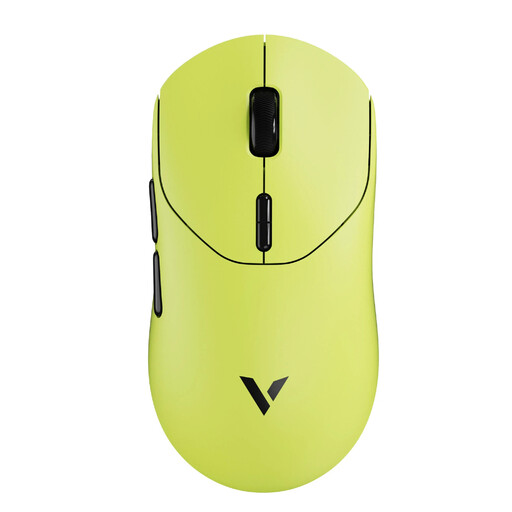
Why This Fits Their Persona: This model is designed for players where every millisecond counts. Its extremely low weight and high, stable polling rate are engineered for maximum performance in fast-paced FPS games.
The 8K wireless polling rate isn't just a marketing gimmick here; it's stably implemented by a modern Nordic nRF54L15 chip. It bypasses the DPI myth by using a proven PAW3398 sensor for true precision.
Extremely lightweight at just 53 grams for minimal inertia. Long battery life of up to 750 hours (at 1000 Hz) according to the manufacturer.
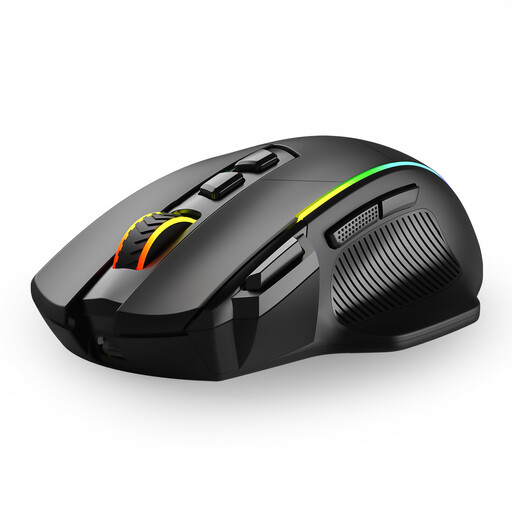
Why This Fits Their Persona: Ideal for users who need one mouse for both gaming and productivity tasks across multiple devices. The flexible connection modes make it a practical companion for PC, laptop, and Mac.
Instead of focusing on a single extreme spec, this model offers a well-rounded package. The tri-mode connectivity is a practical benefit that avoids the unreliable Bluetooth trap by providing a dedicated 2.4 GHz option for gaming.
Tri-mode connectivity (2.4G, USB-C, Bluetooth) for up to 3 devices. 8 programmable buttons, including a rapid-fire button, offer advantages in games and productivity.
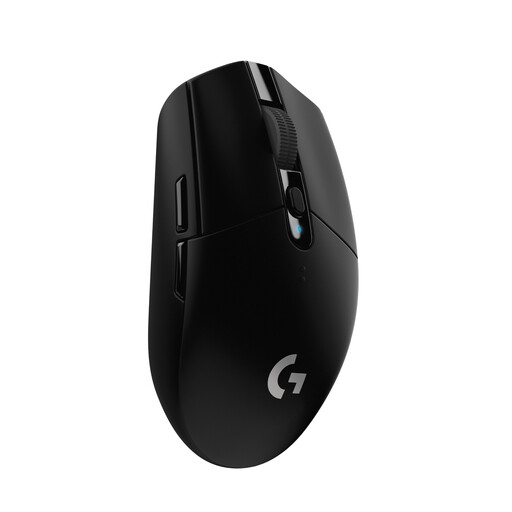
Why This Fits Their Persona: This model offers proven core gaming technologies at an accessible price point. It's a reliable choice for gamers who want solid performance without paying for premium features.
The G305 focuses on the essentials: a lag-free connection via LIGHTSPEED technology and a precise HERO sensor. It forgoes exaggerated DPI values or polling rates, delivering solid, battle-tested performance instead.
Excellent battery life of up to 250 hours on a single AA battery. The proven LIGHTSPEED wireless technology ensures a reliable and responsive connection.
We've compiled a complete, real-time updated list of products that fully meet these strict selection criteria and UK safety regulations.
1. Do I really need a mouse with an 8K polling rate? That depends on your hardware and ambitions. For professional FPS players with high-end PCs (e.g., a 240 Hz monitor and a powerful CPU), an 8K polling rate mouse can offer a noticeably smoother cursor movement. For most gamers, however, 1000 Hz or 4000 Hz is more than sufficient and puts less strain on the system.
2. How important is the weight of a gaming mouse, really? For fast-paced games like FPS or MOBAs, weight is very important. A lightweight gaming mouse (under 70g) reduces wrist fatigue and allows for faster, more precise aiming. For slower strategy games or general use, weight is more a matter of personal preference.
3. Will a wireless gaming mouse's battery last a full gaming session? Yes, modern models are designed for it. Many offer 50 to 150 hours of active use per charge. Some models can even last several hundred hours in power-saving mode. Thanks to USB-C fast charging, just a few minutes of charging can often provide several hours of gameplay.