
Lieferung heute & morgen

Qualitätsgarantie

Willkommens-Angebote freischalten: KOSTENLOSE Lieferung | Bis zu 80 % RABATT | Kostenlose 30-Tage-JoyPlus-Testphase
App herunterladen
In competitive games like FPS or MOBA titles, milliseconds and the slightest movements can decide the outcome of a match. An imprecise mouse or one prone to lag can be a critical disadvantage. However, finding the right wireless gaming mouse is a challenge, given the vast number of models and technical specifications.
This guide is designed to provide clarity. We'll explain the most important technical features to look for in a wireless gaming mouse and present a selection of models tailored to different needs and budgets.
Choosing the right mouse depends on individual preferences and playstyle. However, three technical aspects are particularly relevant for performance.
A lightweight gaming mouse allows for faster, less fatiguing movements across the mousepad. Especially in games that require rapid changes in direction (so-called "flick shots"), a low weight can enhance responsiveness. Models under 70 grams are considered very light in this category. At the same time, an ergonomic gaming mouse that fits well in the hand and provides comfort during long gaming sessions is crucial. The shape should match your personal grip style (palm, claw, or fingertip grip).
The optical sensor is responsible for tracking movement. Modern sensors offer high precision on a wide variety of surfaces. An important value in this context is DPI (Dots Per Inch), which indicates the mouse's sensitivity. A high-DPI mouse is not necessarily better. Most competitive players use settings between 400 and 1600 DPI. More important than a maximum DPI value is a sensor that operates flawlessly and without artificial acceleration at these common settings.
Modern wireless mice use advanced 2.4 GHz technologies that achieve latencies on par with wired models. The polling rate, measured in Hertz (Hz), indicates how often the mouse reports its position to the computer. A standard value is 1000 Hz (1 ms response time). Some high-end models offer an 8KHz polling rate, which further speeds up data transmission and can lead to even smoother cursor movement. This is particularly important for gamers with very high refresh rate monitors (240 Hz and above).
Here is a curated selection of models that are well-suited for different types of gamers due to their technical specifications and design.
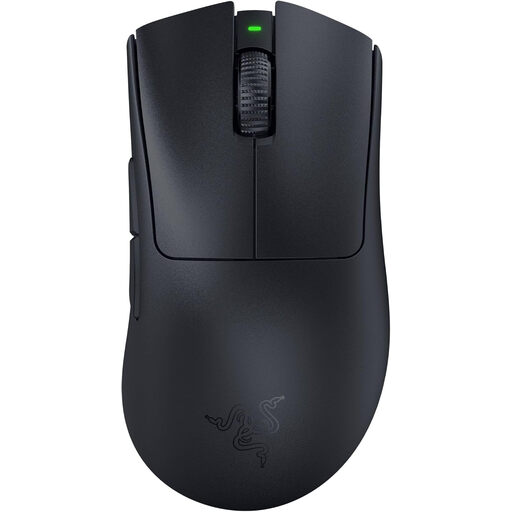
Why It Stands Out The Razer DeathAdder V3 Pro is an evolution of an established shape, optimised in collaboration with esports pros. Weighing just 63 grams, it is over 25% lighter than its predecessor. The combination of low weight and a distinct ergonomic shape for right-handers makes it a precision tool for long gaming sessions.
Pros
Who It's For Competitive players, especially in the FPS gaming mouse segment, who are looking for an ultralight, ergonomic mouse with a proven shape and high-end components.
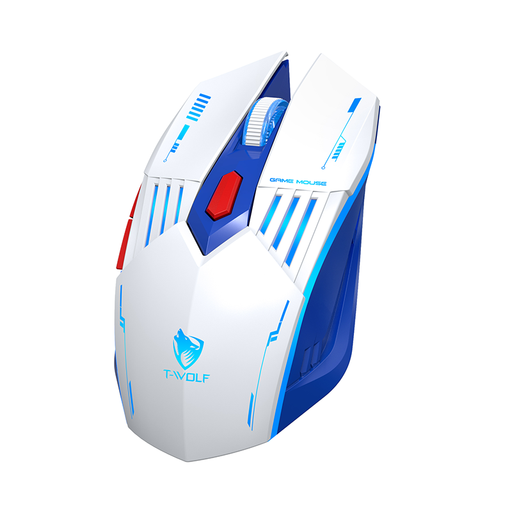
Why It Stands Out The Rexsun X7 is distinguished by its flexibility. With three connection modes – 2.4G Wireless, Bluetooth, and wired – it can be used seamlessly across various devices like PCs, laptops, and tablets. This makes it a practical option for users who need one mouse for both gaming and everyday tasks.
Pros
Who It's For Budget-conscious gamers and all-around users looking for a versatile mouse with solid core features for gaming and daily use.
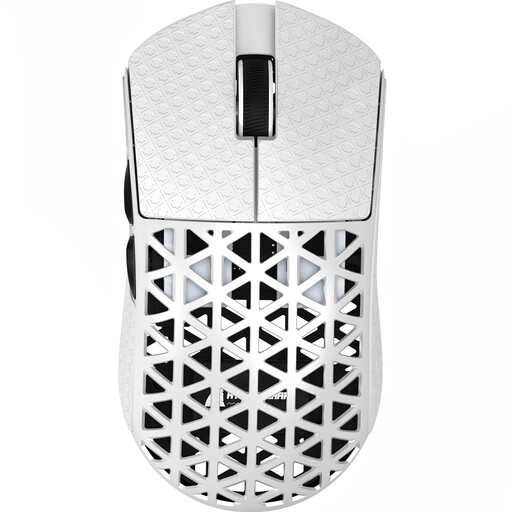
Why It Stands Out The ATTACK SHARK R5 ULTRA is engineered for maximum technical performance. Its shell, made of injection-moulded carbon fibre, allows for an extremely low weight of only approx. 42 grams. Its most outstanding feature is the support for a wireless 8000Hz polling rate, enabling ultra-responsive data transmission and making it a specialised esports mouse.
Pros
Who It's For Tech enthusiasts and competitive gamers who are seeking the absolute maximum performance and prioritise extremely low weight and the lowest possible latency.
The models presented here cover a wide spectrum. However, if you are looking for mice with specific features, such as additional side buttons for MMOs or different ergonomic shapes, you can find more alternatives in our broader category.
? Discover our entire selection of gaming mice with thumb buttons here.
Yes. Modern wireless gaming mice that use a 2.4 GHz connection offer latencies comparable to their wired counterparts. They are therefore fully suitable for competitive gaming, including fast-paced FPS titles, and offer the added benefit of freedom of movement without cable drag.
There is no universally "good" DPI setting. Most professional FPS players prefer values between 400 and 1600 DPI, as this allows for precise control without the cursor jumping across the screen with the slightest hand movement. A high maximum DPI number is more of a marketing feature than an indicator of sensor quality.
The polling rate indicates how many times per second the mouse reports its position to the PC. A rate of 1000 Hz (1000 times per second) is the current standard. An 8KHz polling rate reports the position 8000 times per second, which further minimises the delay from movement to on-screen display. This advantage is most noticeable on monitors with very high refresh rates (240Hz+) and results in a visibly smoother cursor movement.