
Lieferung heute & morgen

Qualitätsgarantie

Willkommens-Angebote freischalten: KOSTENLOSE Lieferung | Bis zu 80 % RABATT | Kostenlose 30-Tage-JoyPlus-Testphase
App herunterladen
A wireless gaming mouse can give you more freedom of movement when gaming, streaming and working. At the same time, unclear specifications about DPI, battery life or wireless technology can easily lead to a poor purchase. It's particularly common for a high maximum resolution to be automatically equated with better precision. Likewise, a supposedly ergonomic shape won't suit every grip or hand size.
This buying guide from the Joybuy Product Recommendation Officer provides a balanced overview of the most important criteria and shows which models suit different usage scenarios.
A wireless mouse with 24000 DPI sounds powerful, but the maximum resolution alone doesn't determine everyday usability. Many gamers use significantly lower values. What matters more is predictable sensor behaviour, a suitable DPI range and reliable tracking without unwanted jumps.
For FPS games like CS2, Valorant or Apex Legends, actual movement control, the polling rate and the surface of your mouse mat also count.
Bluetooth is well suited to office work, tablets and multiple devices. For fast-paced gaming, a 2.4 GHz gaming mouse with a USB receiver is usually the more obvious connection choice. When comparing products, you should also check whether the manufacturer distinguishes between wired operation, 2.4 GHz and Bluetooth.
A tri-mode mouse is versatile, but it only makes sense if switching between modes is straightforward in everyday use and the desired polling rate is available in each mode.
Figures like "up to 90 hours" depend on settings and usage. RGB lighting, high polling rates and frequent wireless activity can all affect power consumption. A gaming mouse with a charging dock can make recharging easier, but it takes up extra space on your desk.
With a built-in battery, buyers should also pay attention to the charging port, the included cable and the manufacturer's instructions for safe use.
The sensor converts movement on the mouse mat into cursor movements. A PAW3311 sensor or PixArt-3395 sensor can offer different maximum values, speeds and settings depending on the product. The name alone is no substitute for checking the full data sheet.
For a gaming mouse for CS2 or a Valorant mouse, stable movement and a suitable shape are often more relevant than the highest possible DPI value.
A lightweight gaming mouse weighing around 53 to 65 grams can make quick direction changes easier. Heavier models, on the other hand, can feel more controlled. What matters is the combination of weight, centre of gravity, mouse mat and your personal play style.
For medium to large hands, you should check the length, width and height. An ergonomic gaming mouse is often shaped for right-handed users. If you play with a claw grip or palm grip, pay particular attention to the shape of the back and the position of the side buttons.
An AI gaming mouse with voice interaction or translation features can offer additional possibilities. Before buying, however, you should clarify which functions you actually need and which software or operating systems are supported.
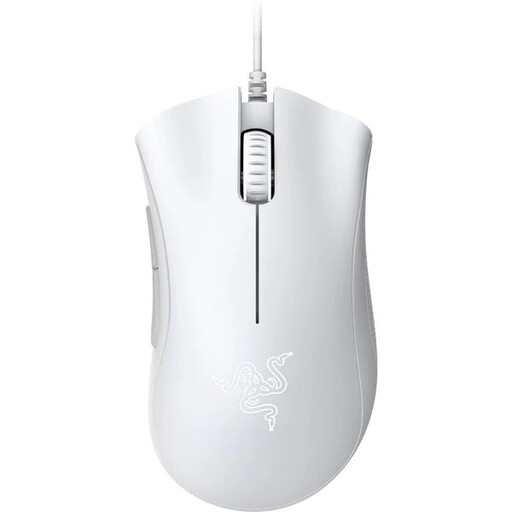
Why this product suits the profile: This wired model doesn't need a battery or a wireless receiver. It's aimed at users who want a clearly defined gaming mouse for their PC with an ergonomic right-handed shape.
The connection doesn't depend on battery level or wireless interference. The technical specifications state 6400 DPI, five programmable buttons and a USB connection.
Optical 6400 DPI sensor, five programmable buttons and a stated click lifespan of up to 10 million clicks.
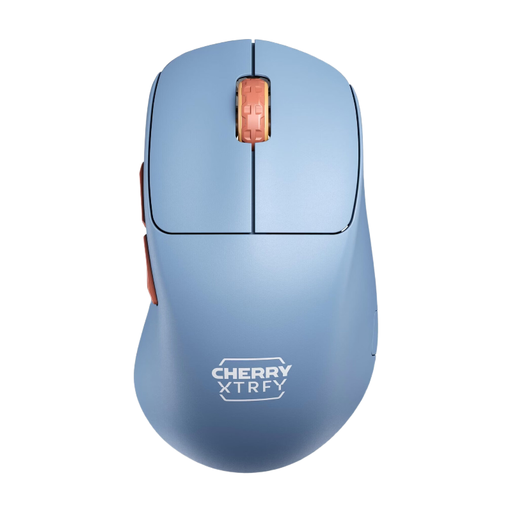
Why this product suits the profile: The M64 combines a weight of 53 grams, a 2.4 GHz connection and a Pixart-3395 sensor. It suits right-handed gamers who value low mass and a low front end for FPS games.
The specifications list the wireless type, sensor resolution and selectable polling rates separately. This makes it easier to assess suitability for fast-paced gaming than relying on DPI alone.
53 grams weight, Pixart-3395 sensor, up to 1000 Hz polling rate and up to 90 hours battery life according to product specifications.
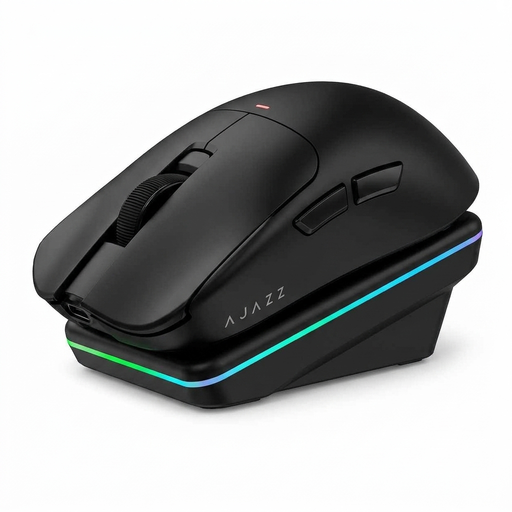
Why this product suits the profile: This mouse is aimed at users who want to combine gaming, office work and multiple devices. It supports Bluetooth, 2.4 GHz and USB-C, and comes with a magnetic charging dock.
The three connection modes are explicitly stated. In addition, DPI, polling rate and battery capacity are listed separately, rather than relying on a general performance promise.
PAW3311 sensor with up to 24000 DPI, up to 1000 Hz in wired and 2.4 GHz mode, 300 mAh battery and charging dock with RGB lighting.
We've put together a complete, regularly updated list of products that fully meet these strict selection criteria and the safety regulations in force in the EU.
Bluetooth is practical for office work, mobile devices and casual gaming. For fast-paced FPS games, a 2.4 GHz connection is often preferred because it's designed for a USB receiver. What ultimately matters are the manufacturer's specifications and compatibility with your PC.
Battery life varies depending on the battery, polling rate, lighting and connection mode. Product claims like "up to 75 or 90 hours" should be understood as maximum values. A charging dock or USB-C charging function can make ongoing use more convenient.
For most users, an adjustable range well below the advertised maximum values is sufficient. More important than 24000 DPI or more are consistent tracking, a suitable weight, a comfortable shape and a polling rate that matches your intended use.