
Lieferung heute & morgen

Qualitätsgarantie

Willkommens-Angebote freischalten: KOSTENLOSE Lieferung | Bis zu 80 % RABATT | Kostenlose 30-Tage-JoyPlus-Testphase
App herunterladen
A wireless gaming mouse can help keep your desk tidy and give you greater freedom of movement. For PC gamers, however, going cable-free is only part of the equation. The sensor, wireless connection, weight, shape and battery usage all determine whether the mouse performs reliably day after day.
When buying a wireless gaming mouse, you will often come across high DPI figures, 8,000 Hz polling rates and exceptionally low weight specifications. These figures are relevant, but they are often advertised without the necessary context. The following criteria will help you assess marketing claims and choose a wireless gaming mouse that suits the way you use it.
A high-DPI gaming mouse can move the cursor a long way across the screen with only a small hand movement. This can be useful for certain gaming styles and high screen resolutions. However, many players use significantly lower settings and adjust the sensitivity in the game as well.
What matters, therefore, is whether the DPI levels can be adjusted precisely and whether the software supports profiles or freely assignable buttons. A sensor with 26,000 or 44,000 DPI offers a wide adjustment range, but it does not automatically improve every user’s accuracy.
An 8,000 Hz gaming mouse theoretically transmits its positional data more frequently than a 1,000 Hz model. This can reduce the intervals between individual updates. However, the mouse, receiver, USB port, software and computer system must all support the mode for it to work.
A higher polling rate can also drain the battery more quickly and increase system load. For many applications, 1,000 Hz is sufficient. If you want to use 8,000 Hz, activate the function deliberately and monitor battery life in your own setup.
A lightweight gaming mouse weighing around 40 to 60 grams can be moved quickly and may feel comfortable at low sensitivity settings. Larger or heavier models, on the other hand, often offer more buttons, a pronounced thumb rest or a more stable support surface.
Weight should therefore be considered alongside the dimensions and grip style. An ergonomic gaming mouse does not necessarily have to be exceptionally light. Palm, claw and fingertip grips all have different requirements when it comes to shape and shell height.
Pay attention to the genuinely usable DPI range, the available levels and the configuration options. For PC gaming, specifications such as tracking speed and maximum acceleration are also relevant. They describe the sensor’s technical limits, but should not be confused with a guaranteed better gaming experience.
A wireless gaming mouse should transmit movements reliably during rapid changes of direction. Use the mouse on a suitable, even surface and keep the sensor opening free from dust.
The polling rate is measured in hertz. 1,000 Hz corresponds to a theoretical update every millisecond, while 8,000 Hz means updates are requested much more frequently. The advertised response time should always be considered in conjunction with the transmission mode.
For example, the Reaper 820 Wireless is specified with 0.125 ms and 8,000 Hz. The HyperX Pulsefire Haste 2 Wireless is specified as supporting up to 1,000 Hz in 2.4 GHz mode. The comparison shows that a higher figure is only relevant if it can be used in your preferred wireless mode and with your existing hardware.
For competitive gaming, 2.4 GHz wireless via a USB receiver is usually the obvious choice. Bluetooth is particularly suitable for multiple devices, mobile systems or workspaces without a free USB port. However, a Bluetooth gaming mouse may use a lower polling rate depending on the model.
USB-C is convenient if the mouse can continue to be used as a wired device while charging. You should also check:
Built-in lithium batteries must not be opened or replaced yourself. If you notice visible damage, unusual heat or a swollen casing, stop using the mouse and dispose of it properly.

Why this product suits the profile: This model combines a low weight with 2.4 GHz wireless, Bluetooth and USB cable operation, making it suitable for a range of PC setups.
The specifications list the wireless mode and polling rate separately: 1,000 Hz is specified for 2.4 GHz, while Bluetooth is designed to provide up to 100 hours of battery life.
Approximately 61 g, 26,000-DPI sensor, six programmable buttons and USB-C charging port.
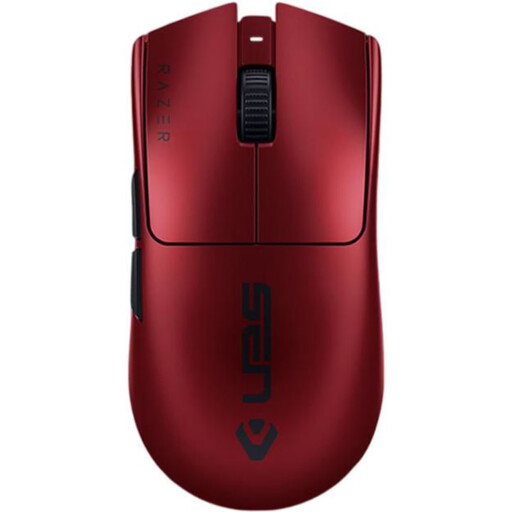
Why this product suits the profile: For users looking for a lightweight, right-handed mouse with a high polling rate and clearly specified USB-C functionality.
The 8,000 Hz function is explicitly linked to system support. This means you can check before buying whether the desired mode can be used in practice.
54 g, up to 35,000 DPI, 8,000 Hz, six programmable buttons and up to 95 hours of battery life according to the product specifications.

Why this product suits the profile: This mouse is designed for players who need plenty of functions directly on the body and prioritise longer battery life over minimal weight.
The 102 g weight and larger number of buttons are clearly stated. This makes it easier to weigh up the shape against a lightweight gaming mouse with fewer controls.
13 programmable buttons, onboard memory, USB-C operation and a stated battery life of up to 140 hours.
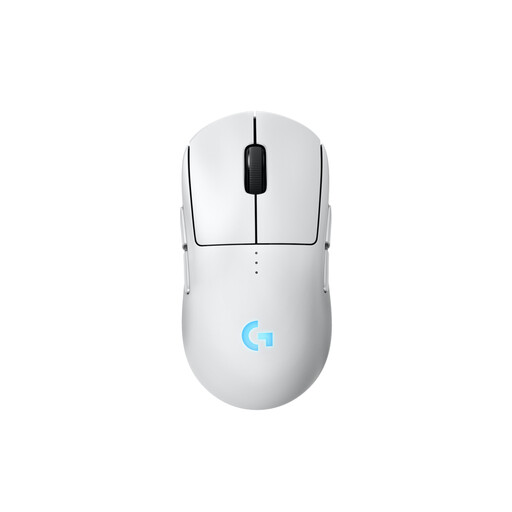
Why this product suits the profile: The symmetrical design and interchangeable magnetic side buttons appeal to users who need left- and right-handed use or different grip styles.
The button layout can be physically adjusted. This means the shape is not limited to use with one hand.
HERO-2 sensor, LIGHTSPEED wireless, USB-C charging, up to 95 hours of battery life and configurable side buttons.
We have put together a complete, regularly updated list of products that fully meet these strict selection criteria and the safety regulations applicable in the EU.
Yes, provided the preferred wireless mode, USB receiver and computer system work reliably together. For competitive use, 2.4 GHz wireless with a dedicated receiver is usually the sensible choice. Bluetooth can be convenient, but depending on the model it may come with a lower polling rate.
The manufacturer’s stated battery life depends on the wireless mode, polling rate, lighting and usage habits. The models in this selection quote figures ranging from approximately 72 to 140 hours, for example. Actual battery life may be lower at 8,000 Hz or with the lighting switched on. With suitable models, a USB-C cable allows you to continue using the mouse while it charges.
There is no universally suitable setting. It depends on the game, screen resolution, mouse mat size and personal sensitivity. We recommend choosing a model with several storable DPI levels, so you can quickly adjust the sensitivity for different games or applications.