
Lieferung heute & morgen

Qualitätsgarantie

Willkommens-Angebote freischalten: KOSTENLOSE Lieferung | Bis zu 80 % RABATT | Kostenlose 30-Tage-JoyPlus-Testphase
App herunterladen
A wireless gaming mouse can give you greater freedom of movement at your desk and work well for gaming, working from home and switching between multiple devices. For competitive games such as CS2, Valorant and Apex Legends, however, it is not just high DPI values or eye-catching RGB lighting that count. What matters is whether the sensor, wireless connection, shape and battery setup suit the way you actually use it.
A gaming mouse with a high DPI rating may offer a high maximum resolution. That does not automatically mean it will be more precise at every setting. Many players use considerably lower values in everyday use and adjust the sensitivity in-game as well.
Pay attention to the sensor, adjustable DPI levels and software. Figures such as 24,000, 35,000 or 44,000 DPI are not enough on their own to guide your choice.
A gaming mouse with 8000 Hz transmits position data more frequently than a 1000 Hz model. This can increase the temporal resolution of inputs. At the same time, the feature requires a compatible receiver, suitable drivers and sufficient system resources. In Bluetooth mode, this polling rate is generally not achieved.
Therefore, check which connection mode the advertised polling rate actually applies to. According to the product data, the ATTACK SHARK R5 ULTRA can be set to up to 8000 Hz in 2.4 GHz mode, while Bluetooth is specified at 125 Hz.
A lightweight gaming mouse is easier to move quickly. However, a smaller battery can limit battery life. Conversely, a larger battery often adds extra weight. Battery-life figures also depend on the connection mode, lighting and polling rate.
Compare weight, battery capacity and battery life together rather than focusing on just one figure.
When choosing a gaming mouse with a PAW3950 sensor, PAW3311 sensor or proprietary sensor, you should pay attention to the following specifications:
A high DPI value is particularly useful if you work with high pointer sensitivity. For most users, stable tracking at their preferred setting is more important than the maximum value.
Polling rate is measured in Hertz. 1000 Hz corresponds to a data request approximately every millisecond. 2000, 4000 or 8000 Hz may appeal to serious players, but the setting should suit both your system and your playing style.
A tri-mode gaming mouse typically offers:
Bluetooth is convenient for use with multiple devices, but it generally operates at a lower polling rate. For competitive gaming, the supplied 2.4 GHz receiver is often the best choice.
An ergonomic gaming mouse should suit your hand size and grip style. Check its length, width and height, as well as whether it is designed for right- or left-handed users. Palm, claw and fingertip grips each place different demands on the shape of the casing.
The number of buttons is not automatically an advantage either. Five or six buttons are often enough for shooters. Strategy games, MMOs and productivity applications, on the other hand, may benefit from several programmable buttons. RGB lighting is primarily an aesthetic extra and should not dominate your decision.
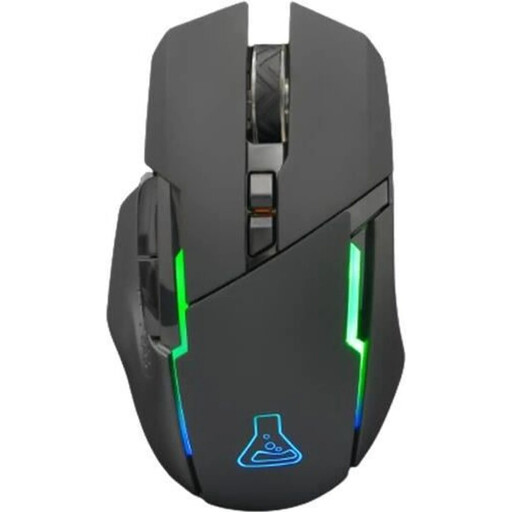
Why this product suits this profile: This mouse combines 2.4 GHz wireless connectivity, six programmable buttons and an adjustable range of 400 to 7200 DPI. That makes it suitable for first gaming setups and everyday PC use.
The technical specifications clearly state the connection type, DPI range, number of buttons and battery life of up to 32 hours. This makes it easier to compare the model with your own requirements.
2.4 GHz receiver, six programmable buttons and RGB lighting; stated weight: 125 g.
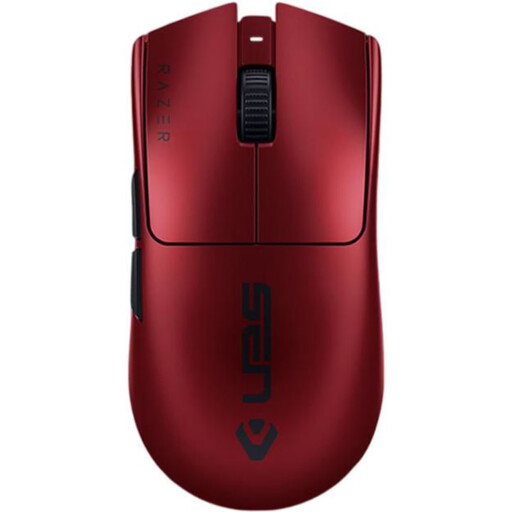
Why this product suits this profile: For users who want to combine low weight and a high polling rate with a wired fallback option, Razer specifies a weight of 54 g, up to 8000 Hz and USB-C connectivity.
The specifications distinguish between RF wireless and USB-C operation. Battery life is also stated as up to 95 hours, so the battery does not have to be judged solely by the peak polling-rate figure.
Optical sensor with up to 35,000 DPI, six programmable buttons and stated battery life of up to 95 hours.
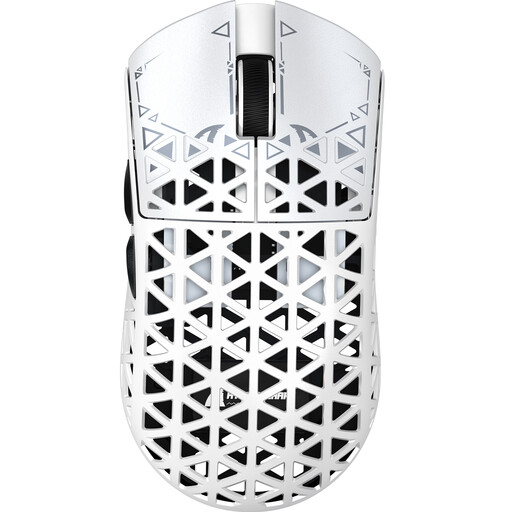
Why this product suits this profile: This model is aimed at players looking for very low weight, a PAW3950 sensor, multiple connection options and a high polling rate in one device.
The product data lists the different polling rates for 2.4 GHz, USB and Bluetooth separately. It also specifies the dimensions, a 230 mAh battery and a USB-C cable.
Stated weight of approximately 42 g, PAW3950 sensor, 2.4 GHz at up to 8000 Hz, plus wired and Bluetooth connectivity.

Why this product suits this profile: This model combines 2.4 GHz, Bluetooth and USB connectivity with a low weight of approximately 54 g. Replaceable batteries may appeal to users with long or variable working days.
The three operating modes are clearly specified, and the maximum polling rate of 1000 Hz is not presented as applying to Bluetooth. Two replaceable batteries reduce charging interruptions in everyday use.
PAW3311 sensor with up to 24,000 DPI, tri-mode connectivity, approximately 54 g and two interchangeable 300 mAh batteries.
We have put together a complete, regularly updated list of products that fully meet these strict selection criteria and the safety regulations applicable in the EU.
For CS2, Valorant and similar titles, a stable 2.4 GHz wireless connection via the USB receiver is usually the obvious choice. Bluetooth is better suited to laptops, tablets and office tasks. A USB cable is useful when the battery needs charging or you prefer to use the mouse in wired mode.
Battery life depends on the polling rate, lighting, wireless mode and usage. For the models mentioned, the stated battery life ranges from approximately 32 to 95 hours. Figures described as ‘up to’ should be treated as a guide. Also check whether the battery is built in or replaceable.
That depends on your playing style and system. The option may be worthwhile for serious players with a compatible PC and high-refresh-rate monitor. If you mainly use office applications, single-player games or Bluetooth, you may not need the high polling rate. Base your decision on the mode you actually use, not solely on the figure printed on the packaging.