
Lieferung heute & morgen

Qualitätsgarantie

Willkommens-Angebote freischalten: KOSTENLOSE Lieferung | Bis zu 80 % RABATT | Kostenlose 30-Tage-JoyPlus-Testphase
App herunterladen
The search for a new wireless keyboard can quickly become overwhelming. The market is flooded with models that promise wireless freedom but often lead to frustration in practice. A clutter-free desk is easy to achieve, but what good is it if the connection drops, the typing experience feels wrong, or the battery is constantly dead? As a Joybuy Product Recommendation Officer, I'll filter the essential information for you and show you how to separate marketing hype from genuine performance features.
Many buyers fall into recurring pitfalls that complicate their daily workflow. Before you make a decision, you should be aware of these three common problems:
To avoid these pitfalls, focus on three verifiable technical specifications. These are the primary determinants of the reliability and user comfort of your future keyboard.
The type of wireless connection is the foundation for a smooth experience.
The typing feel is determined by the technology beneath the keycaps.
Always check for the standard layout for your region (e.g., QWERTY keyboard in the US/UK) to find special characters in their familiar places. The form factor determines the keyboard's size:
Here are three models that represent a considered choice for specific user groups based on objective features.

Why This Fits Their Persona: Designed for professional environments where productivity and comfort are paramount. The keyboard combines the precise feel of a mechanical keyboard with a quiet keystroke that won't disturb others in an office. The multi-device function is ideal for users who switch between a company laptop and a personal computer.
Solves the "wrong switch type" problem with tactile quiet mechanical switches. The dual connectivity via Bluetooth and the Logi Bolt USB receiver bypasses the trap of unstable connections and poor compatibility.
German QWERTZ layout, smart key backlighting, and seamless switching between up to 3 devices. The aluminum body ensures high stability.
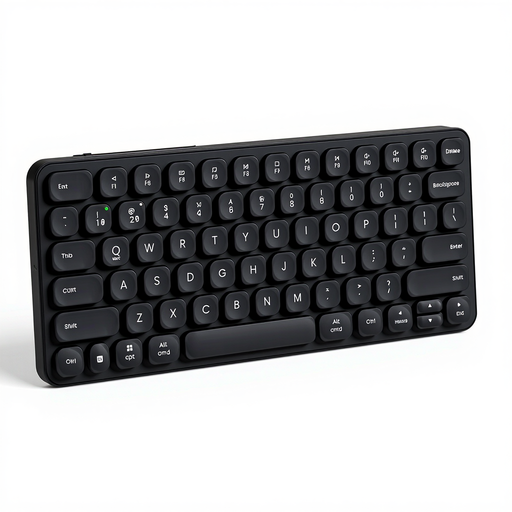
Why This Fits Their Persona: Perfect for users who are frequently on the go or work in various locations. The ultra-slim and compact design fits easily into any bag. The ability to connect to up to four devices makes it a versatile companion for a laptop, tablet, and smartphone.
The multi-mode connection (Bluetooth 4.0, 5.0, and 2.4G) ensures maximum compatibility and bypasses connection issues. The long battery life of up to 90 days (according to the manufacturer) prevents the battery trap. Note: This model has a US (QWERTY) layout, which underscores the importance of checking the layout before buying.
Extremely slim design (13 mm) with an aluminum frame. Quiet scissor-switch keys for comfortable typing. Rechargeable via USB-C.
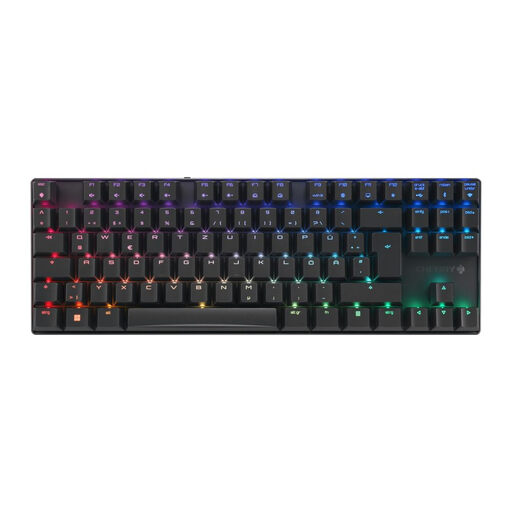
Why This Fits Their Persona: For gamers who refuse to compromise on performance. This keyboard offers the responsiveness of a wired keyboard in a wireless format. The compact TKL form factor leaves more room for the mouse, while the mechanical switches provide the precise feedback required for gaming.
Sidesteps the latency trap with a special 2.4 GHz gaming mode with sub-1ms latency. The high-quality CHERRY MX2A Brown switches provide the desired tactile feedback without a loud click, solving the "wrong switch type" problem for demanding users.
German QWERTZ layout in a TKL form factor. Robust aluminum housing, triple-mode connectivity (2.4 GHz, Bluetooth, Cable), and features like Full N-Key Rollover for flawless input.
We've compiled a full, up-to-date list of products that fully meet these strict selection criteria and German regulations.
Battery life varies greatly depending on the model and usage. Keyboards with integrated, switchable backlighting often last several weeks per charge. Models without backlighting that use replaceable AA or AAA batteries can achieve a runtime of 12 to 36 months, according to manufacturer specifications, such as the Logitech MK540 Keyboard and Mouse Combo. Rechargeable models like the RAPOO E9050L offer up to 90 days on a full charge. Always check the manufacturer's claims and note that intensive use will reduce battery life.
Neither technology is universally better; it depends on your use case.
Yes, modern wireless gaming keyboards are absolutely competitive. Look for models that offer 2.4 GHz wireless technology with a latency of 1 millisecond (ms) or less. This response time is indistinguishable from a wired connection for humans. Models like the CHERRY MX 8.2 TKL are specifically designed for this purpose and also offer essential gaming features like anti-ghosting and N-key rollover.