
Lieferung heute & morgen

Qualitätsgarantie

Willkommens-Angebote freischalten: KOSTENLOSE Lieferung | Bis zu 80 % RABATT | Kostenlose 30-Tage-JoyPlus-Testphase
App herunterladen
A wireless keyboard frees up space on your desk and is suitable for PCs, Macs, tablets and smartphones. However, models vary considerably in terms of layout, connectivity, power supply and key mechanism. If you focus only on RGB lighting, a long range or an especially slim design, it is easy to overlook important details.
A Bluetooth keyboard does not require a USB receiver, but pairing speed can vary depending on the device and surroundings. A wireless keyboard with a 2.4 GHz receiver is usually connected directly via a USB port. This connection can be useful for gaming or applications where minimal input lag is important.
Many models combine Bluetooth, 2.4 GHz and USB-C. This type of tri-mode keyboard offers greater flexibility, but requires a little more explanation: the receiver needs to be stored safely, and depending on the model, you switch between modes using a selector, key combination or function key.
A compact keyboard with a 60, 65 or 75 per cent form factor takes up less space. Depending on the layout, however, it may lack a number pad, a separate row of function keys or individual navigation keys. This can make sense for gaming and space-saving workstations. If you enter numbers frequently, you should choose a keyboard with a number pad instead.
The term “QWERTY” is also a common source of confusion. For users in Germany, a keyboard with a German QWERTZ layout is often more straightforward. With US layouts, Y and Z are positioned differently, while umlauts and special characters may also be accessed using different key combinations.
A keyboard with RGB lighting can make it easier to find your way around in dark surroundings or help personalise your workspace. However, it increases power consumption and does not replace clearly legible key markings. The keycaps used, brightness controls and the option to switch the lighting off completely are also important.
For use with several devices, a multi-device keyboard with dedicated switching keys is practical. Check how many devices can be saved at the same time and whether Windows, macOS, iPadOS, iOS, Android or Linux are supported. A model for PC and Mac may offer different function-key assignments, but compatibility should still be checked in the product description.
The Bluetooth version is also relevant, but it is not the only deciding factor. The operating system and the specific Bluetooth implementation also affect the connection. A USB receiver can be useful with desktop PCs if Bluetooth is not built in.
Pay attention to the exact number of keys, the dimensions and the layout. A 75 per cent keyboard usually retains the arrow keys and some function keys, while a TKL model generally omits the number pad.
Key types can broadly be divided into three categories:
A mechanical keyboard is not automatically quiet. The switch type, case, dampening material and keycaps all affect the level of noise produced.
Wireless keyboards use either AAA batteries, an integrated rechargeable battery or a combination of wireless and USB operation. With battery-powered models, runtime figures should always be understood as usage estimates. Lighting, wireless standard and typing time all affect actual power consumption.
For integrated lithium batteries, a suitable charging port and safe handling are important. Keyboards should be protected from liquids, high temperatures and improper dismantling. A soft, dry cloth is suitable for cleaning, along with appropriate compressed air if required. Liquid should never be applied directly to the device.
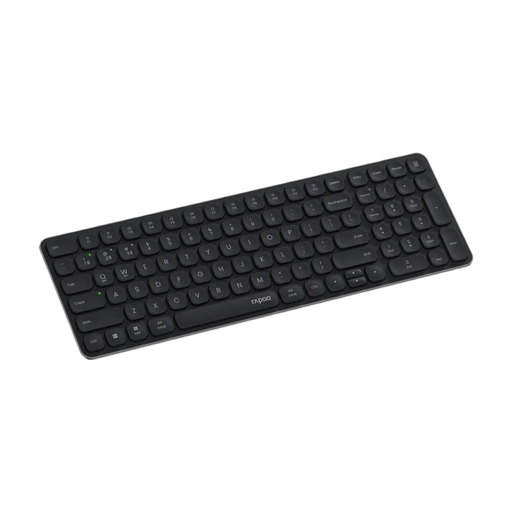
Why this product suits the profile: This slim keyboard with a German layout is aimed at users who need a number pad in the office or at home and want to connect several devices.
The German QWERTZ layout avoids the adjustment period that typically comes with switching from an office keyboard. Bluetooth and 2.4 GHz provide alternative connection options.
99-key layout, scissor keys, 12 multimedia keys and operation with two AAA batteries.
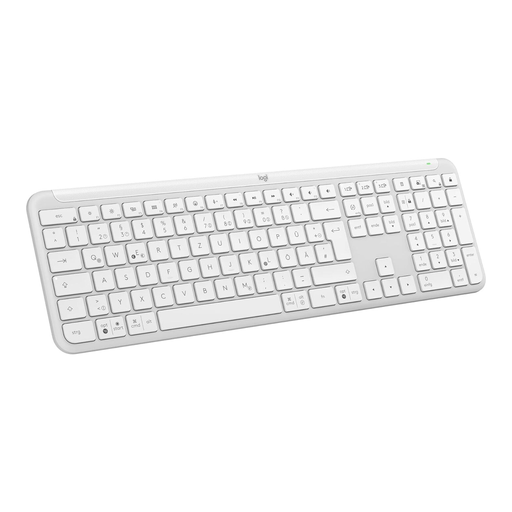
Why this product suits the profile: For office workers and home-working users who prefer a slim, quiet keyboard with device switching.
Compatibility with Windows, macOS, ChromeOS, Linux, iPadOS, iOS and Android is specified. Up to three devices can be switched between at the touch of a key.
105 keys, Logi-Bolt receiver, Bluetooth, adjustable feet and two AAA batteries included.
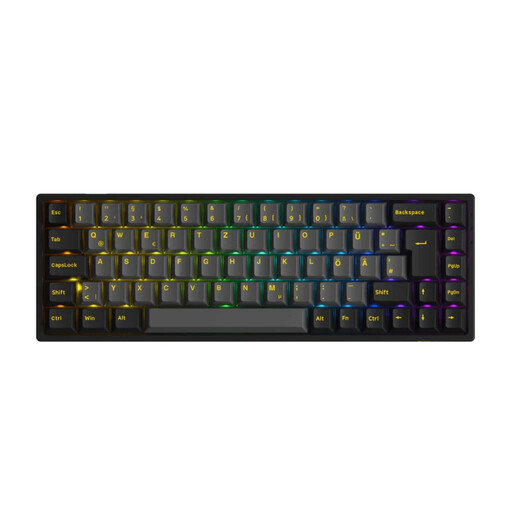
Why this product suits the profile: The 65 per cent form factor is aimed at gamers, programmers and users who want to combine mechanical keys with several connection options.
Bluetooth 5.0, 2.4 GHz and USB-C are available as connection modes. The ISO-DE layout addresses the common mistake of buying a US layout.
Hot-swap support for 3-pin and 5-pin switches, RGB lighting, N-key rollover and a 1,800-mAh battery.
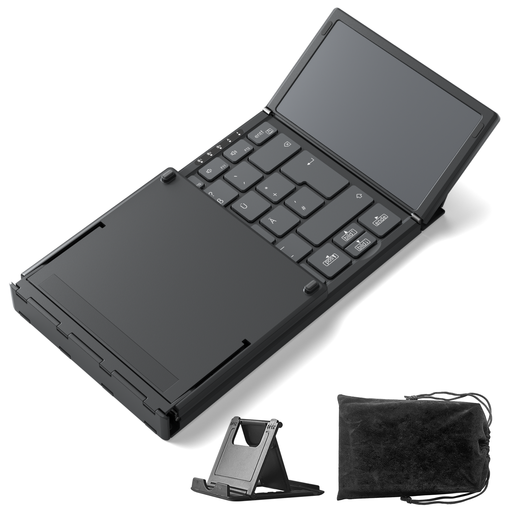
Why this product suits the profile: For students, travellers and tablet users who need a lightweight keyboard with an integrated touchpad.
The foldable design reduces its size when carried. Three Bluetooth channels make it easier to switch between Windows, Android and iPadOS devices.
Weight of 228 grams, integrated touchpad, Bluetooth 5.3 and keys measuring 15 × 15 millimetres.
We have put together a complete, regularly updated list of products that fully meet these strict selection criteria and the safety regulations applicable in the EU.
For Bluetooth, activate Bluetooth on your computer, put the keyboard into pairing mode and select it from the device list. With a 2.4 GHz wireless keyboard, plug in the USB receiver and switch on the keyboard. The exact steps may vary depending on the model.
This depends on the battery or rechargeable battery type, lighting, wireless standard and usage. Models with AAA batteries do not require recharging, while keyboards with an integrated battery are charged via USB-C. RGB lighting can be expected to result in higher energy consumption.
This depends on the switch used and the level of noise produced. Linear or tactile switches may be suitable for typing, while clicky switches can be disruptive in shared spaces. For a quiet office, slim scissor or membrane keys are generally the more straightforward choice.