
Lieferung heute & morgen

Qualitätsgarantie

Willkommens-Angebote freischalten: KOSTENLOSE Lieferung | Bis zu 80 % RABATT | Kostenlose 30-Tage-JoyPlus-Testphase
App herunterladen
A wireless keyboard can declutter your desk, connect multiple devices and save space when you’re on the move. Yet the sheer range of products can easily lead to a wrong purchase. Marketing terms like “multi-device”, “gaming” or “long battery life” alone tell you little about whether a keyboard will work with your Windows PC, MacBook, tablet or smartphone.
This guide explains which technical specifications really matter before you buy, and which models suit different usage scenarios.
A Bluetooth keyboard doesn’t need a separate receiver, but it does require a compatible Bluetooth device. A wireless keyboard with a 2.4 GHz receiver usually connects via a USB dongle. This can be handy for desktop PCs, but it does take up a USB port.
A tri-mode keyboard typically combines Bluetooth, 2.4 GHz and a USB cable. This flexibility is useful if you switch between a laptop, tablet and gaming PC. Still, check whether the number of devices you need is actually supported and how switching works – by a button, a key combination or a rotary dial.
For users in Germany, a QWERTZ keyboard is usually the simpler choice. On a QWERTY keyboard, the “Y” and “Z” keys are in different positions; umlauts and special characters may also be arranged differently. Although you can change the keyboard layout in the operating system, the printed keycaps remain the same.
So pay attention not just to the language of the product description, but specifically to the mention of “DE layout” or “QWERTZ”. For US models, “QWERTY US layout” should be clearly stated.
A compact keyboard, a 75% keyboard or a 65% model saves space, but depending on the design it may omit the number pad, function keys or separate navigation keys. For spreadsheets, a missing number pad can be annoying. For small desks, mobile work or gaming, a reduced width can be a sensible choice.
Three points are relevant when choosing:
With a multi-device keyboard, the number of devices it can store should match your own usage. Models with three or four channels are ideal for a combination of work computer, tablet and smartphone, for example.
A mechanical keyboard uses individual switches under the keys. The feel, noise level and actuation depend on the switch type. Linear switches feel smooth, while tactile or clicky variants can give you more noticeable feedback. A mechanical keyboard is therefore not automatically quieter or more pleasant than a scissor-switch or membrane keyboard.
For shared spaces, flat scissor mechanisms or models explicitly described as quiet are often more suitable. A hot-swap keyboard lets you replace compatible 3-pin or 5-pin switches without soldering. Before modifying, check the manufacturer’s specifications and the compatibility of the replacement switches.
Don’t just compare the stated capacity – also consider the conditions for battery life. An RGB keyboard with the lighting turned on generally uses more power than when the LEDs are off. Figures like “up to” usually refer to specific usage profiles.
Battery-powered models don’t need charging, while keyboards with a built-in battery are charged via USB-C. For longer trips, the charge level, a spare cable and the ability to use the keyboard wired are practical factors to consider.
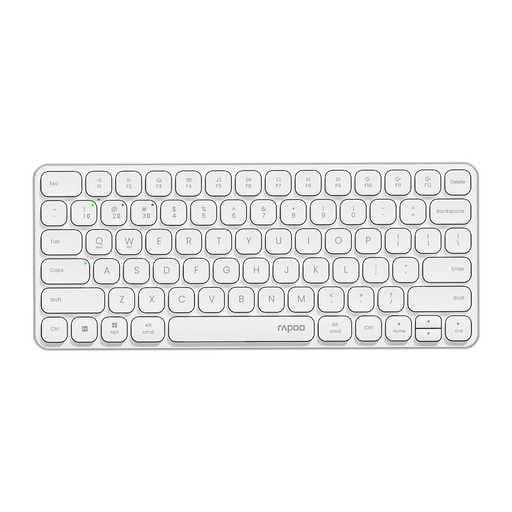
Why this product fits the profile: This model combines a 78-key layout with Bluetooth 4.0/5.0 and 2.4 GHz wireless. It is designed for Windows, Mac OS and other systems, making it suitable for school, office and compact workstations.
The transmission methods are clearly stated. The compact design is also described with scissor keys and multimedia keys, rather than just a vague mobility promise.
78 keys, 500 mAh battery, aluminium frame and up to 90 days of stated battery life.

Why this product fits the profile: The 98% form factor offers plenty of keys while remaining more compact than a classic full-size model. It is aimed at users who want to combine mechanical switches, status information and customisable features.
Tri-mode connectivity and hot-swap compatibility are clearly stated. This means you can use the keyboard wired, via Bluetooth or over 2.4 GHz.
10,000 mAh battery, rotary dial, TFT display, RGB lighting and support for 3-pin and 5-pin switches according to product specifications.
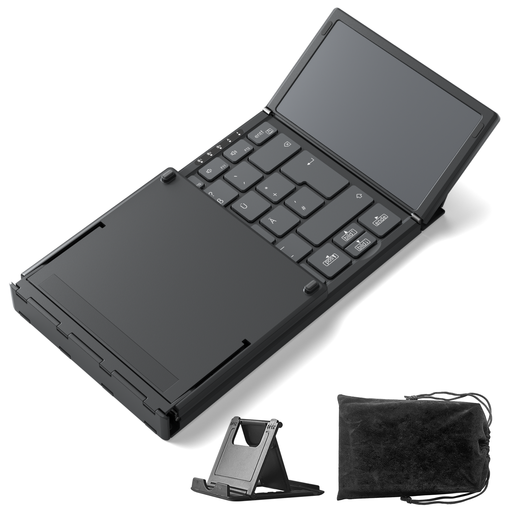
Why this product fits the profile: This foldable keyboard is designed for mobile professionals, students and tablet users. It supports up to three Bluetooth devices and integrates a touchpad for situations without a separate mouse.
The dimensions when folded, the weight of 228 g and Bluetooth 5.3 are all specified. This makes it easier to assess for luggage and mobile workstations.
Integrated touchpad, three Bluetooth channels and support for Windows, iPadOS and Android.
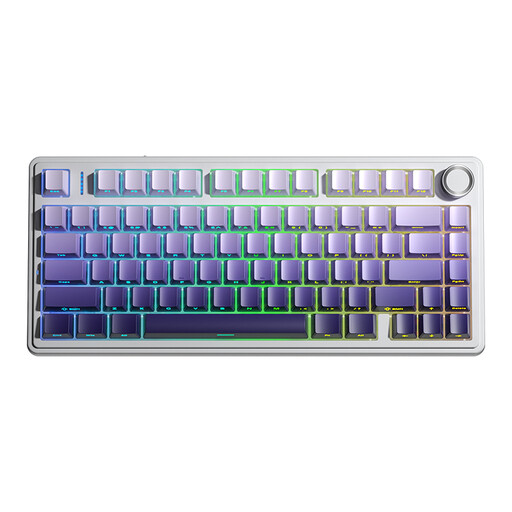
Why this product fits the profile: The 75% keyboard keeps the arrow keys and reduces the width compared to full-size models. It is suitable for gaming and productive use with a PC, laptop, tablet or smartphone.
The three connection methods – Bluetooth 5.0, 2.4 GHz and USB – are specified. Additionally, compatible 3-pin and 5-pin switches can be swapped without soldering.
4000 mAh battery, 16.8 million RGB colours, programmable keys and N-key rollover according to manufacturer specifications.
We have put together a complete, regularly updated list of products that fully meet these strict selection criteria and the safety regulations in force in the EU.
For Bluetooth models, turn on Bluetooth on your laptop, put the keyboard into pairing mode and select it in the system settings. For 2.4 GHz models, plug in the USB receiver and switch on the keyboard. The exact key combinations are in the instruction manual.
Battery life depends on the battery capacity, lighting, usage time and wireless standard. Models with AAA batteries can run for several months depending on the product specification. With built-in batteries, you should pay attention to capacity, charging time and the ability to use the keyboard wired while charging.
That depends mainly on the switch type and the noise level. Linear or explicitly quiet switches can be suitable for many workplaces. In shared spaces, you should consider the volume and, if necessary, opt for a flat scissor-switch or membrane keyboard.