
Lieferung heute & morgen

Qualitätsgarantie

Willkommens-Angebote freischalten: KOSTENLOSE Lieferung | Bis zu 80 % RABATT | Kostenlose 30-Tage-JoyPlus-Testphase
App herunterladen
A wireless keyboard frees up space on your desk and works with a PC, laptop, tablet or smartphone. But not every model suits every workflow. A bargain buy can quickly turn impractical if the layout doesn't match the UK keyboard standard, the connection keeps dropping, or essential keys are missing.
This buying guide explains what details matter before you purchase, and which models suit different user profiles.
Many internationally available keyboards use the QWERTY or US layout. On a UK keyboard, however, QWERTZ is the standard. Differences include the positions of Z and Y, as well as umlauts and special characters. Although you can change the keyboard layout in Windows or macOS, the keycap labelling stays the same.
If you regularly type in German, you should specifically look for a QWERTZ keyboard. A QWERTY keyboard can be useful for English-language applications or users who prefer an international layout.
A Bluetooth keyboard connects directly to compatible devices. This is handy for tablets, smartphones and many laptops. A 2.4 GHz connection, on the other hand, usually requires a USB receiver and is ideal for desktop PCs. Some models also support a wired USB-C mode.
It's important to check the details on device count and switching between devices. A multi-device keyboard can switch between three, four or more saved connections, depending on the model. This saves time, but doesn't replace checking operating system compatibility.
A compact keyboard or a 65% or 75% layout takes up less space. However, this often means no number pad, function keys or individual navigation keys. For spreadsheets and data entry, a keyboard with a separate number pad is usually more practical.
An ultra-flat keyboard isn't automatically suitable for long typing sessions either. What really matters is key travel, mechanism, tilt angle and personal preference.
Check before you buy:
A keyboard for Windows and Mac may offer different labelling or toggle functions for both systems. With a keyboard that uses a USB receiver, you should also check whether your device has a suitable USB-A or USB-C port.
Bluetooth 5.x can provide a modern connection to compatible devices. However, actual stability also depends on your environment, distance and radio interference. Manufacturer claims such as a range of up to ten metres apply under certain conditions; walls and other wireless sources can reduce the range.
For gaming, a wired or 2.4 GHz connection is often the obvious choice. Some gaming keyboards also offer Bluetooth for office or tablet use.
Wireless keyboards use either:
Battery life figures like "up to 18 months" or "up to 26 hours" depend on usage, lighting and test conditions. With RGB lighting, battery life usually drains faster than on a keyboard without lighting. For on-the-go use, a battery indicator or a wired backup mode can be useful.
Scissor mechanisms are common on many flat office keyboards. They usually offer short key travel and a quiet typing sound. A mechanical keyboard uses individual switches per key. It can feel more direct and, on some models, can be customised with hot-swap switches. However, height, weight and noise levels are often higher.
Look for specific details on key travel, switch type, keycap material and layout, rather than vague marketing claims like "comfortable" or "professional".
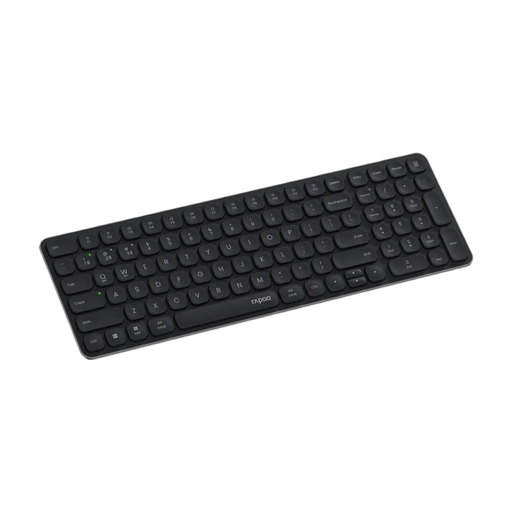
Why this product fits the profile: This model combines a German layout, a 99-key format with number pad, and multiple connection types for Windows, Mac and Linux.
The DE layout reduces the risk of incorrectly labelled special characters. Connection is via Bluetooth 4.0, Bluetooth 5.0 or 2.4 GHz.
99 keys, twelve media keys, scissor mechanism and a stated battery life of up to twelve months.
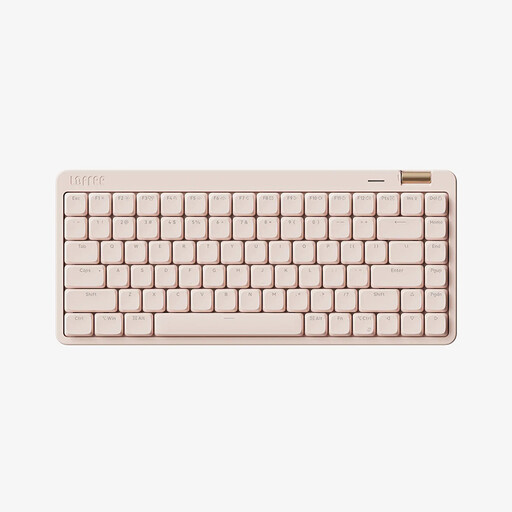
Why this product fits the profile: The 84-key layout combines compact dimensions with mechanical low-profile switches and three operating modes.
Bluetooth 5.4, 2.4 GHz and USB-C avoid reliance on just one connection type. The layout remains functional despite the compact design.
Kailh linear low-profile switches, PBT keycaps, 2,000 mAh battery and white LED lighting.
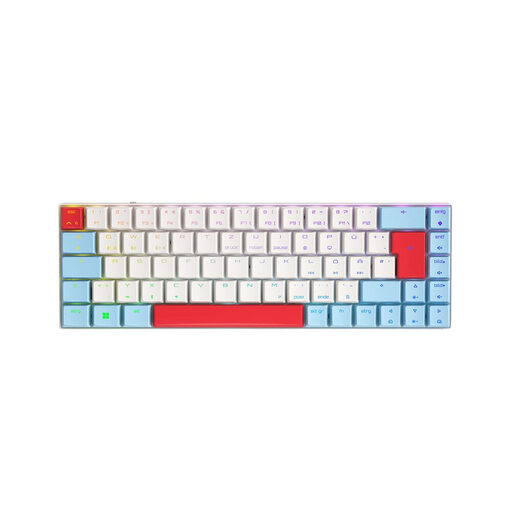
Why this product fits the profile: The German QWERTZ layout, 65% format and tri-mode connection are designed for gamers with limited space and multiple devices.
The QWERTZ layout prevents the typical deviation of a US keyboard. For gaming, 2.4 GHz, N-key rollover and anti-ghosting are also available.
CHERRY MX Low Profile Speed switches, per-key RGB, USB-C, Bluetooth for up to three devices and a 2,800 mAh battery.
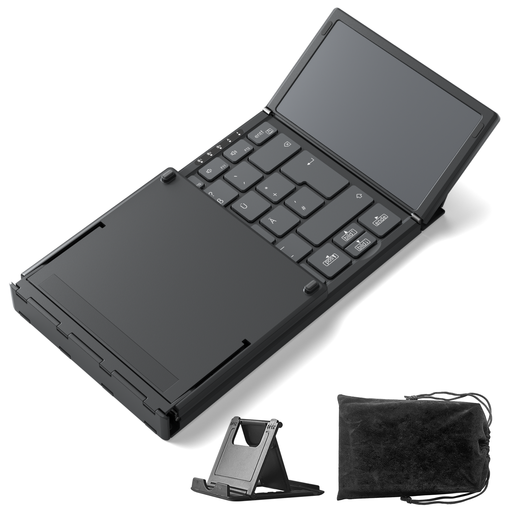
Why this product fits the profile: The foldable design is intended for travel, the library, cafés or use with a tablet and smartphone.
The Bluetooth connection supports three channels. The built-in touchpad often makes a separate mouse unnecessary when you're on the move.
Bluetooth 5.3, 228 g weight, foldable dimensions and additional keys for volume and screen brightness.
We've put together a full, regularly updated list of products that fully meet these strict selection criteria and the safety regulations in force in the EU.
For a PC, a 2.4 GHz keyboard with a USB receiver is practical, provided you have a compatible port. For laptops, Bluetooth is often sufficient. If you switch between a PC, laptop, tablet and smartphone, you should choose a multi-device keyboard with several channels.
Battery life depends on capacity, lighting, connection type and usage. Replaceable AAA batteries can last many months on office models. Built-in batteries are charged via USB-C; on illuminated mechanical models, battery life is usually shorter than on a simple office keyboard.
That depends on the switch type and noise level. Linear low-profile switches can offer short travel, while other mechanical switches are noticeably louder. In shared spaces, you should check noise levels and user reviews. What also matters is the right layout, the desired form factor and the connection to your work device.