
Lieferung heute & morgen

Qualitätsgarantie

Willkommens-Angebote freischalten: KOSTENLOSE Lieferung | Bis zu 80 % RABATT | Kostenlose 30-Tage-JoyPlus-Testphase
App herunterladen
A wireless keyboard frees up space on your desk and makes it easier to switch between your PC, laptop, tablet and smartphone. However, product promises don't always lead to the right buying decision. What matters isn't just design and wireless range, but above all layout, connection technology, power supply and intended use.
Bluetooth, 2.4 GHz wireless and USB-C cable all have different characteristics. A Bluetooth keyboard works well with tablets and smartphones, while a USB receiver often provides a straightforward connection for desktop PCs. A tri-mode keyboard combines Bluetooth, 2.4 GHz and wired operation, but its setup is usually more involved.
So check which ports and operating systems your devices support. For example, a laptop without a USB-A port can make using a classic nano receiver difficult unless you have an adapter.
A 75% keyboard saves space but normally keeps the arrow keys and important function keys. A 65% or 60% keyboard is even smaller, but reduces the available key area. The layout question is also important: QWERTY and QWERTZ differ, among other things, in the positions of Y and Z.
If you regularly write German texts, you should explicitly look for a QWERTZ keyboard. With iPad keyboards and international models, the physical layout can differ from the device's language setting. So check both the product description and the system settings.
Manufacturer claims about battery life depend on lighting, usage time and wireless standard. A rechargeable keyboard doesn't need regular battery changes, but must be charged via USB-C or another port. Models with AAA batteries can be practical for longer life, but incur ongoing costs and need replacement batteries.
Also pay attention to information about charging and battery safety. Lithium-ion or lithium-polymer batteries should not be opened or exposed to high heat, moisture or mechanical damage.
For multiple devices, a multi-device keyboard makes sense. What matters is the actual number of connections it can store, not just the term "multi-device". According to the product information, the CHERRY KW 9200 MINI supports up to four devices: two Bluetooth connections, one 2.4 GHz connection and one wired USB-C mode.
Other models, like the Inateck Foldable Mini Keyboard, offer three Bluetooth channels. Look for easily accessible switching keys or status indicators. A clear display reduces the risk of accidentally typing on the wrong device.
Scissor mechanisms, as commonly found on flat office keyboards, offer a short key travel and a relatively quiet typing sound. Mechanical keyboards use individual switches per key. They can provide defined feedback and high customisability, but are noticeably louder depending on the switch type.
For an office with several people, a quiet scissor keyboard is often more suitable than a mechanical keyboard with a loud click switch. For gaming or heavy typing, on the other hand, linear mechanical switches, N-key rollover and anti-ghosting can be relevant. These features should be explicitly listed in the technical specifications.
A compact keyboard without a numeric keypad takes up less space, but is less practical for extensive number entry. The CHERRY KW 9200 MINI has a 75% format with 79 keys and measures 295.5 × 129 × 15.9 millimetres according to the product data. The Rapoo E9310M, on the other hand, uses a 99-key layout with a numeric keypad and remains comparatively flat.
For spreadsheets, accounting or data entry, a numeric keypad can make your workflow easier. For commuters, small desks and mobile workstations, a reduced layout is usually easier to transport.
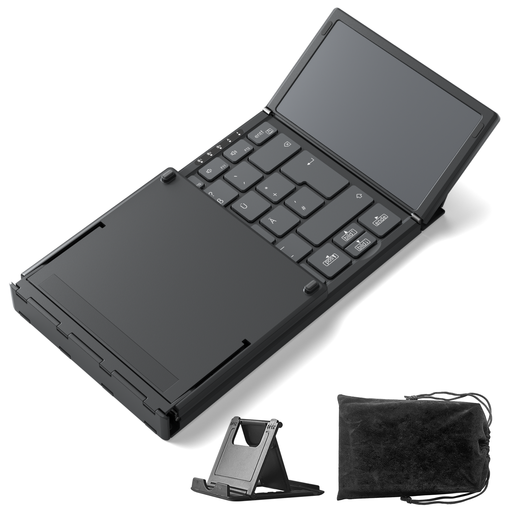
Why this product fits the profile: The foldable format with integrated touchpad is aimed at mobile users who want to combine keyboard and mouse function in one device. According to the product description, it supports Windows, iPadOS and Android and can be connected to three devices.
The stated QWERTZ compatibility and the three Bluetooth channels address typical layout and connection issues. Before buying, you should check compatibility with your specific device.
228 grammes weight, foldable dimensions and integrated touchpad. According to the product information, the keys are designed for quiet typing.
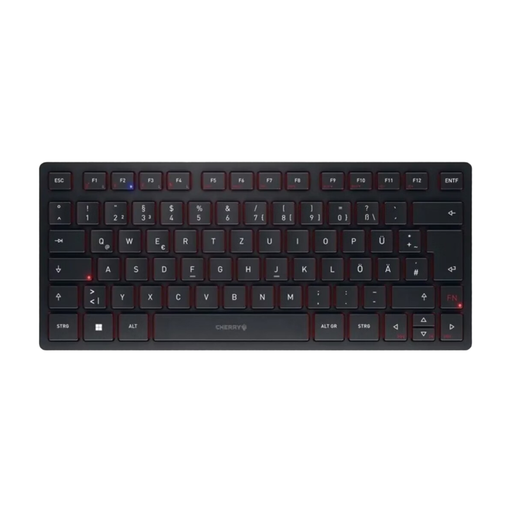
Why this product fits the profile: The combination of four connection paths, USB-C charging port and CHERRY SX scissor mechanism makes it suitable for a flexible workspace in the office and home office.
The wired mode serves as a fallback option when wireless connections are disrupted or the battery needs charging. The product information also indicates AES-128 encryption in Bluetooth and 2.4 GHz modes.
Four connection channels, rechargeable battery, 75% format and, according to the manufacturer, up to 10 million keystrokes.
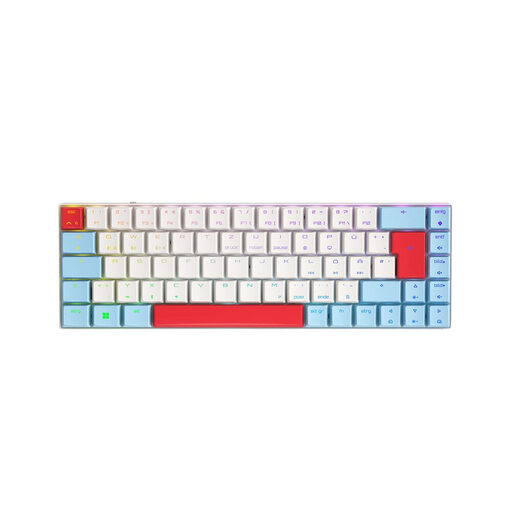
Why this product fits the profile: The 65% form factor creates room for mouse movement. Low-profile MX Speed switches, tri-mode connection and RGB lighting are aimed at gaming and workstations with changing requirements.
The explicitly stated German QWERTZ layout reduces the risk of an unsuitable international key set. 2.4 GHz, Bluetooth and USB-C enable different connection types depending on the application.
65% layout with 69 keys, programmable RGB lighting, N-key rollover and integrated battery with 2,800 mAh according to the product data.
We've put together a complete, regularly updated list of products that fully meet these strict selection criteria and the safety regulations in force in the EU.
For Bluetooth, activate Bluetooth on your target device and select the keyboard in the settings. For 2.4 GHz models, plug the nano receiver into a suitable USB port. A USB-C keyboard can usually be connected directly and charged at the same time. With multiple devices, switching is done via a special key or key combination.
The battery life depends on lighting, wireless standard and usage. Manufacturer claims range from several weeks to many months, depending on the model. Keyboards with AAA batteries can reportedly run for up to 18 months, while rechargeable models need to be charged regularly via USB-C. What matters is the information about actual usage, not just the battery capacity.
That depends on the switch type and noise level. Linear switches can be quieter than click switches, but a mechanical keyboard is often still more audible than a scissor mechanism. For shared spaces, you should check the information about the switch type and noise characteristics. For gaming, programming and heavy typing, mechanical models can be appealing due to their defined key feel.