
Lieferung heute & morgen

Qualitätsgarantie

Willkommens-Angebote freischalten: KOSTENLOSE Lieferung | Bis zu 80 % RABATT | Kostenlose 30-Tage-JoyPlus-Testphase
App herunterladen
A tidy, clutter-free desk can significantly boost concentration and productivity in your home office or at work. A wireless keyboard is a key component for achieving this. However, the selection is vast, and the technical differences are often unclear. Which key type is right for you? How important is ergonomics? And which connection type is the most reliable?
This guide will help you understand the features relevant to your needs. We'll introduce a selection of models for various use cases, enabling you to make an informed decision for your next office keyboard or your home office keyboard setup.
Before you decide on a model, several fundamental aspects should be considered. These criteria will help you objectively evaluate a keyboard's functionality.
The type of key mechanism largely determines the typing feel and noise level.
For daily, hours-long use, an ergonomic design is crucial to prevent strain on wrists and forearms.
A modern wireless keyboard should connect flexibly with your devices.
Here is a curated selection of models tailored to different needs regarding comfort, productivity, and typing feel.
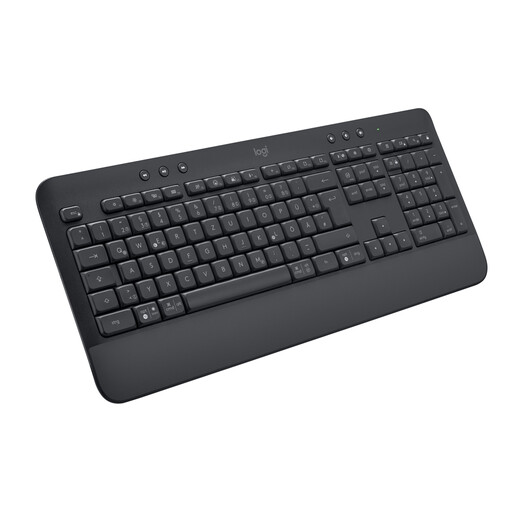
Why it stands out: The Signature K650 is designed for comfort and reliability in daily work. The integrated, soft-touch palm rest and familiar membrane keys allow for hours of comfortable typing.
Benefits:
Who is it for? This model is an excellent choice for professionals and home office users looking for a straightforward, comfortable, and durable all-round keyboard for daily use.
View details for the Logitech Signature K650

Why it stands out: The MX Mechanical combines the precise feel of a mechanical keyboard with a quiet keystroke. The low-profile "Tactile Quiet" switches provide tangible feedback without the loud clicking noises often associated with mechanical keyboards.
Benefits:
Who is it for? Ideal for power users, developers, and creative professionals who need a precise typing feel for high typing speeds but value a quiet work environment.
View details for the Logitech MX Mechanical
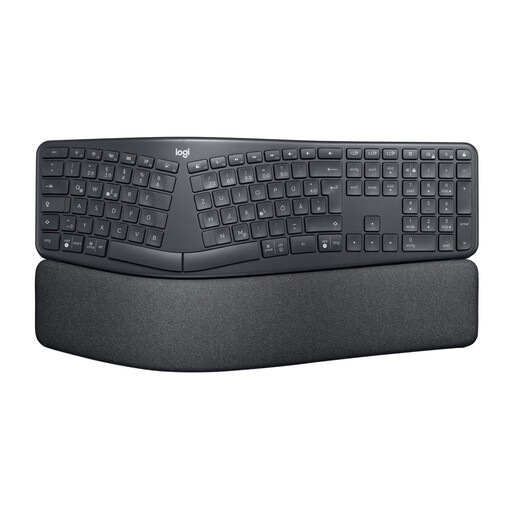
Why it stands out: The ERGO K860 is a specially designed ergonomic keyboard with a curved and split keyframe that promotes a more natural posture for your hands, wrists, and forearms.
Benefits:
Who is it for? This keyboard is aimed at users who type for many hours a day and want to proactively prevent postural issues or strain in the wrist and shoulder area.
View details for the Logitech ERGO K860
A wireless keyboard offers maximum flexibility. For stationary workstations where you don't want to change batteries or where a permanently stable connection is the top priority, a wired keyboard can be a sensible alternative. If you are considering other models or a wired solution, you may find the right product in our broader selection.
Explore our selection of USB keyboards
A Bluetooth keyboard connects directly to the built-in Bluetooth module of your computer, laptop, or tablet without occupying a USB port. A USB receiver (dongle) is plugged into a USB-A port and establishes a dedicated wireless connection to the keyboard. This is often considered more stable in environments with heavy wireless traffic. Many Logitech keyboards offer both options for maximum flexibility.
A keyboard with a palm rest supports the wrists and helps keep them in a neutral, straight position. This reduces bending and can lessen the strain on tendons and muscles during long typing sessions. Whether a rest is perceived as comfortable is subjective, but for heavy typists, it's often a key ergonomic feature.
Yes, many modern wireless keyboards, especially models from Logitech, feature a multi-device function (often called "Easy-Switch"). This allows you to pair the keyboard with up to three devices simultaneously (e.g., your desktop PC, a MacBook, and an iPad) and seamlessly switch between them at the touch of a button. This is particularly practical for creating a unified workflow across different platforms.