
Lieferung heute & morgen

Qualitätsgarantie

Willkommens-Angebote freischalten: KOSTENLOSE Lieferung | Bis zu 80 % RABATT | Kostenlose 30-Tage-JoyPlus-Testphase
App herunterladen
A wireless keyboard frees up space on your desk and works well with a laptop, tablet, smartphone or games console. However, not every model will be the right fit for you. Often, it’s the small details that determine whether a keyboard works reliably in your daily life or becomes impractical after a short time.
Many listings use a US layout, even though a QWERTZ keyboard is usually needed in Germany. With QWERTY and QWERTZ, the positions of Z and Y differ, among other things. Umlauts and special characters can also be arranged differently. While you can switch your operating system to German, the key caps themselves remain unchanged.
A wireless keyboard can connect via Bluetooth, a 2.4 GHz receiver or a cable. Bluetooth is handy for tablets and smartphones, while a USB receiver can be an alternative for compatible PCs. If you use multiple devices, the product should clearly state how many connections can be stored and how you switch between them.
A compact keyboard saves space, but depending on the layout, it may omit the number pad, function keys or arrow keys. For spreadsheet work, a missing number pad can be annoying. For mobile users, on the other hand, a low weight is more important. With a mechanical keyboard, you also need to consider height, switch type, noise level and backlighting.
Check before ordering:
For a keyboard that works with both Windows and Mac, the product description should explicitly mention both systems. The assignment of individual special functions may still differ.
A Bluetooth keyboard doesn’t need a free USB port, so it’s a great match for tablets and smartphones. Bluetooth 5.0 or 5.3 describes the standard used, but on its own it doesn’t guarantee a trouble-free connection in every environment. Walls, other wireless devices and a low battery level can affect the range.
A multi-device keyboard is useful if you switch between, say, a work laptop, tablet and smartphone. Pay attention to the number of devices it can store and whether switching is done via dedicated keys or a menu. Models with an additional 2.4 GHz mode can offer another connection option for compatible desktop PCs.
Rechargeable models reduce the need for batteries, but they do need to be charged regularly. Battery-powered keyboards can be practical on the go if you have spare batteries available. Manufacturer claims about battery life are usually based on specific usage conditions, so treat them as a guide.
When it comes to keys, there are scissor-switch, membrane and mechanical switches. Scissor-switch keys are often low-profile and quiet. Mechanical models offer a clearly defined actuation point depending on the switch type, but they can be noisier and heavier. If you work in an open-plan office or a library, you should consider the noise level.
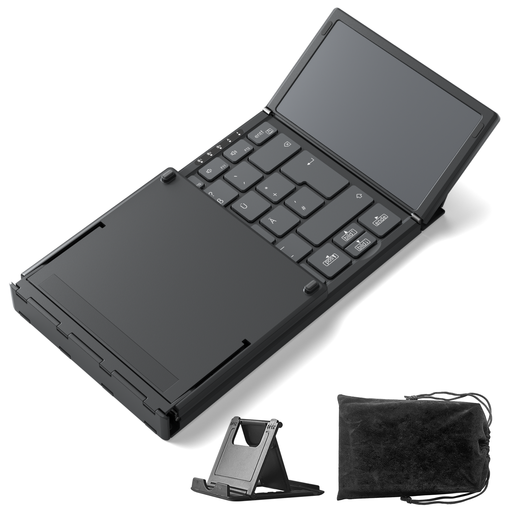
Why this product fits the profile: The foldable design, QWERTZ layout and integrated touchpad are aimed at mobile users looking for a space-saving solution for various devices.
Three Bluetooth channels and a clearly stated QWERTZ layout reduce the risk of an unsuitable connection or wrong key arrangement.
228 g weight, integrated touchpad and support for Windows, iPadOS and Android.
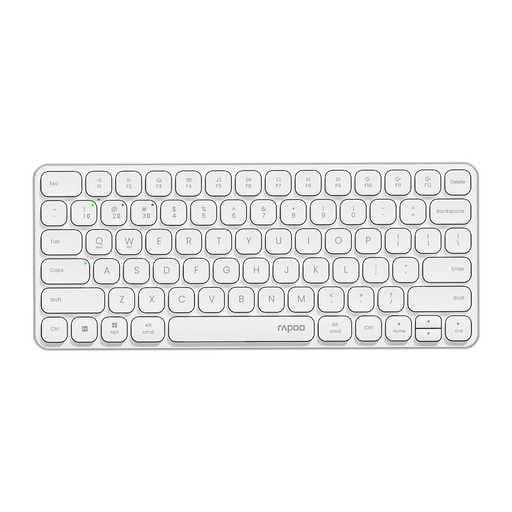
Why this product fits the profile: The slim 78-key layout is designed for users who connect multiple devices and prefer a tidy workspace.
The product details explicitly state the US layout. This means you can check before buying whether QWERTY is what you want for your own use.
Bluetooth 4.0, Bluetooth 5.0 and 2.4 GHz connection; switch between up to four devices.
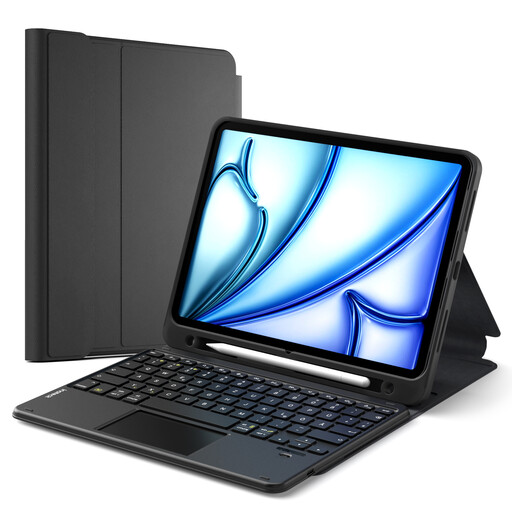
Why this product fits the profile: This iPad case with keyboard combines protection, keyboard and touchpad for studying, working from home and mobile use.
The compatibility list mentions several iPad generations. However, you should still check the AXXXX model number on the back of your device before buying.
Detachable magnetic keyboard, multi-touch trackpad and three-stage adjustable viewing angle.
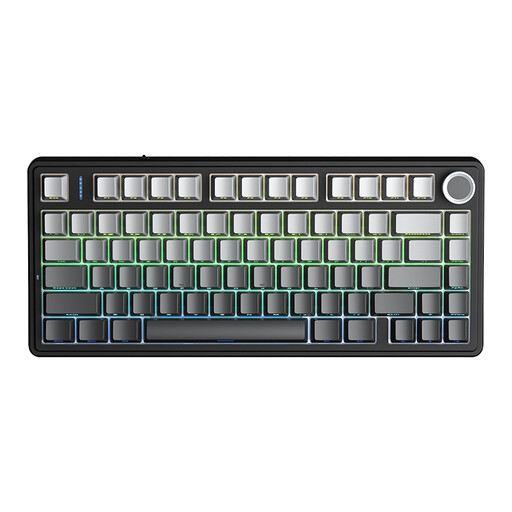
Why this product fits the profile: For gaming and intensive typing work, the mechanical 75% layout offers a compromise between functionality and desk space saved.
Tri-mode connection and N-key rollover address typical requirements for flexible connections and simultaneous key presses.
Bluetooth, 2.4 GHz and USB cable; hot-swap support for 3- or 5-pin switches and RGB lighting.
A wireless keyboard usually needs less maintenance than a device with complex additional software. Clean the surface with a dry or slightly damp cloth and do not apply liquid directly to the casing. For rechargeable models, a suitable USB-C cable is part of regular use. For battery-powered models, dispose of empty batteries according to your local council’s collection guidelines.
Also check whether spare parts such as key caps or switches are available. With mechanical models, a hot-swap function can make it easier to replace individual switches, whereas a simple membrane or scissor-switch keyboard is usually not designed for this.
We have put together a complete, regularly updated list of products that fully meet these strict selection criteria and the safety regulations in force in the EU.
Turn on the keyboard, activate pairing mode and open the Bluetooth settings on your tablet. Select the device name that appears. If you have a QWERTZ keyboard, you should then select the German layout for the physical keyboard in the settings.
The battery life depends on the backlighting, usage time, wireless standard and battery capacity. Manufacturer figures are a guide. Models with AAA batteries can run for many months depending on use; rechargeable variants need a power source regularly.
That depends on the switch type and noise level. Linear or dampened switches can be suitable for longer texts, while noticeably clicky switches can be distracting in shared spaces. So check the noise level, height and wrist position as well as the layout.